authentication
What is authentication?
Authentication is the process of determining whether someone or something is who or what they say they are. Authentication technology provides access control for systems by checking to see if a user's credentials match the credentials in a database of authorized users or a data authentication server. In doing this, authentication ensures that systems, processes and enterprise information are secure.
There are several authentication types. For user identity, users are typically identified with a user ID; authentication occurs when the user provides credentials, such as a password, that match their user ID.
The practice of requiring a user ID and password is known as single-factor authentication (SFA). In recent years, organizations have strengthened authentication by asking for additional authentication factors. These can be a unique code provided to a user over a mobile device when a sign-on is attempted or a biometric signature, such as a facial scan or thumbprint. This is known as two-factor authentication (2FA).
Authentication protocols can go further than 2FA and use multiple factors to authenticate a person or system. Authentication methods that use two or more factors are called multifactor authentication (MFA).
Authentication is sometimes associated with identity and access management, which tracks the lifecycle of user identities and access controls in an organization.
Why is authentication important in cybersecurity?
Authentication enables organizations to keep their networks secure by permitting only authenticated users or processes access to protected resources. This can include personal computers, wireless networks, wireless access points, databases, websites, and other network-based applications and services.
Once authenticated, a user or process is usually subjected to an authorization process to determine whether the authenticated entity should be given access to a specific protected resource or system. A user can be authenticated but not provided access to a resource if that user wasn't granted permission to access it.
While the terms authentication and authorization are often used interchangeably and implemented together, they are distinct functions. Authentication involves validating the identity of a registered user or process before enabling access to protected networks and systems. Authorization is a more granular process that ensures the authenticated user or process has been granted permission to gain access to the specific resource requested.
The process by which access to some protected resources is restricted to certain users is called access control. In access control models, authentication always comes before authorization. Different types of access control require different layers of authentication.
How does authentication work?
During authentication, user-provided credentials are compared to those on file in a database of authorized user information. This database can be located either on the local operating system server or an authentication server. If the credentials match those on file and the authenticated entity is authorized to use the resource, the user gains access. User permissions determine which resources the user gets access to and other access rights linked to the user. Those other rights can be factors such as which hours the user can access the resource and how much of the resource the user can consume.
Traditionally, authentication was accomplished by the systems or resources being accessed. For example, a server would authenticate users using its own password system, login IDs or usernames and passwords.
However, the web's application protocols -- Hypertext Transfer Protocol and HTTP Secure (HTTPS) -- are stateless, meaning strict authentication would require end users to reauthenticate each time they access a resource using HTTPS. To simplify user authentication for web applications, the authenticating system issues a signed authentication token to the end-user application; that token is appended to every request from the client. This means users don't have to sign on every time they use a web application.
What is authentication used for?
Organizations use authentication to control who can access corporate networks and resources, and to identify and control which machines and servers have access. Companies also use authentication to enable remote employees to access applications and networks securely.
Some specific use cases include the following:
- Login to corporate systems. Authentication methods are used to verify the identity of employees and grant them access to corporate systems, such as email, databases and document stores. This helps secure the confidentiality and integrity of sensitive corporate data.
- Online banking and financial transactions. Authentication methods verify the identity of customers and ensure that only authorized users can access bank accounts, approve financial transactions and perform other online banking activities.
- Secure remote access. Many organizations let their employees work remotely, connecting to resources from offsite locations. Authentication methods enable secure remote access, verifying the identity of remote users, ensuring authorized access and maintaining the security of the organization's network infrastructure.
- Electronic healthcare records (EHRs). Authentication methods are critical in healthcare to protect the privacy and security of patients' EHRs while enabling authorized healthcare professionals to access them when needed.
- E-commerce transactions. Authentication methods are used to verify the identity of customers, protect sensitive information and enable secure online transactions. This helps prevent fraud and enhances customer trust.
What are authentication factors?
Validating a user with a user ID and password is considered the most basic type of authentication. It depends on the user knowing those two pieces of information. Since this type of authentication relies on just one authentication factor, it's a type of SFA.
Strong authentication is more reliable and resistant to attack. Typically, it uses at least two different types of authentication factors and often requires strong passwords with at least eight characters, a mix of lowercase and uppercase letters, special symbols and numbers. 2FA and MFA are types of strong authentication, with MFA among today's most common authentication practices.
An authentication factor represents a piece of data or attribute that can validate a user requesting access to a system. An old security adage has it that authentication factors can be something you know, something you have or something you are. Additional factors have been proposed and applied in recent years, with location often serving as the fourth factor and time serving as the fifth factor.
Authentication factors currently used include the following:
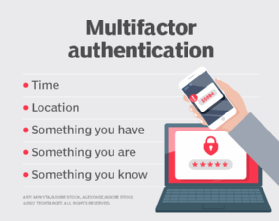
- Knowledge factor. The knowledge factor, or something you know, can be any credential reflecting information the user possesses, such as a personal identification number (PIN), username, password or answers to secret security questions.
- Possession factor. The possession factor, or something you have, can be a credential involving items the user can own and carry with them, including hardware devices, such as a security token, smart card or mobile phone used to accept a text message or run an authentication app that can generate a one-time password (OTP) or PIN.
- Inherence factor. The inherence factor, or something you are, is typically based on biometric identification such as fingerprints or thumbprints, facial recognition or a retina scan.
- Location factor. Where you are may be less specific, but it is sometimes used to supplement the other factors. Location can be determined with reasonable accuracy by devices equipped with a Global Positioning System or with less accuracy by checking network addresses and routes. The location factor usually isn't the only factor used for authentication; it usually complements other factors, providing a means of ruling out some requests. For example, it can prevent an attacker located in a remote geographical area from posing as a user who normally logs in from their home or office in the organization's home country.
- Time factor. Like the location factor, the time factor, or when you are authenticating, is another supplemental mechanism for weeding out attackers who attempt to access a resource when that resource isn't available to the authorized user. It's often paired with location. For example, if the user was last authenticated at noon in the U.S., an attempt to authenticate from Asia an hour later would be rejected based on the combination of time and location. Despite their merit as supplemental authentication factors, location and time by themselves aren't sufficient to authenticate a user, without at least one of the first three factors.
What are the different types of authentication?
There are several different types of authentication mechanisms, including the following:
Single-factor authentication
SFA is the most common authentication method. It depends on the use of a password file, in which user IDs are stored together with hashes of the passwords associated with each user. When logging in, the password the user submits is hashed and compared to the value in the password file. If the two hashes match, the user is authenticated.
This approach to authentication has several drawbacks, particularly for resources deployed across different systems. For one thing, attackers who gain access to the password file for a system can use brute-force attacks against the hashed passwords to extract the passwords. SFA also requires multiple authentications for modern applications that access resources across multiple systems.
Single sign-on technology has addressed some password-based authentication weaknesses. They also can be addressed, to some extent, with smarter usernames and passwords based on rules such as minimum length and complexity and using capital letters and symbols. However, password-based authentication and knowledge-based authentication are more vulnerable than systems that require multiple independent methods.
Two-factor authentication
2FA adds an extra layer of protection by requiring users to provide a second authentication factor in addition to the password. These systems often require the user to enter a verification code received via a text message on a preregistered mobile phone or mobile device, or a code that an authentication application generates.
Multifactor authentication
MFA requires users to authenticate with more than one authentication factor, including a biometric factor such as a fingerprint or facial recognition; a possession factor, like a security key fob; or a token generated by an authenticator app.
One-time password
An OTP is an automatically generated numeric or alphanumeric string of characters that authenticates a user. This password is only valid for one login session or transaction and is typically employed for new users or for users who lost their passwords and are given an OTP to log in and change to a new password.
Three-factor authentication
This type of MFA uses three authentication factors -- usually, these are a knowledge factor, such as a password, combined with a possession factor, such as a security token, and an inherence factor, such as a biometric.
Biometrics authentication
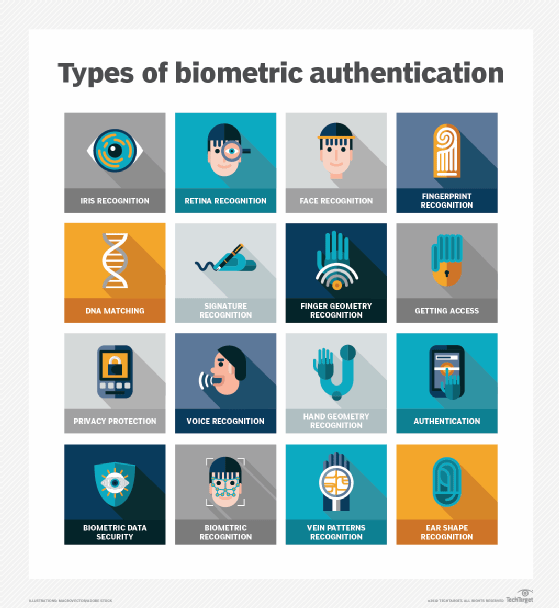
This type of authentication is usually used as a second or third factor. Fingerprint scans, facial or retina scans, and voice recognition are common examples.
Mobile authentication
This is the process of verifying users via their devices or verifying the devices themselves. It enables users to log into secure locations and resources from anywhere. The mobile authentication process typically requires MFA that can include OTPs, biometric authentication or a quick response code.
Continuous authentication
With this type of authentication, users don't log in or out. Instead, a company's application continually computes an authentication score that measures how sure it is that the account owner is the individual using the device.
Application programming interface (API) authentication
The following three methods are the standard ways of managing API authentication:
- In HTTP basic authentication, the server requests authentication information, such as a username and password, from a client. The client then passes the authentication information to the server in an authorization header.
- In API key authentication, a first-time user is assigned a unique generated value indicating the user is known. Each time the user tries to enter the system again, their unique key is used to verify they're the same user who entered the system previously.
- Open Authorization, or OAuth, is an open standard for token-based authentication and authorization on the internet. It enables a user's account information to be used by third-party services, such as Facebook, without exposing the user's password. OAuth acts as an intermediary on behalf of the user, providing the service with an access token that authorizes the sharing of specific account information.
Authentication vs. Authorization
Authentication verifies that a user is who they say they are. Authorization is the process through which an administrator grants rights to authenticated users, and the process of checking user account permissions to verify the user was granted access to those resources.
The privileges and preferences granted for an authorized account depend on the user's permissions. Those are stored locally or on an authentication server. An administrator establishes the settings defined for these user access variables.
User authentication vs. machine authentication
Machines and applications need to authorize their automated actions in a network. Examples of these include online backup services, patching, updating and remote monitoring systems, such as those used in telemedicine and smart grid technologies. These all need to securely authenticate to verify they're authorized to do whatever interaction they request and aren't a hacker.
Machine authentication can be carried out with machine credentials, similar to a user's ID and password but submitted by the device in question. Machine authentication also uses digital certificates issued and verified by a certificate authority as part of a public key infrastructure to prove identification while exchanging information over the internet.
With the growth of internet-enabled devices, reliable machine authentication is crucial to enable secure communication for home automation and other internet of things applications. Each IoT access point is a potential intrusion point. And every networked device needs strong machine authentication and must be configured for limited permissions access to restrict what can be done should they be breached.
API keys and tokens are two leading methods of access management. Learn the difference between API keys and tokens.