IPsec (Internet Protocol Security)
What is IPsec (Internet Protocol Security)?
IPsec (Internet Protocol Security) is a suite of protocols and algorithms for securing data transmitted over the internet or any public network. The Internet Engineering Task Force, or IETF, developed the IPsec protocols in the mid-1990s to provide security at the IP layer through authentication and encryption of IP network packets.
IPsec originally defined two protocols for securing IP packets: Authentication Header (AH) and Encapsulating Security Payload (ESP). The former provides data integrity and anti-replay services, and the latter encrypts and authenticates data.
The IPsec suite also includes Internet Key Exchange (IKE), which is used to generate shared security keys to establish a security association (SA). SAs are needed for the encryption and decryption processes to negotiate a security level between two entities. A special router or firewall that sits between two networks usually handles the SA negotiation process.
What is IPsec used for?
IPsec is used for protecting sensitive data, such as financial transactions, medical records and corporate communications, as it's transmitted across the network. It's also used to secure virtual private networks (VPNs), where IPsec tunneling encrypts all data sent between two endpoints. IPsec can also encrypt application layer data and provide security for routers sending routing data across the public internet. IPsec can also be used to provide authentication without encryption -- for example, to authenticate that data originated from a known sender.
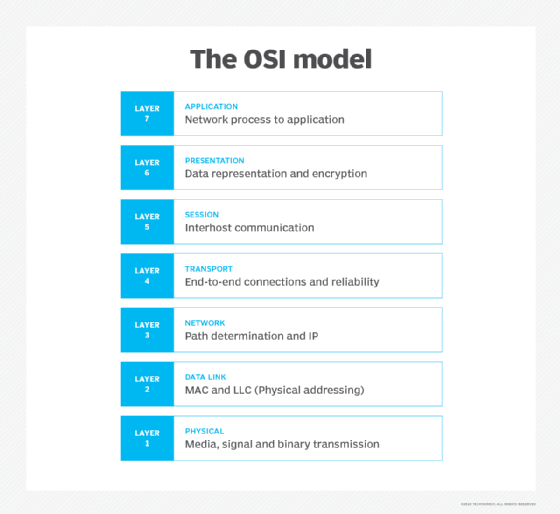
Encryption at the application or the transport layers of the Open Systems Interconnection (OSI) model can securely transmit data without using IPsec. At the application layer, Hypertext Transfer Protocol Secure (HTTPS) performs the encryption. While at the transport layer, the Transport Layer Security (TLS) protocol provides the encryption. However, encrypting and authenticating at these higher layers increase the chance of data exposure and attackers intercepting protocol information.
IPsec protocols
IPsec authenticates and encrypts data packets sent over both IPv4- and IPv6-based networks. IPsec protocol headers are found in the IP header of a packet and define how the data in a packet is handled, including its routing and delivery across a network. IPsec adds several components to the IP header, including security information and one or more cryptographic algorithms.
The IPsec protocols use a format called Request for Comments (RFC) to develop the requirements for the network security standards. RFC standards are used throughout the internet to provide important information that enables users and developers to create, manage and maintain the network.
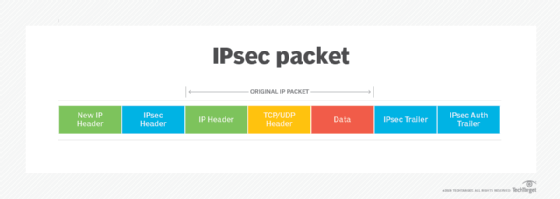
The following are key IPsec protocols:
- IP AH. AH is specified in RFC 4302. It provides data integrity and transport protection services. AH was designed to be inserted into an IP packet to add authentication data and protect the contents from modification.
- IP ESP. Specified in RFC 4303, ESP provides authentication, integrity and confidentiality through encryption of IP packets.
- IKE. Defined in RFC 7296, IKE is a protocol that enables two systems or devices to establish a secure communication channel over an untrusted network. The protocol uses a series of key exchanges to create a secure tunnel between a client and a server through which they can send encrypted traffic. The security of the tunnel is based on the Diffie-Hellman key exchange.
- Internet Security Association and Key Management Protocol (ISAKMP). ISAKMP is specified as part of the IKE protocol and RFC 7296. It is a framework for key establishment, authentication and negotiation of an SA for a secure exchange of packets at the IP layer. In other words, ISAKMP defines the security parameters for how two systems, or hosts, communicate with each other. Each SA defines a connection in one direction, from one host to another. The SA includes all attributes of the connection, including the cryptographic algorithm, the IPsec mode, the encryption key and any other parameters related to data transmission over the connection.
IPsec uses, or is used by, many other protocols, such as digital signature algorithms and most protocols outlined in the IPsec and IKE Document Roadmap, or RFC 6071.
Learn more about VPNs
VPNs had a significant role to play in securing the communication and work of the expanded remote workforce during the COVID-19 pandemic. Here are articles focused on what we learned about using them:
Plan a VPN and remote access strategy for pandemic, disaster
Coronavirus: VPN hardware becomes a chokepoint for remote workers
How does IPsec work?
There are five key steps involved with how IPsec works. They are as follows:
- Host recognition. The IPsec process begins when a host system recognizes that a packet needs protection and should be transmitted using IPsec policies. Such packets are considered "interesting traffic" for IPsec purposes, and they trigger the security policies. For outgoing packets, this means the appropriate encryption and authentication are applied. When an incoming packet is determined to be interesting, the host system verifies that it has been properly encrypted and authenticated.
- Negotiation, or IKE Phase 1. In the second step, the hosts use IPsec to negotiate the set of policies they will use for a secured circuit. They also authenticate themselves to each other and set up a secure channel between them that is used to negotiate the way the IPsec circuit will encrypt or authenticate data sent across it. This negotiation process occurs using either main mode or aggressive mode.
With main mode, the host initiating the session sends proposals indicating its preferred encryption and authentication algorithms. The negotiation continues until both hosts agree and set up an IKE SA that defines the IPsec circuit they will use. This method is more secure than aggressive mode because it creates a secure tunnel for exchanging data.
In aggressive mode, the initiating host does not allow for negotiation and specifies the IKE SA to be used. The responding host's acceptance authenticates the session. With this method, the hosts can set up an IPsec circuit faster. - IPsec circuit, or IKE Phase 2. Step three sets up an IPsec circuit over the secure channel established in IKE Phase 1. The IPsec hosts negotiate the algorithms that will be used during the data transmission. The hosts also agree upon and exchange the encryption and decryption keys they plan to use for traffic to and from the protected network. The hosts also exchange cryptographic nonces, which are random numbers used to authenticate sessions.
- IPsec transmission. In the fourth step, the hosts exchange the actual data across the secure tunnel they've established. The IPsec SAs set up earlier are used to encrypt and decrypt the packets.
- IPsec termination. Finally, the IPsec tunnel is terminated. Usually, this happens after a previously specified number of bytes have passed through the IPsec tunnel or the session times out. When either of those events happens, the hosts communicate, and termination occurs. After termination, the hosts dispose of the private keys used during data transmission.
How is IPsec used in a VPN?
A VPN essentially is a private network implemented over a public network. Anyone who connects to the VPN can access this private network as if directly connected to it. VPNs are commonly used in businesses to enable employees to access their corporate network remotely.
IPsec is commonly used to secure VPNs. While a VPN creates a private network between a user's computer and the VPN server, IPsec protocols implement a secure network that protects VPN data from outside access. VPNs can be set up using one of the two IPsec modes: tunnel mode and transport mode.
What are the IPsec modes?
In simple terms, transport mode secures data as it travels from one device to another, typically for a single session. Alternatively, tunnel mode secures the entire data path, from point A to point B, regardless of the devices in between.
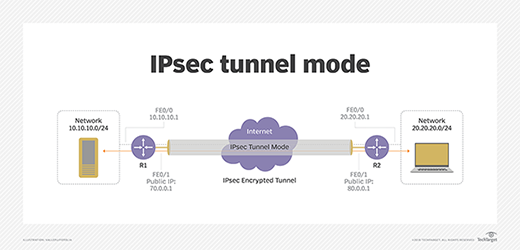
Tunnel mode. Usually used between secured network gateways, IPsec tunnel mode enables hosts behind one of the gateways to communicate securely with hosts behind the other gateway. For example, any users of systems in an enterprise branch office can securely connect with any systems in the main office if the branch office and main office have secure gateways to act as IPsec proxies for hosts within the respective offices. The IPsec tunnel is established between the two gateway hosts, but the tunnel itself carries traffic from any hosts inside the protected networks. Tunnel mode is useful for setting up a mechanism for protecting all traffic between two networks, from disparate hosts on either end.
Transport mode. A transport mode IPsec circuit is when two hosts set up a directly connected IPsec VPN connection. For example, this type of circuit might be set up to enable a remote information technology (IT) support technician to log in to a remote server to do maintenance work. IPsec transport mode is used in cases where one host needs to interact with another host. The two hosts negotiate the IPsec circuit directly with each other, and the circuit is usually torn down after the session is complete.
A next step: Comparing IPsec VPN vs. SSL VPN
A Secure Socket Layer (SSL) VPN is another approach to securing a public network connection. The two can be used together or individually depending on the circumstances and security requirements.
With an IPsec VPN, IP packets are protected as they travel to and from the IPsec gateway at the edge of a private network and remote hosts and networks. An SSL VPN protects traffic as it moves between remote users and an SSL gateway. IPsec VPNs support all IP-based applications, while SSL VPNs only support browser-based applications, though they can support other applications with custom development.
Learn more about how IPsec VPNs and SSL VPNs differ in terms of authentication and access control, defending against attacks and client security. See what is best for your organization and where one type works best over the other.