SSL (secure sockets layer)
What is a secure sockets layer?
Secure sockets layer (SSL) is a networking protocol designed for securing connections between web clients and web servers over an insecure network, such as the internet. Netscape formally introduced the SSL protocol in 1995, making it the first widely used protocol for securing online transactions between consumers and businesses. It eventually came to be used to secure authentication and encryption for other applications at the network transport layer.
SSL suffered from numerous problems, and the Internet Engineering Task Force (IETF) stopped recommending its use in 2015. It was replaced by the Transport Layer Security (TLS) protocol. While SSL is still in use today, mostly in legacy systems, TLS has taken over its role in securing internet connections.
In addition to securing internet connections, SSL was also used to authenticate and encrypt other applications at the network transport layer. SSL typically involved securing connections between a web browser (client) and a website (server). It facilitated safe transactions between consumers and businesses, helping create the foundation for e-commerce. Without SSL, data sent to and from a website could be intercepted by a threat actor.
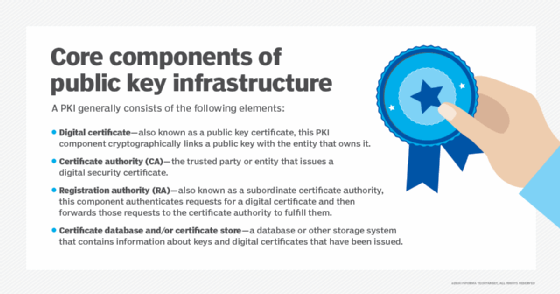
SSL uses public key and private key encryption and other cryptographic functions to secure connections between devices communicating over a TCP/IP network. SSL can scramble clear text entered on a website using asymmetric cryptography and public key encryption. It is just one of the ways in which public key infrastructure (PKI) is used by modern businesses.
Why is SSL important?
Part of SSL's significance lies in the fact that it was the first widely used and broadly implemented network protocol to enable cryptographically secured communications between client and server systems.
Netscape initially launched SSL as a proprietary protocol. The web server software company then published the protocol and made it available for other companies to implement. By making the protocol accessible to its competitors, Netscape expanded its share of the web server market and also ensured the SSL protocol would become an IETF proposed standard.
SSL became a key part of internet security because of problems with Hypertext Transfer Protocol (HTTP), the framework used to connect web clients to web servers. HTTP uses public networks and lacks encryption, making it vulnerable. Malicious actors can easily read or extract names, addresses, credit card numbers and other personally identifiable information sent to a website. This is why HTTP over SSL (HTTPS), also known as HTTP Secure, has emerged as HTTP's more secure successor.
Most websites today display the prefix HTTPS at the beginning of their web address. The "s" indicates to the visitor that the site uses SSL or TLS to secure its user activity.
How the SSL certificate is obtained
The SSL protocol process starts with a company acquiring a valid SSL certificate from a trusted certificate authority (CA). The purpose of the SSL certificate is to confirm to the user and the web browser they're using that they are interacting with the desired web server and not an imposter.
Let's say that a company, Brand A, wants to launch a secure website where users can safely order its products without putting themselves at risk of having their information stolen. Brand A decides to use SSL on its website. It coordinates with a reputable CA, such as Comodo SSL or DigiCert to get an SSL certificate for its website.
The digital certificate includes the following:
- the person, organization or device to which the certificate was issued;
- the certificate thumbprint -- a hash of all the certificate data and its signature;
- the SSL or TLS version being used;
- the domain name it was issued under;
- any associated subdomains
- the name of the CA issuing it;
- the CA's digital signature;
- the certificate's issue and expiration dates;
- the public key; and
- an associated private key that is kept secret.
Brand A's digital certificate not only confirms to clients that Brand A owns its specified domain; it also verifies that Brand A is reputable by referencing the SSL certificate's CA details. This lets the customer and the web browser they're using know that the site can be trusted. Websites that are secured with SSL or TLS will usually display a lock symbol next to the web domain. Search engines will rank these sites higher on their results pages based on this additional user security.
The public and private security keys generated by this process are unique and mathematically related. These two keys make this cryptographic method asymmetric; because without the private key, information encrypted using the public key cannot be decoded.
In the case of SSL and PKI, the public key and the private key act as the encryptor and the decryptor, respectively. The private key can only decrypt data that has been encrypted by the public key. Think of it like a door that can only be locked with a public key and unlocked with a private key.
The public key gets its name because it is distributed publicly and its utility is negligible without access to the private key. The private key is kept secret by the web server, or Brand A in this example.
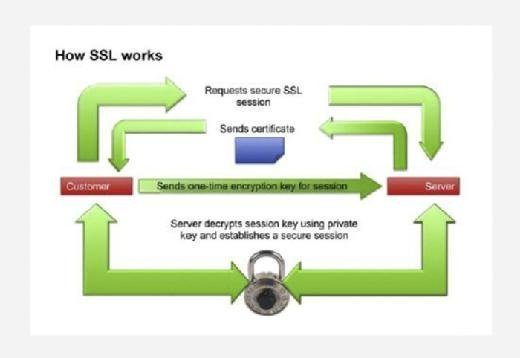
Steps involved in the secure sockets layer process
There are several steps involved in the SSL process, including the following:
- Initial connection. When a user -- say a customer -- logs onto Brand A's website, the web browser indicates to Brand A's server that a user wants to establish a private connection. After receiving this notification, the Brand A server sends over its SSL certificate, which includes its public key.
- Certificate authentication. As part of the initial handshake process, Brand A's server presents its SSL certificate to authenticate itself to the client. In this case, that would be the customer's web browser. Server certificates follow the 509 certificate format defined by the Public Key Cryptography Standards. The web browser analyzes the certificate to verify that the customer is interacting with the intended server. Public key encryption is used to validate the digital certificate and to verify that a server is what it claims to be. Most web browsers will implicitly trust SSL certificates that have been issued by a CA, as a way of expediting the process.
- Once the browser, or client, has authenticated the web server and its certificate, it encrypts the user's message using Brand A's public key. The message is then sent to Brand A's server.
- Brand A's server decrypts the message using its own private key. The message includes a symmetric session key to establish a two-way handshake between the two entities.
- Cipher settings and shared encryption key. Once the server has been authenticated, the client and server establish cipher settings and a shared key to encrypt the information they exchange during the remainder of the session. This provides data confidentiality and integrity. This process is invisible to the customer. For example, if a webpage requires an SSL connection, the URL will change from HTTP to HTTPS, and a padlock icon will appear in the browser once the server has been authenticated.
- Client authentication. The handshake also allows the client to authenticate itself to the server. In this case, after server authentication is complete, the client must present its certificate to the server to authenticate the client's identity before the encrypted SSL session can be established.
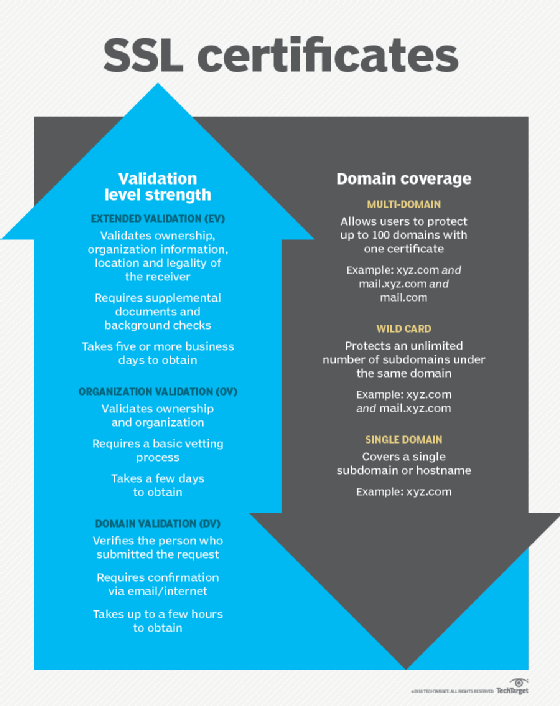
Types of SSL certificates
The three types of SSL certificates that can be obtained are: Extended Validation (EV SSL), Organization Validated (OV SSL) and Domain Validated (DV SSL). Their encryption levels are the same, but the processes used to verify applicants for the certificates differs. Some of the differences include the following:
- EV SSL verifies the existence and identity of the entity making the application and its right to use the domain it is applying under. A range of supplemental documents are required to get one, as well as background checks. It can take five or more business days to get this certificate.
- OV SSL validates right of the applicant to use the domain and does some vetting of the organization. It can take two to five days to obtain.
- DM SSL verifies the person submitting the request. Company information is not checked. It requires only email or internet confirmation of the request. It can be obtained in a few hours.
SSL vs. TLS
SSL was originally specified in the 1990s as a proprietary protocol that enabled Netscape browser clients using HTTP to communicate securely with Netscape web servers. While version 1.0 of SSL was never released, version 2.0 made its debut in 1995.
The IETF took over the SSL protocol to standardize it through an open process. Version 3.1 of SSL was released as TLS 1.0. The name was changed to avoid potential legal issues with Netscape.
While TLS and SSL are not interoperable, versions of TLS through 1.2 were backward compatible with SSL 3.0. However, backward compatibility with SSL was removed from TLS 1.3, the current version of TLS that was published in 2018.
Many attacks against SSL have focused on SSL implementation issues. However, the Poodle (Padding Oracle On Downgraded Legacy Encryption) vulnerability is a known flaw in the SSL 3.0 protocol itself. POODLE exploits the way in which SSL ignores padding bytes when running in cipher block chaining mode. This flaw allows an attacker to decrypt sensitive information, such as authentication cookies. TLS 1.0 is not vulnerable to this attack because it specifies that all padding bytes must have the same value and must be verified.
Other key differences between SSL and TLS that make TLS a more secure and efficient protocol are message authentication, key material generation and supported cipher suites with TLS supporting newer and more secure algorithms.
SSL and TLS are just one part of the bigger network security picture. Find out more about network security in our ultimate guide to the zero-trust model.