Transmission Control Protocol (TCP)
What is Transmission Control Protocol (TCP)?
Transmission Control Protocol (TCP) is a standard that defines how to establish and maintain a network conversation by which applications can exchange data.
One of the main communication protocols of the IP suite, TCP resides at the transport layer of the Open Systems Interconnection (OSI) model. It works with the IP, which defines how computers send packets of data to each other. Together, TCP and IP are the basic rules that define the internet and ensure the successful delivery of messages over networks.
History of TCP
The emergence of the internet is intertwined with the history of the transmission control protocol. The following is a brief timeline of the key events in the history of TCP:
- 1960s. Various protocols were created in the early days of computer networking to ease communication between different computers. Protocols such as network control program were used in the ARPANET, the forerunner to the contemporary internet.
- Early 1970s. Work on the TCP/IP suite began in the early 1970s. TCP/IP is widely regarded as having been invented by Vinton Cerf and Bob Kahn. The initial version was intended to connect various research networks financed by the United States Department of Defense (DoD).
- 1974. In a paper titled "A Protocol for Packet Network Intercommunication," Cerf and Kahn outlined the specifications for TCP. The essential principles of connection-oriented communication and the concept of splitting data into packets for transmission across networks were outlined in this paper.
- 1978. Initially, TCP and IP were closely connected. In 1978, the protocols were separated into two layers: IP for packet addressing and routing and TCP for dependable, connection-oriented communication.
- 1980s. In 1981, Request for Comments 791 and RFC 793 by the Internet Engineering Task Force standardized IPv4 and TCP respectively. This was an important turning point in the evolution of the internet as a worldwide network. Over the years, TCP was improved and extended to address various difficulties and increase performance. These included the creation of congestion control algorithms, improvements for high-speed networks and protocol definition revisions.
- 1990s-2000s. As accessible IPv4 addresses grew scarce, the migration to IPv6 became a top priority. IPv6 affects TCP and other protocols at the transport layer even though its focus is IP addressing.
TCP is still being developed and standardized, with continual efforts to handle new challenges, improve performance and adapt to evolving networking environments.
Four layers of TCP/IP
TCP/IP is composed of four layers, each of which handles a certain function in the data transmission process.
The four layers of the TCP/IP stack include the following:
- Network access layer. The network access layer, sometimes referred to as the data link layer, manages the network infrastructure that enables computer communication over the internet. The main components include device drivers, network interface cards, ethernet connections and wireless networks.
- Internet layer. Data packet addressing, routing and fragmentation across various networks are handled by the internet layer. It makes use of the internet protocol to provide devices with distinct IP addresses and guarantee that packets reach their intended locations.
- Transport layer. This layer enables devices to communicate with each other end-to-end. By utilizing protocols such as User Datagram Protocol (UDP) and TCP, it guarantees the consistent and systematic delivery of data packets. While UDP enables quicker, connectionless communication, TCP connection delivers dependable, connection-oriented communication.
- Application layer. The topmost layer, the application layer, is in charge of providing support for certain services and applications. It covers a wide range of protocols, including File Transfer Protocol (FTP), Simple Mail Transfer Protocol (SMTP), and HTTP.

How Transmission Control Protocol works
TCP is a connection-oriented protocol, which means a connection is established and maintained until the applications at each end have finished exchanging messages.
TCP performs the following actions:
- Establishes through a three-way handshake where the sender and the receiver exchange control packets to synchronize and establish a connection.
- Determines how to break application data into packets that networks can deliver.
- Sends packets to, and accepts packets from, the network layer.
- Manages flow control.
- Handles retransmission of dropped or garbled packets, as it's meant to provide error-free data transmission.
- Acknowledges all packets that arrive.
- Terminates connection once data transmission is complete through a four-way handshake.
In OSI communication model, TCP covers parts of Layer 4, the transport layer, and parts of Layer 5, the session layer.
When a web server sends an HTML file to a client, it uses the HTTP to do so. The HTTP program layer asks the TCP layer to set up the connection and send the file. The TCP stack divides the file into data packets, numbers them and then forwards them individually to the IP layer for delivery.
Although each packet in the transmission has the same source and destination IP address, packets may be sent along multiple routes. The TCP program layer in the client computer waits until all packets have arrived. It then acknowledges those it receives and asks for the retransmission of any it does not, based on missing packet numbers. The TCP layer then assembles the packets into a file and delivers the file to the receiving application.
TCP vs. UDP
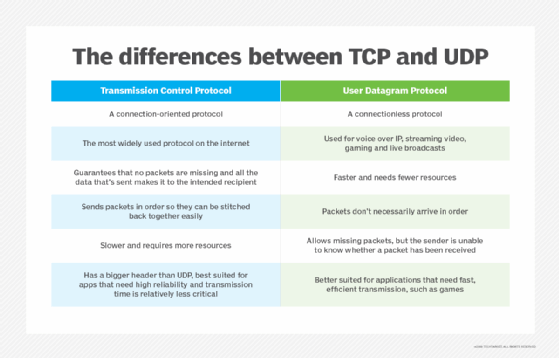
TCP and UDP are two different protocols used for transmitting data over the internet. The key differences between TCP and UDP include the following:
- TCP provides reliable delivery due to the process of error detection, in which TCP retransmits and reorders packets after they arrive. However, it can introduce latency in a TCP stream. UDP on the other hand doesn't retransmit data. Highly time-sensitive applications, such as voice over IP, streaming video and gaming, generally rely on UDP, because it reduces latency and jitter by not reordering packets or retransmitting missing data.
- Unlike TCP, UDP is classified as a datagram protocol, or connectionless protocol, because it has no way of detecting whether both applications have finished their back-and-forth communication.
- Instead of correcting invalid data packets, as TCP does, UDP discards those packets and defers to the application layer for more detailed error detection.
- The header of a UDP datagram contains far less information than a TCP segment header. The UDP header also goes through much less processing at the transport layer in the interest of reduced latency.
What TCP is used for?
TCP is used for organizing data in a way that ensures secure transmission between the server and the client. It guarantees the integrity of data sent over the network, regardless of the amount. For this reason, it is used to transmit data from other higher-level protocols that require all transmitted data to arrive.
Examples of these protocols include the following:
- Secure Shell, FTP, Telnet. For peer-to-peer file sharing, and, in Telnet's case, logging into another user's computer to access a file.
- SMTP, Post Office Protocol, Internet Message Access Protocol. For sending and receiving email.
- HTTP. For web access.
These examples all exist at the application layer of the TCP/IP stack and send data downwards to TCP on the transport layer.
Some important use cases of TCP include the following:
- Reliable transfer of data. One of the main functions of TCP is to ensure reliable data delivery by providing error detection, packet re-transmission and sequencing of data packets. It guarantees that data is received error-free and in the correct order.
- Web browsing. Without TCP, web browsing wouldn't be possible. TCP establishes a connection between the client, which is the web browser and the server hosting the website. It guarantees that resources and web pages are supplied consistently and in the right order.
- Email delivery. TCP is also used for email delivery. By establishing a connection between the client and the mail server, TCP guarantees that emails are delivered and received reliably.
- File transfer. TCP is often used for file transfer protocols such as FTP and secure file transfer protocol. It ensures that files are transported reliably and without errors.
- Remote access. TCP is also used for remote access with protocols including Telnet and SSH. These protocols enable users to access and control computers or network devices remotely through a secure connection.
- Database access. TCP is used for accessing databases over networks. It guarantees the secure and dependable transmission of queries and database responses.
- Messaging and chat. TCP is employed in messaging and chat applications to guarantee the dependable delivery of messages among users.
- Virtual private networks (VPNs). TCP is utilized within VPNs to create secure and dependable connections linking remote users with private networks.
Why is TCP important?
TCP is important because it establishes the rules and standard procedures for the way information is communicated over the internet. It is the foundation for the internet as it currently exists and ensures that data transmission is carried out uniformly, regardless of the location, hardware or software involved.
TCP is flexible and highly scalable, meaning new protocols can be introduced to it. It will accommodate them. It is also nonproprietary, meaning no one person or company owns it.
Advantages and disadvantages of TCP
TCP provides the following advantages:
- Reliability. As mentioned above, TCP offers error detection, packet retransmission for missing packets and packet sequencing to provide dependable data delivery.
- Flow control. To prevent sending too much data to the recipient at once, TCP uses flow control methods to regulate the rate of data transfer.
- Order and sequence of packets. TCP ensures that data packets are received in the same order as they were transmitted by guaranteeing their order and sequence number.
- Error checking. TCP carries out extensive error checking, identifying flaws in the received data by using checksums.
- Connection oriented. TCP creates a link between the sender and recipient to guarantee a dependable and steady communication link.
Along with its many benefits, TCP also comes with a few drawbacks. Common disadvantages of TCP include the following:
- Overhead. Due to its reliability features, TCP has more overhead than UDP, which can sometimes cause slower transmission speeds.
- Latency. The method of delivery used by TCP includes acknowledgments and retransmissions, which can sometimes add latency that can affect real-time applications.
- Congestion control. To avoid network congestion, TCP's congestion control techniques can slow down data transfer. This could be a drawback when a high-speed transmission is necessary.
- Connection-oriented. TCP's connection-oriented design necessitates extra expense for the creation and upkeep of connections, while this feature may not be required for many applications.
- Generality. TCP is specifically tailored to the TCP/IP suite and cannot be applied to represent other protocol stacks, such as Bluetooth connections.
Location in the TCP/IP stack
The TCP/IP stack is a model that represents how data is organized and exchanged over networks using the TCP/IP protocol. It depicts a series of layers that represent the way data is handled and packaged by a series of protocols as it makes its way from client to server and vice versa.
TCP exists in the transport layer with other protocols, such as UDP. Protocols in this layer ensure the error-free transmission of data to the source, except for UDP because it has a more limited error-checking capability.
Like the OSI model, the TCP/IP stack is a conceptual model for data exchange standards. Data is repackaged at each layer based on its functionality and transport protocols.
Requests come down to the server through the stack, starting at the application layer as data. From there, the information is broken into packets of different types at each layer. The data moves in the following ways:
- It moves from the application to the transport layer, where it is sorted into TCP segments.
- It goes to the internet layer, where it becomes a datagram.
- It transfers to the network interface layer, where it breaks apart again into bits and frames.
- As the server responds, it travels up through the stack to arrive at the application layer as data.
TCP/IP vs. OSI model
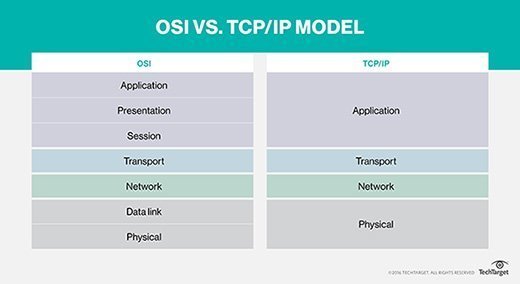
The OSI model and TCP/IP have a lot in common. For instance, they both offer a foundation for comprehending how various protocols interact with one another and with network communication. Both models support the idea of encapsulation, in which data is packaged into headers and trailers at each layer for transmission and have levels that define certain functionalities.
However, both models also have many differences:
- Specificity. The main difference between the TCP/IP model and the OSI model is the level of specificity. The OSI model is a more abstract representation of the way data is exchanged and is not specific to any protocol. It is a framework for general networking systems. The TCP/IP stack is more specific and comprises the dominant set of protocols used to exchange data.
- Protocol dependence. The OSI model is abstract and based more on functionality and is not protocol dependent. The TCP/IP stack is concrete and protocol based.
- Number of layers. Further, the OSI model has seven layers, whereas the TCP/IP model has only four.
- Development and usage. Developed by the U.S. DoD, the TCP/IP model predates the OSI model and has become the de facto standard for internet communication. The OSI model was developed by the International Organization for Standardization and is more of a conceptual model and less widely used in practice.
- Complexity. The OSI model is intricate and detailed, featuring more layers and a detailed breakdown of functions. In contrast, the TCP/IP model is simpler and more streamlined, emphasizing the essential functions necessary for internet communication.