
Stephen Finn - stock.adobe.com
How to prevent buffer overflow attacks
Read up on types of buffer overflow attacks, and learn secure coding best practices that prevent such vulnerabilities, as well as post-deployment steps to keep apps and websites safe.

Buffer overflow attacks can cause serious damage to an organization by enabling an attacker to assault an application and gain control of the corporate network.
These attacks are far from new -- the first documented buffer overflow attack was 1988's Morris worm. Yet, despite their longevity and well-known tactics, they can be difficult to defend against.
To successfully mitigate buffer overflow attacks, it is important to understand how they unfold. Read on to learn how they work and then identify best practices during software development and post-deployment that help stop a buffer overflow vulnerability from compromising your enterprise's network and applications.
What is a buffer overflow and how does it work?
A buffer is a temporary area for data storage. When the amount of allocated data exceeds the capacity of the buffer, the extra data will overflow -- hence the name buffer overflow. This may cause data to leak out into other buffers, which can then corrupt or overwrite their contents.
In a buffer overflow attack, a malicious actor exploits vulnerable software. There are two main types of buffer overflows. Heap-based overflow attacks, which are difficult to execute and less common, infiltrate an application by flooding the memory space reserved for a program. The more common stack-based buffer overflow attack exploits an application's stack, the memory space that stores user input.
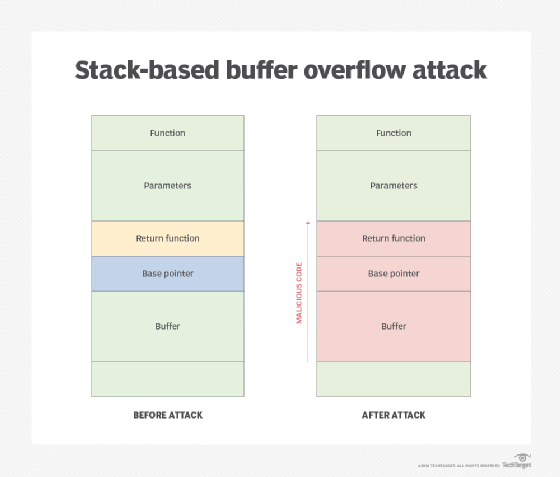
If a malicious actor sends more data to a buffer stack than it can hold, legitimate data may be displaced by malware that can damage files, change data or expose private information. This act of using an input string longer than the amount of space reserved causes a security hole. Hackers use scanning tools to find applications vulnerable to overflow and then trigger an attack. Once malicious code causes an overflow, the hacker executes the command by indicating a return address that points to the command. The buffer causes the application to crash partially, but it tries to recover by going to the return address that has been redirected to the malicious command by the hacker.
When the buffer overflow attack runs the command found at the new return address, the program thinks it is still running. This means the command prompt window that has been opened is running with the application's same set of executable permissions as the application that was compromised, enabling the hacker to gain full control of the OS.
Other types of buffer overflows include the following:
- In an integer overflow attack, also known as arithmetic attack, an arithmetic operation results in an integer that is larger than the maximum integer size allowed by the programming language.
- In a Unicode overflow attack, Unicode characters are sent to a buffer that expects ASCII (American Standard Code for Information Interchange) characters, causing an overflow.
- With format string attacks, the input is read as a command by an application. For example, malicious code input with functions such as printf or sprintf, if not validated, can be executed.
How to prevent buffer overflow attacks
After understanding how a buffer overflow attack works, organizations can better grasp how to prevent them from infiltrating their systems and taking control of their applications.
To bulk up enterprise defenses, ensure secure coding practices, and prevent buffer overflow vulnerabilities by adhering to the following:
- Choose programming language wisely. Certain programming languages, such as C and C++, are prone to buffer overflows as they have no built-in protections against them. Many modern programming languages, such as C#, Java, JavaScript Perl, Python and .NET, have built-in protections to prevent buffer overflow coding errors. However, this doesn't mean they are 100% safe from buffer overflows, especially when they interact with programs, services and libraries in other programming languages.
- Avoid risky library files. Many library files, which are used in programming languages, are inherently insecure and attractive targets for hackers during application attacks. Any weakness found in a library file will also exist in all applications using that library file. Do not use any library functions that are not bounds-checked.
- Validate input. Validate any input an application receives, whether from a user or other programs or processes. Design code with data filtering checks to only accept input if it falls within the bounds of what is expected.
- Filter malicious input. Filter potentially dangerous HTML code and any characters that could cause database problems. For example, in ASP (Active Server Pages) code, apostrophes, quotation marks and ampersands are reserved symbols and should be filtered out; if included within a user's input, they will cause the application to crash.
- Test applications predeployment. Be sure to test all applications prior to deployment, trying to break into every facet to ensure secure coding. If the application breaks, it will be clear there is a problem that needs to be fixed before a hacker is able to exploit it.
- Enable runtime protections. Many OSes include runtime protections that hinder attackers targeting buffer overflows. For example, address space layout randomization, or ASLR, randomizes where system executables are and the positions of stacks, heaps and libraries in memory, making these processes harder for an attacker to locate. Structured Exception Handling Overwrite Protection, or SEHOP, blocks malicious code from attacking SEH, a built-in system that manages hardware and software exceptions in Windows.
- Use executable space protection. Called Data Execution Prevention in Windows, executable space protection marks areas of memory as executable or nonexcecutable, thus preventing attackers from running buffer overflow code in particular memory regions.
It is critical to also test applications and websites for buffer overflow vulnerabilities post-deployment. Enterprises must ensure the following steps are taken:
- Install vendor-issued patches and software updates in a timely manner.
- Test websites and applications with manual and automated vulnerability scanning tools.
- Block IP addresses associated with malicious actors.
- Use intrusion detection and prevention systems that block known buffer overflow exploits.
- Use deep packet inspection to monitor network traffic.