What is identity and access management? Guide to IAM
Identity and access management (IAM) is a framework of business processes, policies and technologies that facilitates the management of electronic or digital identities. With an IAM framework in place, information technology (IT) managers can control user access to critical information within their organizations. Systems used for IAM include single sign-on systems, two-factor authentication, multifactor authentication and privileged access management. These technologies also provide the ability to securely store identity and profile data as well as data governance functions to ensure that only data that is necessary and relevant is shared.
IAM systems can be deployed on premises, provided by a third-party vendor through a cloud-based subscription model or deployed in a hybrid model.
On a fundamental level, IAM encompasses the following components:
- how individuals are identified in a system (understand the difference between identity management and authentication);
- how roles are identified in a system and how they are assigned to individuals;
- adding, removing and updating individuals and their roles in a system;
- assigning levels of access to individuals or groups of individuals; and
- protecting the sensitive data within the system and securing the system itself.
Why is IAM important?
Businesses leaders and IT departments are under increased regulatory and organizational pressure to protect access to corporate resources. As a result, they can no longer rely on manual and error-prone processes to assign and track user privileges. IAM automates these tasks and enables granular access control and auditing of all corporate assets on premises and in the cloud.
IAM, which has an ever-increasing list of features -- including biometrics, behavior analytics and AI -- is well suited to the rigors of the new security landscape. For example, IAM's tight control of resource access in highly distributed and dynamic environments aligns with the industry's transition from firewalls to zero-trust models and with the security requirements of IoT. For more information on the future of IoT security, check out this video.
While IT professionals might think IAM is for larger organizations with bigger budgets, in reality, the technology is accessible for companies of all sizes.
Read more about the importance of IAM.
Basic components of IAM
An IAM framework enables IT to control user access to critical information within their organizations. IAM products offer role-based access control, which lets system administrators regulate access to systems or networks based on the roles of individual users within the enterprise.
In this context, access is the ability of an individual user to perform a specific task, such as view, create or modify a file. Roles are defined according to job, authority and responsibility within the enterprise.
IAM systems should do the following: capture and record user login information, manage the enterprise database of user identities, and orchestrate the assignment and removal of access privileges.
That means systems used for IAM should provide a centralized directory service with oversight and visibility into all aspects of the company user base.
Digital identities are not just for humans; IAM can manage the digital identities of devices and applications to help establish trust.
In the cloud, IAM can be handled by authentication as a service or identity as a service (IDaaS). In both cases, a third-party service provider takes on the burden of authenticating and registering users, as well as managing their information. Read more about these cloud-based IAM options.
Benefits of IAM
IAM technologies can be used to initiate, capture, record and manage user identities and their related access permissions in an automated manner. An organization gains the following IAM benefits:
- Access privileges are granted according to policy, and all individuals and services are properly authenticated, authorized and audited.
- Companies that properly manage identities have greater control of user access, which reduces the risk of internal and external data breaches.
- Automating IAM systems allows businesses to operate more efficiently by decreasing the effort, time and money that would be required to manually manage access to their networks.
- In terms of security, the use of an IAM framework can make it easier to enforce policies around user authentication, validation and privileges, and address issues regarding privilege creep.
- IAM systems help companies better comply with government regulations by allowing them to show corporate information is not being misused. Companies can also demonstrate that any data needed for auditing can be made available on demand.
Companies can gain competitive advantages by implementing IAM tools and following related best practices. For example, IAM technologies allow the business to give users outside the organization -- like customers, partners, contractors and suppliers -- access to its network across mobile applications, on-premises applications and SaaS without compromising security. This enables better collaboration, enhanced productivity, increased efficiency and reduced operating costs.
IAM technologies and tools
IAM technologies are designed to simplify the user provisioning and account setup process. These systems should reduce the time it takes to complete these processes with a controlled workflow that decreases errors and the potential for abuse while allowing automated account fulfillment. An IAM system should also allow administrators to instantly view and change evolving access roles and rights.
These systems should balance the speed and automation of their processes with the control that administrators need to monitor and modify access rights. Consequently, to manage access requests, the central directory needs an access rights system that automatically matches employee job titles, business unit identifiers and locations to their relevant privilege levels.
Multiple review levels can be included as workflows to enable the proper checking of individual requests. This simplifies setting up appropriate review processes for higher-level access as well as easing reviews of existing rights to prevent privilege creep, which is the gradual accumulation of access rights beyond what users need to do their jobs.
IAM systems should be used to provide flexibility to establish groups with specific privileges for specific roles so that access rights based on employee job functions can be uniformly assigned. The system should also provide request and approval processes for modifying privileges because employees with the same title and job location may need customized, or slightly different, access.
Types of digital authentication
With IAM, enterprises can implement a range of digital authentication methods to prove digital identity and authorize access to corporate resources.
Unique passwords. The most common type of digital authentication is the unique password. To make passwords more secure, some organizations require longer or complex passwords that require a combination of letters, symbols and numbers. Unless users can automatically gather their collection of passwords behind a single sign-on entry point, they typically find remembering unique passwords onerous.
Pre-shared key (PSK). PSK is another type of digital authentication where the password is shared among users authorized to access the same resources -- think of a branch office Wi-Fi password. This type of authentication is less secure than individual passwords.
A concern with shared passwords like PSK is that frequently changing them can be cumbersome.
Behavioral authentication. When dealing with highly sensitive information and systems, organizations can use behavioral authentication to get far more granular and analyze keystroke dynamics or mouse-use characteristics. By applying artificial intelligence, a trend in IAM systems, organizations can quickly recognize if user or machine behavior falls outside of the norm and can automatically lock down systems.
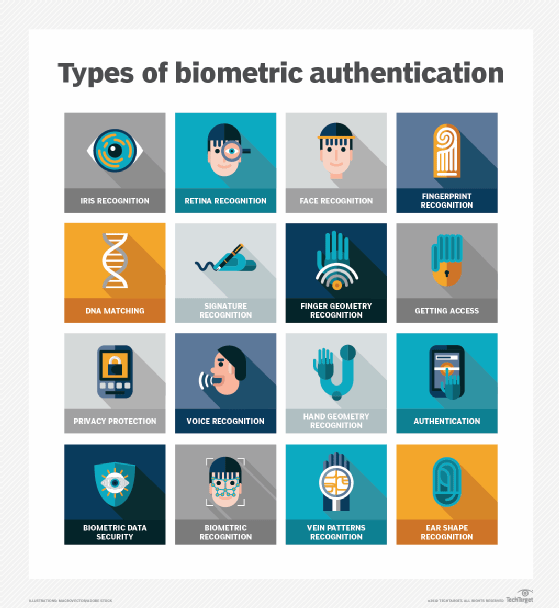
Biometrics. Modern IAM systems use biometrics for more precise authentication. For instance, they collect a range of biometric characteristics, including fingerprints, irises, faces, palms, gaits, voices and, in some cases, DNA. Biometrics and behavior-based analytics have been found to be more effective than passwords.
When collecting and using biometric characteristics, companies must consider the ethics in the following areas:
- data security (accessing, using and storing biometric data);
- transparency (implementing easy-to-understand disclosures);
- optionality (providing customers a choice to opt in or out); and
- biometric data privacy (understanding what constitutes private data and having rules around sharing with partners.
One danger in relying heavily on biometrics is if a company's biometric data is hacked, then recovery is difficult, as users can't swap out facial recognition or fingerprints like they can passwords or other non-biometric information.
Another critical technical challenge of biometrics is that it can be expensive to implement at scale, with software, hardware and training costs to consider.
Before getting attached to passwordless IAM, make sure you understand the pros and cons of biometric authentication.
Implementing IAM in the enterprise
Before any IAM system is rolled out into the enterprise, businesses need to identify who within the organization will play a lead role in developing, enacting and enforcing identity and access policies. IAM impacts every department and every type of user (employee, contractor, partner, supplier, customer, etc.), so it's essential the IAM team comprises a mix of corporate functions.
IT professionals implementing an IAM system largely on-premises and largely for employees should become familiar with the OSA IAM design pattern for identity management, SP-010. The pattern lays out the architecture of how various roles interact with IAM components as well as the systems that rely on IAM. Policy enforcement and policy decisions are separated from one another, as they are dealt with by different elements within the IAM framework.
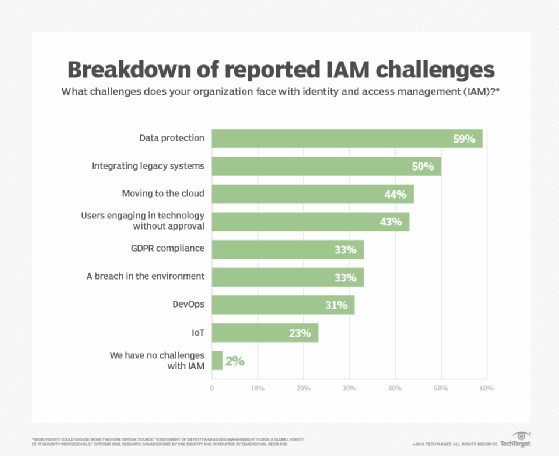
Organizations that want to integrate non-employee users and make use of IAM in the cloud in their architecture should follow these steps for building an effective IAM architecture, as explained by expert Ed Moyle:
- Make a list of usage, including applications, services, components and other elements users will interact with. This list will help validate that usage assumptions are correct and will be instrumental in selecting the features needed from an IAM product or service.
- Understand how the organization's environments, such as cloud-based applications and on-premises applications, link together. These systems might need a specific type of federation (Security Assertion Markup Language OpenID Connect, for instance).
- Know the specific areas of IAM most important to the business. Answering the following questions will help:
- Is multifactor authentication needed?
- Do customers and employees need to be supported in the same system?
- Are automated provisioning and deprovisioning required?
- What standards need to be supported?
Implementations should be carried out with IAM best practices in mind, including documenting expectations and responsibilities for IAM success. Businesses also should make sure to centralize security and critical systems around identity. Perhaps most important, organizations should create a process they can use to evaluate the efficacy of current IAM controls.
Trying to staff your enterprise security team with IAM experts? Use these 17 job interview questions -- and answers -- to find the best hires.
IAM risks
IAM is not without risks, which can include IAM configuration oversights. Expert Stephen Bigelow outlined five oversights that should be avoided, including incomplete provisioning, poor process automation and insufficient reviews. He also explained that paying attention to the principle of least privilege is essential to ensuring proper security.
Biometrics, as mentioned above, also poses security challenges, including data theft. Collecting and keeping only data that is necessary lessens that risk. Organizations should know what biometric data they have, what they need, how to get rid of what they don't require, and how and where data is stored.
Cloud-based IAM can be of concern when the provisioning and deprovisioning of user accounts aren't handled correctly, if there are too many vulnerable inactive assigned user accounts, and if there is a sprawl in admin accounts. Organizations need to ensure lifecycle control over all aspects of cloud-based IAM to prevent malicious actors from gaining access to user identities and passwords.
At the same time, features like multifactor authentication might be more easily deployed in a cloud-based service like IDaaS than they would be on premises because of their complexity.
Audit capabilities act as a check to ensure that when users switch roles or leave the organization, their access changes accordingly.
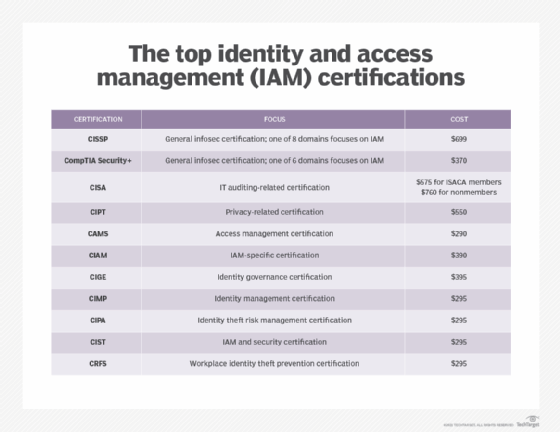
IT professionals can pursue IAM-specific and broader security certifications to be able to assess their organization's security posture and ward off threats. Read this comparison of the top IAM certifications.
IAM vendors and products
IAM vendors range from large companies -- such as IBM, Microsoft, Oracle and RSA -- to pure-play providers -- such as Okta, Ping and SailPoint. Selecting the best IAM product or service for your organization requires legwork to determine the features that address your needs, such as centralized management, single sign-on, governance, compliance and risk analytics. Check out our 2020 IAM vendor, product and feature listing.
Also read how Okta is going up against giants Microsoft and Google with its passwordless IAM offerings. Okta's strategy is to implement non-password factors in conjunction with contextual access, with the goal of an improved user experience.
IAM and compliance
It is easy to think that improved security is simply the act of piling on more security processes, but as staff writer Sharon Shea and expert Randall Gamby wrote, security "is about demonstrating that these processes and technologies are indeed providing a more secure environment."
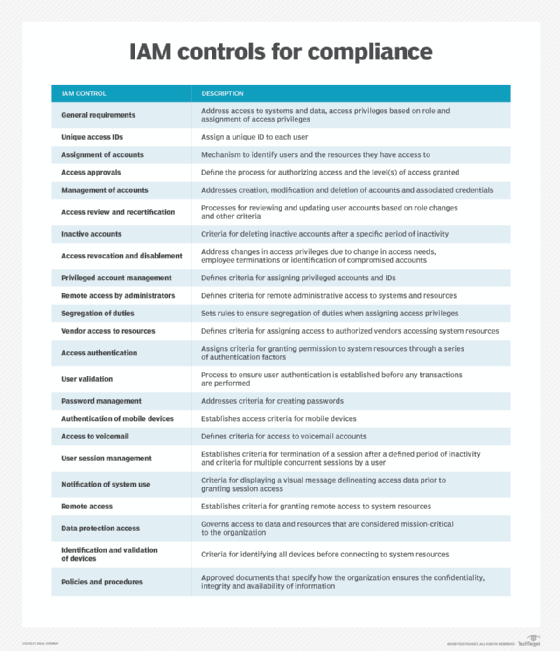
IAM meets this standard by adhering to the principle of least privilege, where a user is granted only the access rights necessary to fulfill his work duties, and separation of duties, where one person is never responsible for every task. With a combination of pre-determined and real-time access control, IAM enables organizations to meet their regulatory, risk management and compliance mandates.
Modern IAM technologies have the ability to confirm an organization's compliance with critical requirements, including HIPAA, the Sarbanes-Oxley Act, Family Educational Rights and Privacy Act, and NIST guidelines, among others.
The IAM roadmap
Innovation is plentiful around IAM, and enterprises are the beneficiaries of new strategies that are backed up by products and features.
Many emerging IAM technologies are designed to reduce risk by keeping personally identifiable information with the owner of the information -- not distributed across databases vulnerable to breaches and theft.
For instance, a decentralized identity framework enables individuals to maintain control of and manage their own identities. Individuals can dictate how and where their personal data is shared, likely reducing corporate risk and liability.
At the heart of this framework and others aimed at giving users more authority over their data is blockchain technology, which facilitates the safe exchange of data between individuals and third parties.
Healthcare is an ideal use case for blockchain, as the lack of interoperability among systems and entities is incredibly limiting. Blockchain improves record sharing and supports greater patient controls.
Some organizations are headed toward a "bring your own identity," or BYOI, approach to IAM. Like single sign-on, BYOI reduces the number of usernames and passwords users need to remember, potentially shrinking the vulnerability landscape. What BYOI can do for the enterprise is enable employees to access applications outside the organization by using corporate identities. For instance, employees may log into a benefits administration program to check insurance coverage or review their 401(k) portfolio.
To learn even more about where IAM is headed, listen to this TechAccelerator podcast. Editor Sandra Gittlen and ESG Senior Analyst Carla Roncato discuss innovation in identity and access management strategies and tools.