active directory
What is Active Directory and how does it work?
Active Directory (AD) is Microsoft's proprietary directory service. It runs on Windows Server and enables administrators to manage permissions and access to network resources.
Active Directory stores data as objects. An object is a single element, such as a user, group, application or device such as a printer. Objects are normally defined as either resources, such as printers or computers, or security principals, such as users or groups.
Active Directory categorizes directory objects by name and attributes. For example, the name of a user might include the name string, along with information associated with the user, such as passwords and Secure Shell keys.
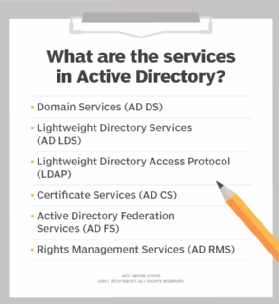
The main service in Active Directory is Domain Services (AD DS), which stores directory information and handles the interaction of the user with the domain. AD DS verifies access when a user signs into a device or attempts to connect to a server over a network. AD DS controls which users have access to each resource, as well as group policies. For example, an administrator typically has a different level of access to data than an end user.
Other Microsoft and Windows operating system (OS) products, such as Exchange Server and SharePoint Server, rely on AD DS to provide resource access. The server that hosts AD DS is the domain controller.
Active Directory services
Several different services comprise Active Directory. The main service is Domain Services, but Active Directory also includes Lightweight Directory Services (AD LDS), Lightweight Directory Access Protocol (LDAP), Certificate Services, or AD CS, Federation Services (AD FS) and Rights Management Services (AD RMS). Each of these other services expands the product's directory management capabilities.
- Lightweight Directory Services has the same codebase as AD DS, sharing similar functionalities, such as the application program interface. AD LDS, however, can run in multiple instances on one server and holds directory data in a data store using Lightweight Directory Access Protocol.
- Lightweight Directory Access Protocol is an application protocol used to access and maintain directory services over a network. LDAP stores objects, such as usernames and passwords, in directory services, such as Active Directory, and shares that object data across the network.
- Certificate Services generates, manages and shares certificates. A certificate uses encryption to enable a user to exchange information over the internet securely with a public key.
- Active Directory Federation Services authenticates user access to multiple applications -- even on different networks -- using single sign-on (SSO). As the name indicates, SSO only requires the user to sign on once, rather than use multiple dedicated authentication keys for each service.
- Rights Management Services control information rights and management. AD RMS encrypts content, such as email or Microsoft Word documents, on a server to limit access.
Major features in Active Directory Domain Services
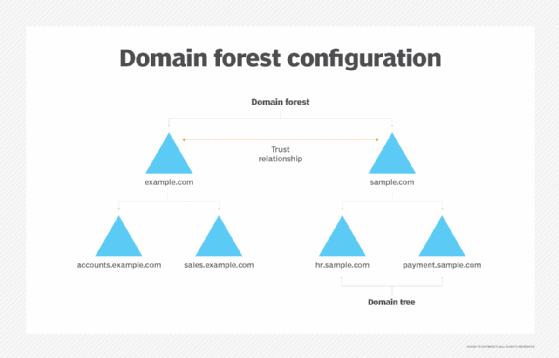
Active Directory Domain Services uses a tiered layout structure consisting of domains, trees and forests to coordinate networked elements.
Domains are the smallest of the main tiers, while forests are the largest. Different objects, such as users and devices, that share the same database will be on the same domain. A tree is one or more domains grouped together with hierarchical trust relationships. A forest is a group of multiple trees. Forests provide security boundaries, while domains -- which share a common database -- can be managed for settings such as authentication and encryption.
- A domain is a group of objects, such as users or devices, that share the same AD database. Domains have a domain name system
- A tree is one or more domains grouped together. The tree structure uses a contiguous namespace to gather the collection of domains in a logical hierarchy. Trees can be viewed as trust relationships where a secure connection, or trust, is shared between two domains. Multiple domains can be trusted where one domain can trust a second, and the second domain can trust a third. Because of the hierarchical nature of this setup, the first domain can implicitly trust the third domain without needing explicit trust.
- A forest is a group of multiple trees. A forest consists of shared catalogs, directory schemas, application information and domain configurations. The schema defines an object's class and attributes in a forest. In addition, global catalog servers provide a listing of all the objects in a forest. According to Microsoft, the forest is Active Directory's security boundary.
- Organizational Units (OUs) organize users, groups and devices. Each domain can contain its own OU. However, OUs cannot have separate namespaces, as each user or object in a domain must be unique. For example, a user account with the same username cannot be created.
- Containers are similar to OUs, but Group Policy Objects cannot be applied or linked to container objects.
Trusting terminology
Active Directory relies on trusts to moderate the access rights of resources between domains. There are several different types of trusts:
- A one-way trust is when a first domain allows access privileges to users on a second domain. However, the second domain does not allow access to users on the first domain.
- A two-way trust is when there are two domains and each domain enables access to users of the other domain.
- A trusted domain is a single domain that enables user access to another domain, which is called the trusting domain.
- A transitive trust can extend beyond two domains and allow access to other trusted domains within a forest.
- An intransitive trust is a one-way trust that is limited to two domains.
- An explicit trust is a one-way, nontransitive trust that is created by a network admin.
- A cross-link trust is a type of explicit trust. Cross-link trusts take place between domains within 1) the same tree, with no child-parent relationship between the two domains, or 2) different trees.
- A forest trust applies to domains within the entire forest and can be one-way, two-way or transitive.
- A shortcut joins two domains that belong to separate trees. Shortcuts can be one-way, two-way or transitive.
- A realm is a trust that is transitive, intransitive, one-way or two-way.
- An external trust is a trust that links domains across separate forests or domains that are non-AD. External trusts can be nontransitive, one-way or two-way.
- A private access management (PAM) trust is a one-way trust that is created by Microsoft Identity Manager between a production forest and a bastion forest.
History and development of Active Directory
Microsoft offered a preview of Active Directory in 1999 and released it a year later with Windows 2000 Server. Microsoft continued to develop new features with each successive Windows Server release.
Windows Server 2003 included a notable update to add forests and the ability to edit and change the position of domains within forests. Domains on Windows Server 2000 could not support newer AD updates running in Server 2003.
Windows Server 2008 introduced AD FS. Additionally, Microsoft rebranded the directory for domain management as AD DS, and AD became an umbrella term for the directory-based services it supported.
Windows Server 2016 updated AD DS to improve AD security and migrate AD environments to cloud or hybrid cloud environments. Security updates included the addition of PAM.
PAM monitored access to an object, the type of access granted and what actions the user took. PAM added bastion AD forests to provide an additional secure and isolated forest environment. Windows Server 2016 ended support for devices on Windows Server 2003.
In December 2016, Microsoft released Azure AD Connect to join an on-premises Active Directory system with Azure Active Directory (Azure AD) to enable SSO for Microsoft's cloud services, such as Office 365. Azure AD Connect works with systems running Windows Server 2008, Windows Server 2012, Windows Server 2016 and Windows Server 2019.
Domains vs. workgroups
The workgroup is Microsoft's term for Windows machines connected over a peer-to-peer network. Workgroups are another unit of organization for Windows computers in networks. Workgroups allow these machines to share files, internet access, printers and other resources over the network. Peer-to-peer networking removes the need for a server for authentication. There are several differences between domains and workgroups:
- Domains, unlike workgroups, can host computers from different local networks.
- Domains can be used to host many more computers than workgroups. Domains can include thousands of computers, unlike workgroups, which typically have an upper limit close to 20.
- In domains, at least one server is a computer, which is used to control permissions and security features for every computer within the domain. In workgroups, there is no server and computers are all peers.
- Domain users typically require security identifiers such as logins and passwords, unlike workgroups.
Main competitors to Active Directory
Other directory services on the market that provide similar functionality to AD include Red Hat Directory Server, Apache Directory and OpenLDAP.
Red Hat Directory Server manages user access to multiple systems in Unix environments. Similar to AD, Red Hat Directory Server includes user ID and certificate-based authentication to restrict access to data in the directory.
Apache Directory is an open source project that runs on Java and operates on any LDAP server, including systems on Windows, macOS and Linux. Apache Directory includes a schema browser and an LDAP editor and browser. Apache Directory supports Eclipse plugins.
OpenLDAP is a Windows-based open source LDAP directory. OpenLDAP enables users to browse, search and edit objects in an LDAP server. OpenLDAP features include copying, moving and deleting trees in the directory, as well as enabling schema browsing, password management and LDAP SSL (Secure Sockets Layer) support.
Read this overview to learn about Active Directory basics.
Learn what techniques can be used to troubleshoot common issues in Active Directory, and tips on replication troubleshooting.






