What is role-based access control (RBAC)?
Role-based access control (RBAC) is a method of restricting network access based on the roles of individual users within an enterprise. Organizations use RBAC -- also called role-based security -- to parse levels of access based on an employee's roles and responsibilities.
Limiting network access is important for organizations that have many workers, have contractors or allow third parties -- such as customers and vendors -- network access, as monitoring network access effectively can be difficult. Companies that depend on RBAC are better able to secure their sensitive data and critical applications. RBAC ensures that users access only the information they need to do their jobs, preventing them from accessing information that doesn't pertain to them.
An employee's role in an organization determines the permissions an individual is granted, ensuring that lower-level employees can't access sensitive information or perform high-level tasks.
RBAC is based on the concept of roles and privileges. Access is based on factors such as authority, competency and responsibility. Network access and other resources -- such as access to specific files or programs -- can be limited by employee. For example, specific files might be read-only, but temporary access can be granted to specific files or programs to complete a task. Organizations can designate whether a user is an end user, administrator or specialist user. These roles can also overlap or give different permission levels to specific roles.
Benefits of RBAC
There are multiple benefits to using RBAC, including the following:
- Improved operational efficiency. With RBAC, companies can decrease the need for paperwork and password changes when they hire new employees or switch the roles of existing employees. RBAC lets organizations quickly add and change roles, as well as implement them across platforms, operating systems and applications. It also cuts down on the potential for error when assigning user permissions. Additionally, with RBAC, companies can more easily integrate third-party users into their networks by giving them predefined roles.
- Enhanced compliance. Every organization must comply with local, state and federal regulations. Companies generally prefer to implement RBAC systems to meet the regulatory and statutory requirements for confidentiality and privacy, as executives and IT departments can more effectively manage how the data is accessed and used. This is particularly important for financial institutions and healthcare organizations that manage sensitive data.
- Increased visibility. RBAC gives network administrators and managers more visibility and oversight into the business, while also guaranteeing authorized users or guests are only given access to what they need in order to do their jobs.
- Reduced costs. By not allowing user access to certain processes and applications, companies can conserve or more cost-effectively use resources such as network bandwidth, memory and storage.
- Decreased risk of breaches and data leakage. Implementing RBAC means restricting access to sensitive information, thus reducing the potential for data breaches or data leakage.
Best practices for role-based access control implementations
There are several best practices organizations should follow for implementing RBAC, including the following:
- Having an identity and access management system isn't a prerequisite for implementing RBAC; however, having an IAM system in place makes implementing RBAC easier. IAM facilitates the management of electronic or digital identities. With an IAM framework in place, IT managers can control user access to critical information within their organizations.
- Create a list of resources that require control access. This could include customer databases, email systems and contact management systems.
- Analyze the workforce, and establish roles that have the same access needs. However, don't create too many roles, as this could defeat the purpose of role-based access control. Some RBAC examples include a basic role that includes the access every employee needs -- such as to email and the corporate intranet. Another role could be a customer service representative who has read and write access to the customer database.
- Use the principle of least privilege (POLP). POLP states that users should only have access to the actions, software or files needed to do their job. Access to additional actions above the least privilege must be given using RBAC roles.
- After creating a list of roles and their access rights, align employees to those roles, and set their access.
- Evaluate how roles can be changed, how to close accounts for those leaving the company and how to register new employees.
- Create an RBAC policy that states how to avoid potential issues.
- Ensure RBAC is integrated across all systems throughout the company.
- Conduct training so employees understand the principles of RBAC.
- Periodically conduct audits of the roles, including the employees who are assigned to them and the access that's permitted for each role. If a role is found to have unnecessary access to a certain system, change the role, and modify the access level.
RBAC vs. ABAC
Role-based access control and attribute-based access control (ABAC) are both access control methods but differ in their approaches. While RBAC grants access rights depending on the roles of users, ABAC controls access based on a combination of the following categories:
- User attributes. These can include the user's name, nationality, organization, ID, role and security clearance.
- Resource attributes. These can describe the owner, name and data creation date of the object being accessed.
- Action attributes. These attributes describe the action associated with the system or application being accessed.
- Environmental attributes. These can include access location, time of access and threat levels. For example, the U.S. Army adopted ABAC, while also implementing a zero-trust security model.
As an access control method, RBAC relies on predefined roles, while ABAC is more dynamic in comparison -- offering more granular control.
For example, organizations should use RBAC for coarse-grained access control, such as giving all professors in a university access to Google for doing research or giving all contractors access to corporate email. On the other hand, companies should use ABAC for fine-grained access control or if they need to make decisions under specific conditions -- for example, giving professors access to Google only if they work in building X and teach freshman classes.
Examples of RBAC
Organizations can designate a user by role or group. Adding a user to a role group means the new user has access to all the permissions in that specific group.
An organization might want to split roles to include administrators, job-specific end users or guests. Example roles might include the following:
- A software engineer who is given a role and access to only the organization's software engineering tools -- GitHub, Docker and Jenkins.
- A marketer who is given a role and access to use just the organization's marketing tools. For example, this could be access to email marketing lists, Google Analytics or social media profiles.
- A human resources employee who is given a role and access to HR-related tools, such as ADP, Oracle Cloud Human Capital Management or Paycor.
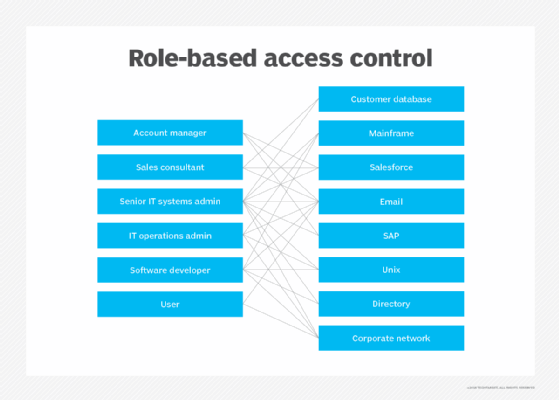
Software engineers, for example, won't have access to the tools or files HR or marketers in the same company have, but will have access to the tools they need to complete their tasks. Likewise, those in marketing will have access to the tools they need based on their role, but not the HR or software engineering tools. The permissions of each user depend upon the role and position of each employee.
Learn more about how identity and access management plays a role in the importance of business frameworks.