Top 10 tips for employees to prevent phishing attacks
Share this list of phishing techniques, detection and prevention tips, and best practices to help employees avoid falling victim to phishing schemes.

Only 58% of users know what phishing is, according to a Proofpoint survey -- a staggering gap considering phishing attacks are so common and becoming increasingly sophisticated. The same survey found 84% of organizations faced at least one successful phishing attack in 2022, with 54% of organizations experiencing three or more successful incidents.
Phishing attacks can be devastating for employees and businesses alike. In fact, 74% of all data breaches involve people, per the "2023 Verizon Data Breach Investigations Report." It is, therefore, critical to cover phishing during security awareness trainings, including its definition and how to detect and prevent these potentially malicious attacks.
Types of phishing attacks
Phishing is a form of social engineering that involves attackers tricking users into providing access to data and systems. Attackers' motives can be anything from getting users to download malware, such as ransomware, to stealing users' login credentials to duping users into sharing sensitive information, such as credit card numbers and company data.
Common phishing tactics include the following:
- Email phishing is the most common form. Attackers send emails with malicious links or attachments to infect their targets.
- Spear phishing is more selective, with malicious hackers sending emails to a specific target.
- Whaling targets a high-profile employee, such as the CEO or CFO, in a phishing scam.
- VoIP phishing, or vishing, is a phishing scam carried out using voice technology, such as over the phone.
- Pharming is an attack that tricks a DNS server into replacing a legitimate cached IP address with a malicious one, thereby redirecting users to the malicious website when they type the legitimate one into the browser.
- SMS phishing, or smishing, is a phishing scam executed via text message.
- Social media phishing involves phishing messages sent via social media platforms.
- Search engine phishing, also known as SEO poisoning, involves attackers using search engine optimization to help their spoofed websites rank highly in online searches. Users who click the link to the spoofed site see a legitimate-looking page that is actually malicious.
- Clone phishing involves malicious actors replicating a previously delivered email but replacing the legitimate links or attachments with malicious ones.
- Angler phishing occurs when an attacker masquerades as a customer service representative on a fake company social media account. For example, a customer who complains about a bank online might be contacted by a legitimate-looking social media account from that bank to resolve the issue when the attacker's true motive is to get the customer to download malware or share personal information.
- QR phishing, also known as quishing, tricks users into scanning a QR code with their phone that leads them to download malware or tricks them into sharing sensitive data.
Tips to avoid phishing attacks
Knowing the definition of phishing is just the beginning. It's more important to know how to detect and avoid phishing scams. Employees should follow these 10 tips and best practices.
1. Pay attention to security awareness training
Employee education is the first step in phishing protection. While they might not be the most exciting task, security awareness trainings held by your company contain a lot of important info about how to detect and prevent phishing attacks. Take the information they share to heart -- it could save your identity and your company.
2. Be on the lookout for phishing scams
Phishing emails used to be fairly easy to detect. The Nigerian prince scams of yesteryear are still rampant, but attackers today are more convincing and personalized than ever before.
When you receive an email from an unknown source, be sure to do the following:
- Check for typos. Many phishing emails contain grammatical errors and misspelled words.
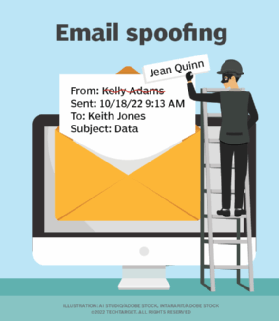
- Check the sender's address. If you don't recognize it, be wary. Remember, phishers can forge sender addresses to make the email appear to be from a legitimate source. Check the IP address in the email source code to see if you can trace it to a legitimate contact.
- Beware of emails that create a sense of urgency. Many attackers try to rattle employees by using urgent, time-sensitive wording or trying to scare you. Don't act hastily and without thinking; question the email and its legitimacy.
3. Don't click links or download attachments
Never reply to a suspicious message, click on any links or download any attachments. All three of these things can lead to malware being installed on your computer.
In addition, never click untrusted shortened URLs, such as Bitly or TinyURL links.
4. Don't copy and paste links
Beyond never clicking links, never copy and paste links from suspicious emails. Many cybersecurity awareness programs suggest hovering over links to check their validity, but this is not always an indicator that the link is safe. Attackers can use coding to make the URL appear like a legitimate link.
5. Beware of impersonators
Many phishing scams have evolved from spray-and-pray phishing campaigns that use one tactic to hit multiple victims to more targeted, personalized attacks, as evidenced in spear phishing, whaling, cloning and business email compromise attacks. In such scenarios, malicious actors search the web and use social media, such as LinkedIn, to masquerade as known contacts and to impersonate legitimate communications and transactions.
Check who sent the email, and if in doubt, reach out separately to the purported sender to ensure an email is legitimate.
6. Beware of sharing data
Never trust an email or website that asks for personal, corporate or financial information. Legitimate companies never ask for such data via email. If you are concerned about your accounts, contact the organization using a telephone number you know is genuine.
If you must enter personal, corporate or financial data into a website, visit the site by typing it into a browser. Never click the link in an email or copy and paste it. Also, ensure the site is secure by checking for a lock symbol in the browser bar and making sure the URL starts with HTTPS.
7. Use email security and antiphishing tools
User awareness only goes so far in phishing defense. Use security tools to help catch phishing attempts. These controls won't eliminate phishing emails but should minimize them:
- Run antivirus and antimalware software, and regularly update them.
- Use a firewall.
- Install a web browser toolbar or extension that protects against known phishing websites.
8. Use strong passwords and MFA
It should go without saying but bears repeating: Never share your passwords. Further, employ password hygiene best practices, such as creating passwords or passphrases that are easy for you to remember but difficult for attackers to guess.
Regardless of password strength, the goal of many phishing attacks is to exfiltrate login credentials. To strengthen password security, don't rely on username/password combos. Use multifactor authentication (MFA) to add more layers to password security. Logging in with MFA could require factors such as a one-time password texted to your phone, a security token or biometric verification -- all of which are more difficult, if not impossible, for cybercriminals to come by.
9. Update and patch systems and browsers
Browser vulnerabilities are often used during phishing attacks. All the major web browsers have antiphishing features, but if not kept up to date, they do not catch the latest known malicious websites.
Likewise, keep all software and hardware up to date, including antimalware and other security tools, for them to work effectively against threats.
10. Report phishing scams
Some companies have a designated email address for users to report suspicious activity. If you receive phishing messages to your company email address, report them if possible. Likewise, some specific vendors and providers at risk of being spoofed have websites or email addresses to report scams, for example, Amazon, Netflix and Visa.
Industry groups also collect phishing attack data to shut down websites and take legal action against phishers. Report phishing scams to groups such as the Anti-Phishing Working Group or Federal Trade Commission.