VPN (virtual private network)

What is a VPN?
A VPN (virtual private network) is a service that creates a safe, encrypted online connection. Internet users may use a VPN to give themselves more privacy and anonymity online or circumvent geographic-based blocking and censorship. VPNs essentially extend a private network across a public network, which should allow a user to securely send and receive data across the internet.
Typically, a VPN is used over a less secure network, such as the public internet. Internet service providers (ISPs) normally have a rather large amount of insight into a customer's activities. In addition, some unsecured Wi-Fi access points (APs) may be a convenient avenue for attackers to gain access to a user's personal data. An internet user could use a VPN to avoid these encroachments on privacy.
VPNs can be used to hide a user's browser history, Internet Protocol (IP) address and geographical location, web activity or devices being used. Anyone on the same network will not be able to see what a VPN user is doing. This makes VPNs a go-to tool for online privacy.
A VPN uses tunneling protocols to encrypt data at the sending end and decrypts it at the receiving end. The originating and receiving network addresses are also encrypted to provide better security for online activities.
VPN apps are often used to protect data transmissions on mobile devices. They can also be used to visit websites that are restricted by location. Secure access through a mobile VPN should not be confused with private browsing, however. Private browsing does not involve encryption; it is simply an optional browser setting that prevents identifiable user data from being collected.
How do VPNs work?
At its most basic level, VPN tunneling creates a point-to-point connection that cannot be accessed by unauthorized users. To create the tunnel, a tunneling protocol is used over existing networks. Different VPNs will use different tunneling protocols, such as OpenVPN or Secure Socket Tunneling Protocol (SSTP). The tunneling protocol used may depend on the platform the VPN is being used on, such as SSTP being used on Windows OS, and will provide data encryption at varying strengths. The endpoint device needs to be running a VPN client (software application) locally or in the cloud. The client will run in the background. The VPN client is not noticeable to the end user unless it creates performance issues.
By using a VPN tunnel, a user's device will connect to another network, hiding its IP address and encrypting the data. This is what will hide private information from attackers or others hoping to gain access to an individual's activities. The tunnel will connect a user's device to an exit node in another distant location, which makes it seem like the user is in another location.
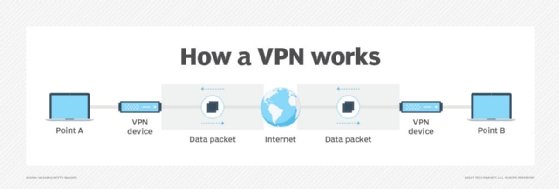
VPNs associate a user's search history with the VPN server's IP address. VPN services will have servers located in different geographical areas, so it will look like the user could be from any one of those locations.
VPNs can affect performance in many ways, like the speed of users' internet connections, the protocol types a VPN provider can use and the type of encryption used. In the enterprise, performance can also be affected by poor quality of service (QoS) outside the control of an organization's information technology (IT) department.
A kill switch is a last resort security feature in some VPN products. If the VPN connection is disrupted, the kill switch will automatically disconnect the device from the internet to eliminate the chance of IP address exposure.
There are two types of kill switches:
- Active kill switch protocols prevent devices from connecting to unsafe networks when the device is connected to the VPN. Apart from server disruptions, it is disabled when not connected to the VPN.
- Passive kill switch protocols are more secure. They keep the device from connecting to non-VPN connections even while disconnected from the VPN server.
What are VPNs used for?
VPNs are used for virtual privacy by both normal internet users and organizations. Organizations can use VPNs to make sure outside users that access their data center are authorized and using encrypted channels. VPNs can also be used to connect to a database from the same organization located in a different area.
VPNs also can be used to provide remote employees, gig economy freelance workers and business travelers with access to software applications hosted on proprietary networks. To gain access to a restricted resource through a VPN, the user must be authorized to use the virtual private network and provide one or more authentication factors. These can be passwords, security tokens or biometric data.
When surfing the web, an internet user could have information accessed by an attacker, including browsing habits or IP address.. If privacy is a concern, a VPN can provide users with peace of mind. Encryption, anonymity and the ability to get around geographically blocked content is what most users find valuable in a VPN.
The ability to get around blocked content from another country, for example, might be extremely useful for journalists. For example, if a country is likely to block internet content from foreign entities, journalists could use a VPN to look like they are within that country.
VPN protocols
VPN protocols ensure an appropriate level of security to connected systems when the underlying network infrastructure alone cannot provide it. Several different protocols can be used to secure and encrypt data. They include the following:
Benefits and challenges of using a VPN
Benefits of using a VPN include the following:
- the ability to hide a user's IP address and browsing history;
- secure connections with encrypted data;
- bypassing geo-blocked content; and
- making it more difficult for advertisers to target ads to individuals.
The challenges of using a VPN, however, include the following:
- Not all devices may support a VPN.
- VPNs do not protect against every threat.
- Paid VPNs are more trusted, secure options.
- A VPN may slow down internet speeds.
- Anonymity through VPNs has some s limitations -- for example, browser fingerprinting can still be done.
Any device that accesses an isolated network through a VPN presents a risk of bringing malware to that network environment -- unless there's a requirement in the VPN connection process to assess the state of the connecting device. Without an inspection to determine whether the connecting device complies with an organization's security policies, attackers with stolen credentials can access network resources, including switches and routers.
Beyond VPNs, security experts recommend network administrators consider adding software-defined perimeter (SDP) components to their VPN protection infrastructure in order to reduce potential attack surfaces. The addition of SDP programming gives midsize and large organizations the ability to use a zero-trust model for access to both on-premises and cloud network environments.
Types of VPNs
Network administrators have several options when it comes to deploying a VPN that include the following.
Remote access VPN
Remote access clients connect to a VPN gateway server on the organization's network. The gateway requires the device to authenticate its identity before granting access to internal network resources. This type usually relies on either IPsec or SSL to secure the connection.
Site-to-site VPN
In contrast, a site-to-site VPN uses a gateway device to connect an entire network in one location to a network in another location. End-node devices in the remote location do not need VPN clients because the gateway handles the connection. Most site-to-site VPNs connecting over the internet use IPsec. It is also common for them to use carrier Multiprotocol Label Switching (MPLS) connections rather than the public internet as the transport for site-to-site VPNs. It is possible to have either Layer 3 connectivity (MPLS IP VPN) or Layer 2 (virtual private local area network service) running across the base transport links.
Mobile VPN
In a mobile VPN, the server still sits at the edge of the organization's network, enabling secure tunneled access by authenticated, authorized clients. Mobile VPN tunnels are not tied to physical IP addresses, however. Instead, each tunnel is bound to a logical IP address. That logical IP address stays to the mobile device. An effective mobile VPN provides continuous service to users and can switch across access technologies and multiple public and private networks.
Hardware VPN
Hardware VPNs offer a number of advantages over software-based VPNs. In addition to offering enhanced security, hardware VPNs can provide load balancing for large client loads. Administration is managed through a web browser interface. A hardware VPN is more expensive than a software-based one. Because of the cost, hardware VPNs are more viable for larger businesses. Several vendors offer devices that can function as hardware VPNs.
VPN appliance
A VPN appliance, also known as a VPN gateway appliance, is a network device with enhanced security features. Also known as an SSL VPN appliance, it is a router that provides protection, authorization, authentication and encryption for VPNs.
Dynamic multipoint virtual private network (DMVPN)
A DMVPN exchanges data between sites without needing to pass through an organization's headquarter VPN server or router. A DMVPN creates a mesh VPN service that runs on VPN routers and firewall concentrators. Each remote site has a router configured to connect to the company's headquarters device (hub), providing access to the resources available. When two spokes are required to exchange data between each other -- for a voice over IP (VoIP) telephone call, for example -- the spoke will contact the hub, obtain the needed information about the other end and create a dynamic IPsec VPN tunnel directly between them.
VPN vendors and products
VPN services are available as free or paid options. Paid vendor options tend to be recommended more often than free ones, however. Some VPNvendors, among many, include the following:
- NordVPN contains a strong collection of security features with a large collection of servers. NordVPN has features such as Tor browser connections for anonymous web surfing, while maintaining a strong stance on customer privacy.
- Private Internet Access VPN is an app for iOS and Android that can support up to 10 different simultaneous connections. It does not offer too much in terms of extra features and privacy tools, however. Still, it is generally considered a good VPN service.
- ExpressVPN is a VPN service with a large and diverse set of distributed servers. It has strong privacy and information practices focused on security and offers extra features such as split tunneling. It also uses the OpenVPN protocol.
How to choose a VPN
VPNs are legal in the United States, but users and organizations should check if they are legal in specific countries.
Many VPNs offer extremely similar technologies, so it can be hard to choose which VPN will work best. Paid VPN services tend to be more trusted and include more security features. Reputable VPN services will be upfront about their security, their strengths and weaknesses, and their transparency by releasing third-party audits, for example. Extra VPN features include split tunneling, access to the Tor network or multihop connections.
Once individuals look at the added features and find a service they think will work for them, it's a good idea to start out with a short-term subscription. Many vendors offer free trials of their paid versions. Some free trial versions may include a limit on how much data can be used.
History of VPNs
VPN technology was first used in 1996 when a Microsoft employee developed the PPTP. The protocol created a more secure private connection between a user device and the internet. In 1999, the specification was published.
In the early 2000s, VPNs were mostly associated with and used by businesses. The technology wasn't quite used by average online users. At this time, VPNs were being used by businesses to access private business networks. In this use case, organizations were able to access company data from anywhere while looking as if they were in the office. Secure file sharing between different offices became possible.
After this, encryption standards started to become more powerful, and new tunneling protocols were developed. As individuals started to learn about potential online threats and privacy issues, VPN use expanded to individual, at-home users. Privacy scandals, such as WikiLeaks or the separate security leaks by Edward Snowden, were injected into the modern zeitgeist. Around 2017, internet users in the United States learned that ISPs could collect and sell their browsing history, and net neutrality became a concept citizens had to fight for -- and effectively lost. A bill was passed by the U.S. House of Representatives in 2019 to bring back net neutrality, but was ultimately blocked by the Senate. Since then, different states have enacted versions of net neutrality laws. With this knowledge, the use of VPNs became a more legitimate need for individuals.