Wireless security: WEP, WPA, WPA2 and WPA3 differences
As wireless networks have evolved, so have the protocols for securing them. Get an overview of WLAN security standards, and learn the differences among WEP, WPA, WPA2 and WPA3.
In wireless security, passwords are only half the battle. Choosing the proper level of encryption is just as vital, and the right choice determines whether your wireless LAN is a house of straw or a resilient fortress.
What is wireless security?
Complexity is the new normal in wireless networks. From IoT to personal devices to hybrid cloud environments, IT professionals have their hands full just keeping track of everything on the wireless network -- never mind securing it all.
Wireless only gets more complicated from there. IT pros contend with other factors, including cloud-managed wireless LAN architecture, IoT devices without display interfaces and end-user populations who chafe at new security measures that potentially interfere with their internet connections.
On top of all that is the endless march of increasingly sophisticated attacks, including some that seek to exploit vulnerabilities in enterprise wireless networks.
Enter wireless network security -- a set of practices and tools used to protect WLAN infrastructure and the traffic that traverses it. Broadly speaking, wireless security articulates which endpoints are and aren't permitted on a Wi-Fi network through network access and security policies. Technology enforces those rules and protects the network from anyone, or anything, that attempts to breach it.
How does wireless security work?
Wired network security protects traffic that travels between devices like switches, routers and anything using an Ethernet cable. In contrast, wireless security primarily concerns itself with traffic that travels over the air between wireless devices. These include wireless access points (APs) communicating with a controller device (or, on a mesh network, with each other), as well as communications between APs and endpoints connected to the Wi-Fi network.
Encryption is one of the most important tools used to create a secure network, including -- and perhaps especially -- in a wireless LAN. It works by using formulas known as algorithms to scramble messages as they travel between wireless devices. Even if intercepted, these messages are incomprehensible to unauthorized users without a decryption key.
Over the years, wireless encryption standards have evolved in response to changing network requirements, emerging security issues and the discovery of vulnerabilities in prior encryption protocols.
How do unsecured networks create risks?
Just as an unlocked building represents an open invitation to burglars, an unsecured network is at high risk of being compromised by internal or external threat actors seeking to steal data, eavesdrop or perform other malicious activities. In some ways, the stakes are even higher on a wireless network, as anyone within range can intercept the radio waves that carry Wi-Fi traffic -- no direct access to hardware required.
To further illustrate the threat, imagine being in a crowded restaurant and hearing another diner conduct a call with their bank on speakerphone. They loudly share all kinds of sensitive information -- their credit card numbers, Social Security number, name, date of birth and so forth -- within earshot of everyone else in the restaurant. Anyone could take that information and commit every flavor of fraud and identity theft. Essentially, that's what an unsecured, or even insufficiently secured, wireless network looks like to would-be attackers.
In addition to the risk of snooping and data breaches, threat actors can use unsecured wireless networks as a point of vulnerability to gain access to the broader enterprise network. Encryption doesn't necessarily solve this problem, but it's reasonable to expect that attackers who see a WLAN with outdated encryption protocols in place will begin poking around for other weak spots in the wireless network.
Types of wireless security protocols
Most wireless APs come with the ability to enable one of four wireless encryption standards:
- Wired Equivalent Privacy (WEP)
- Wi-Fi Protected Access (WPA)
- WPA2
- WPA3
WEP, WPA, WPA2 and WPA3: Which is best?
When choosing from among WEP, WPA, WPA2 and WPA3 wireless security protocols, experts agree WPA3 is best for Wi-Fi security. As the most up-to-date wireless encryption protocol, WPA3 is the most secure choice. Some wireless APs do not support WPA3, however. In that case, the next best option is WPA2, which is widely deployed in the enterprise space today.
At this point, no one should use the original wireless security protocol, WEP, or even its immediate successor, WPA, as both are outdated and make wireless networks extremely vulnerable to outside threats. Network administrators should replace any wireless AP or router that supports WEP or WPA with a newer device that's compatible with WPA2 or WPA3.
How does WEP work?
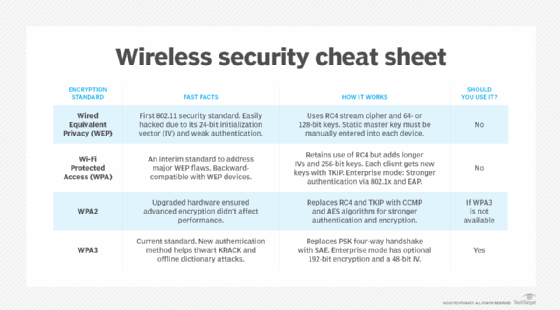
Wi-Fi Alliance developed WEP -- the first encryption algorithm for the 802.11 standard -- with one main goal: prevent hackers from snooping on wireless data as it is transmitted between clients and APs. From its inception in the late 1990s, however, WEP lacked the strength necessary to accomplish this aim.
WEP uses the RC4 (Rivest Cipher 4) stream cipher for authentication and encryption. The standard originally specified a 40-bit, preshared encryption key. A 104-bit key later became available after the U.S. government lifted certain federal restrictions.
An administrator must manually enter and update the key, which combines with a 24-bit initialization vector (IV) in an effort to strengthen encryption. The small size of the IV increases the likelihood that users will recycle keys, however, making them easier to crack. This characteristic, along with several other security flaws and vulnerabilities -- including problematic authentication mechanisms -- makes WEP a risky choice for wireless security.
Cybersecurity experts identified several severe flaws in WEP in 2001, eventually leading to industrywide recommendations to phase out the use of WEP in both enterprise and consumer devices. After investigators traced a large-scale cyber attack against T.J.Maxx in 2007 back to vulnerabilities exposed by WEP, the Payment Card Industry Data Security Standard prohibited retailers and other entities that process credit card data from using WEP.
How does WPA work?
The numerous flaws in WEP revealed the immediate need for an alternative. But the deliberately slow and careful processes required to write a new security specification conflicted with the urgency of the situation. In response, Wi-Fi Alliance released WPA as an interim standard in 2003, while IEEE worked to develop a more advanced, long-term replacement for WEP.
WPA has discrete modes for enterprise users and for personal use. The enterprise mode, WPA-Extensible Authentication Protocol (WPA-EAP), uses more stringent 802.1x authentication and requires the use of an authentication server. The personal mode, WPA-Pre-Shared Key (WPA-PSK), uses preshared keys for simpler implementation and management among consumers and small offices.
Although WPA is also based on RC4, it introduced several enhancements to encryption -- namely, the use of the Temporal Key Integrity Protocol (TKIP). TKIP contained a set of the following functions to improve WLAN security:
- use of 256-bit keys;
- per-packet key mixing, which generates a unique key for each packet;
- automatic broadcast of updated keys;
- message integrity check;
- larger IV size using 48 bits; and
- mechanisms to reduce IV reuse.
Wi-Fi Alliance designed WPA to be backward-compatible with WEP to encourage quick, easy adoption. Network security professionals were able to support the new standard on many WEP-based devices with a simple firmware update. This framework, however, also meant the security WPA provided was not as comprehensive as it could have been.
How does WPA2 work?
As the successor to WPA, the WPA2 standard was ratified by IEEE in 2004 as 802.11i. Like its predecessor, WPA2 also offers enterprise and personal modes.
WPA2 replaces RC4 and TKIP with two stronger encryption and authentication mechanisms:
- Advanced Encryption Standard (AES), an encryption mechanism; and
- Counter Mode with Cipher Block Chaining Message Authentication Code Protocol (CCMP), an authentication mechanism.
Also meant to be backward-compatible, WPA2 supports TKIP as a fallback if a device cannot support CCMP.
Developed by the U.S. government to protect classified data, AES comprises three symmetric block ciphers. Each cipher encrypts and decrypts data in blocks of 128 bits using 128-, 192- and 256-bit keys. Although the use of AES requires more computing power from APs and clients, ongoing improvements in computer and network hardware have mitigated performance concerns.
CCMP protects data confidentiality by allowing only authorized network users to receive data. It uses cipher block chaining message authentication code to ensure message integrity.
WPA2 also introduced more seamless roaming, enabling clients to move from one AP to another on the same Wi-Fi network without having to reauthenticate, using Pairwise Master Key (PMK) caching or pre-authentication.
KRACK vulnerability exposes WPA2 flaws
In 2017, Belgian security researcher Mathy Vanhoef discovered a major security flaw in WPA2, known as the key reinstallation attack (KRACK) vulnerability, which exploits the reinstallation of wireless encryption keys. While WPA2-Enterprise has a stronger authentication scheme due to its use of EAP -- compared to WPA2-Personal, which uses preshared keys -- the KRACK vulnerability exists at the encryption stage. As a result, it affects all WPA2 implementations.
A new Wi-Fi network connection begins with a cryptographic four-way handshake between an endpoint and AP in which both devices, through a series of back-and-forth messages, prove they know a preestablished authentication code -- PMK in enterprise mode and PSK in personal mode -- without either one revealing it explicitly. Upon authentication, the third step in the four-way handshake involves the AP passing a traffic encryption key to the client. If the endpoint doesn't acknowledge it has received the key, the AP assumes a connectivity issue, resending and reinstalling it repeatedly. KRACK attackers -- who must be within physical range of both client and network -- can trigger, capture, analyze, manipulate and replay those retransmissions until they're able to determine the key, break encryption and gain access to network data.
"The weaknesses are in the Wi-Fi standard itself and not in individual products or implementations," Vanhoef wrote at the time. "Therefore, any correct implementation of WPA2 is likely affected."
Industry analysts widely acknowledged KRACK as a serious WPA2 security flaw. The finding prompted technology providers to quickly roll out software patches to mitigate risk until the arrival of the next generation of wireless security. But many experts argued the KRACK vulnerability would prove difficult to exploit in the real world.
"Do patch when you can, but don't panic," cybersecurity researcher Martijn Grooten tweeted.
The four-way handshake method also makes WPA2 networks with weak passcodes vulnerable to offline dictionary attacks, a type of brute-force attack that involves systematically trying hundreds, thousands or millions of pre-compiled possible passwords, out of earshot of the target network. In this scenario, an attacker might capture a WPA2 handshake, take that information offline and use a computer program to compare it against a list of likely codes, with the goal of finding one that aligns logically with the available handshake data. Dictionary attacks are far less likely to succeed against long passwords with combinations of uppercase and lowercase letters, numbers and special characters.
How does WPA3 work?
In 2018, Wi-Fi Alliance began certification for WPA3, the most recent wireless security standard and the one experts now consider the most secure. As of July 2020, Wi-Fi Alliance required all devices seeking Wi-Fi certification to support WPA3.
WPA3 mandates the adoption of Protected Management Frames, which help guard against eavesdropping and forging. It also standardizes the 128-bit cryptographic suite and disallows obsolete security protocols. WPA3-Enterprise has optional 192-bit security encryption and a 48-bit IV for heightened protection of sensitive corporate, financial and governmental data. WPA3-Personal uses CCMP-128 and AES-128.
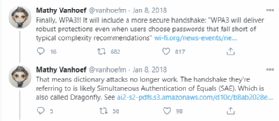
WPA3 addresses WPA2's KRACK vulnerability with a more secure cryptographic handshake, replacing the PSK four-way handshake with Simultaneous Authentication of Equals (SAE), a version of the Internet Engineering Task Force's dragonfly handshake in which either client or AP can initiate contact. Each device then transmits its authentication credentials in a discrete, one-off message, instead of in a give-and-take, multipart conversation. Importantly, SAE also eliminates the reuse of encryption keys, requiring a new code with every interaction. Without open-ended communication between AP and client or encryption key reuse, cybercriminals can't as easily eavesdrop or insert themselves into an exchange.
SAE limits users to active, on-site authentication attempts -- flagging anyone who has exceeded a certain number of password guesses. This capability should make the typical Wi-Fi network more resistant to offline dictionary attacks. By mandating a new encryption passphrase for each connection, SAE also enables a feature called forward secrecy, which aims to prevent attackers who have cracked a passcode from using it to decrypt data they previously captured and saved.
Alongside WPA3, Wi-Fi Alliance also introduced a new protocol called Wi-Fi Easy Connect, which simplifies the onboarding process for IoT devices that don't have visual configuration interfaces via a mechanism such as a QR code scan. Finally, an additional feature called Wi-Fi Enhanced Open makes connecting to public Wi-Fi networks safer by automatically encrypting information between each client and AP using a new unique key.
In practice, WPA3 is not impervious to threats. Vanhoef, the security expert who discovered KRACK, and Eyal Ronen, a researcher at Tel Aviv University, published several new security flaws in WPA3 in 2019. The so-called Dragonblood vulnerabilities included two downgrade attacks, in which an attacker forces a device to revert to WPA2, and two side-channel attacks, which enable offline dictionary attacks. Wi-Fi Alliance downplayed the risks, however, saying vendors could readily mitigate them via software upgrades. Regardless of its potential vulnerabilities, experts agree WPA3 is the most secure wireless protocol available today.
Editor's note: This article was updated in December 2022 by Jessica Scarpati to include general information about wireless security and wireless security risks and to improve the reader experience.