What is risk management and why is it important?
Risk management is the process of identifying, assessing and controlling threats to an organization's capital, earnings and operations. These risks stem from a variety of sources, including financial uncertainties, legal liabilities, technology issues, strategic management errors, accidents and natural disasters.
A successful risk management program helps an organization consider the full range of risks it faces. Risk management also examines the relationship between different types of business risks and the cascading impact they could have on an organization's strategic goals.
This holistic approach to managing risk is sometimes described as enterprise risk management because of its emphasis on anticipating and understanding risk across an organization. In addition to a focus on internal and external risk threats, enterprise risk management (ERM) emphasizes the importance of managing positive risk. Positive risks are opportunities that could increase business value or, conversely, damage an organization if not taken, as the companies disrupted by Amazon, Netflix and other born-digital powerhouses will attest.
Indeed, the aim of any risk management program is not to eliminate all risk but to preserve and add to overall enterprise value by making smart risk decisions.
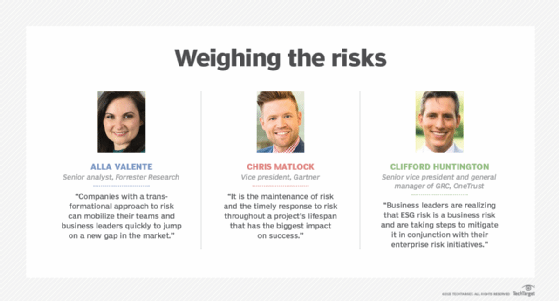
"We don't manage risks so we can have no risk. We manage risks so we know which risks are worth taking, which ones will get us to our goal, which ones have enough of a payout to even take them," said Forrester Research senior analyst Alla Valente, who specializes in governance, risk and compliance (GRC), third-party risk management, ERM and other risk-related topics.
Thus, a risk management program should be intertwined with organizational strategy. To link them, risk management leaders must first define the organization's risk appetite -- i.e., the amount of risk it is willing to accept to realize its objectives. Some risks will fit within the risk appetite and be accepted with no further action necessary. Others will be mitigated to reduce the potential negative effects, shared with or transferred to another party, or avoided altogether.
Every organization faces the risk of unexpected, harmful events that can cost it money -- or, in the worst case, cause it to close. This guide to risk management provides a comprehensive overview of the key concepts, requirements, tools, trends and debates driving this dynamic field. Throughout, hyperlinks connect to other TechTarget articles that deliver in-depth information on the topics covered here, so be sure to click on them to learn more.
Why is risk management important?
Risk management has perhaps never been more important than it is now. The risks that modern organizations face have grown more complex, fueled by the rapid pace of globalization. New risks are constantly emerging, often related to and generated by the now-pervasive use of digital technology. Climate change has been dubbed a "threat multiplier" by risk experts.
A recent external risk that initially manifested itself as a supply chain issue at many companies -- the COVID-19 pandemic -- quickly evolved into an existential threat, affecting the health and safety of employees, the means of doing business, the ability to interact with customers and corporate reputations.
Businesses made rapid adjustments to the threats posed by the pandemic. But, going forward, they are grappling with novel risks, including the ongoing issue of how or whether to bring employees back to the office, what can be done to make supply chains less vulnerable, inflation and the business and economic effects of the war in Ukraine.
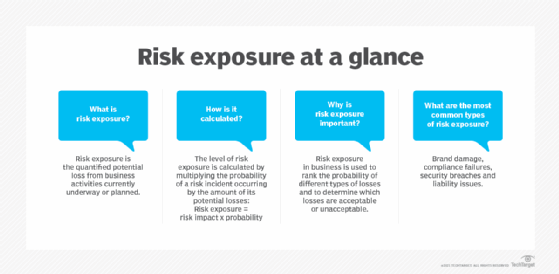
In many companies, business executives and the board of directors are taking a fresh look at their risk management programs. Organizations are reassessing their risk exposure, examining risk processes and reconsidering who should be involved in risk management. Companies that currently take a reactive approach to risk management -- guarding against past risks and changing practices after a new risk causes harm -- are considering the competitive advantages of a more proactive approach. There is heightened interest in supporting business sustainability, resiliency and agility. Companies are also exploring how AI technologies and sophisticated GRC platforms can improve risk management.
Financial vs. nonfinancial industries. In discussions of risk management, many experts note that managing risk is a formal function at companies that are heavily regulated and have a risk-based business model.
Banks and insurance companies, for example, have long had large risk departments typically headed by a chief risk officer (CRO), a title still relatively uncommon outside of the financial industry. Moreover, the risks that financial services companies face tend to be rooted in numbers and therefore can be quantified and effectively analyzed using known technology and mature methods. Risk scenarios in finance companies can be modeled with some precision.
For other industries, risk tends to be more qualitative and therefore harder to manage, increasing the need for a deliberate, thorough and consistent approach to risk management, said Gartner analyst Matt Shinkman, who leads the consulting firm's enterprise risk management and audit practices. "Enterprise risk management programs aim to help these companies be as smart as they can be about managing risk," he added.
Traditional risk management vs. enterprise risk management
Traditional risk management often gets a bad rap these days compared to enterprise risk management. Both approaches aim to mitigate risks that could harm organizations. Both buy insurance to protect against a range of risks -- from losses due to fire and theft to cyber liability. Both adhere to guidance provided by the major standards bodies. But traditional risk management, experts argue, lacks the mindset and mechanisms required to understand risk as an integral part of enterprise strategy and performance.
For many companies, "risk is a dirty four-letter word -- and that's unfortunate," said Forrester's Valente. "In ERM, risk is looked at as a strategic enabler versus the cost of doing business."
"Siloed" vs. holistic is one of the big distinctions between the two approaches, according to Shinkman. In traditional risk management programs, for example, risk has typically been the job of the business leaders in charge of the units where the risk resides. For example, the CIO or CTO is responsible for IT risk, the CFO is responsible for financial risk, the COO for operational risk and so on. Departments and business units might have sophisticated systems in place to manage their various types of risks, Shinkman explained, but the company can still run into trouble by failing to see the relationships among risks or their cumulative impact on operations. Traditional risk management also tends to be reactive rather than proactive.
"The pandemic is a great example of a risk issue that is very easy to ignore if you don't take a holistic, long-term strategic view of the kinds of risks that could hurt you as a company," Shinkman said. "A lot of companies will look back and say, 'You know, we should have known about this, or at least thought about the financial implications of something like this before it happened.'"
In enterprise risk management, managing risk is a collaborative, cross-functional and big-picture effort. An ERM team, which could be as small as five people, works with the business unit leaders and staff to debrief them, help them use the right tools to think through the risks, collate that information and present it to the organization's executive leadership and board. Having credibility with executives across the enterprise is a must for risk leaders of this ilk, Shinkman said.
These types of experts increasingly come from a consulting background or have a "consulting mindset," he said, and they possess a deep understanding of the mechanics of business. Unlike in traditional risk management, where the head of risk typically reports to the CFO, the heads of enterprise risk management teams -- whether they hold the chief risk officer title or some other title -- commonly report to the CEO, an acknowledgement that risk is part and parcel of business strategy.
In defining the chief risk officer role, Forrester makes a distinction between the "transactional CROs" typically found in traditional risk management programs and the "transformational CROs" who take an ERM approach. The former work at companies that see risk as a cost center and risk management as an insurance policy, according to Forrester. Transformational CROs, in the Forrester lexicon, are "customer-obsessed," Valente said. They focus on their company's brand reputation, understand the horizontal nature of risk and define ERM as the "proper amount of risk needed to grow," as Valente put it.
Risk averse is another trait of organizations with traditional risk management programs. But as Valente noted, companies that define themselves as risk averse with a low risk appetite are sometimes off the mark in their risk assessments.
"A lot of organizations think they have a low risk appetite, but do they have plans to grow? Are they launching new products? Is innovation important? All of these are growth strategies and not without risk," Valente said.
Risk management glossary
Many terms are used to define the various aspects and attributes of risk management. Click on the hyperlinks below to learn more about some useful terms to know.
Risk management process
The risk management discipline has published many bodies of knowledge that document ways for organizations to manage risk. One of the best-known resources is the ISO 31000 standard. Formally called ISO 31000:2018 Risk management -- Guidelines, it was developed by the International Organization for Standardization, a standards body commonly known as ISO.
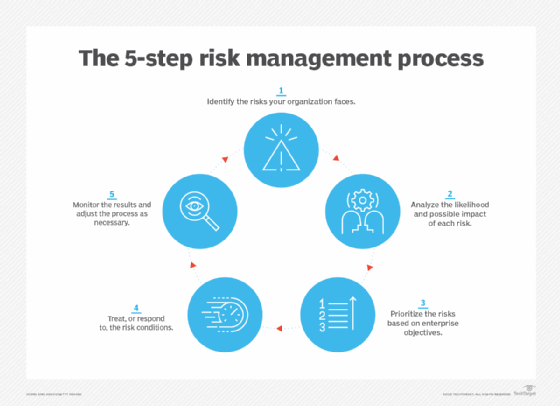
ISO 31000 outlines a risk management process that can be used by any type of entity and includes the following steps for identifying, assessing and managing risks:
- Identify the risks faced by your organization.
- Analyze the likelihood and possible impact of each one.
- Evaluate and prioritize the risks based on business objectives.
- Treat -- or respond to -- the risk conditions.
- Monitor the results of risk controls and adjust as necessary.
These steps are straightforward, but risk management committees should not underestimate the work required to complete the process. For starters, it requires a solid understanding of what makes the organization tick. To obtain that, the ISO 31000 process also includes an upfront step to establish the scope of risk management efforts, the business context for them and a set of risk criteria. The end goal is to know how each identified risk relates to the maximum risk the organization is willing to accept and what actions should be taken to preserve and enhance organizational value.
When identifying risks, it is important to understand that, by definition, something is only a risk if it has a business impact, according to risk expert Greg Witte, a senior security engineer for Huntington Ingalls Industries and an architect of frameworks developed by the National Institute of Standards and Technology (NIST) on cybersecurity, privacy and workforce risks, among others. For example, the following four factors must be present for a negative risk scenario, according to guidance from NISTIR 8286A, a report on identifying cybersecurity risk in ERM initiatives that NIST published in 2021:
- A valuable asset or resources that could be impacted.
- A source of a threatening action that would act against the asset or resources.
- A preexisting condition or vulnerability that enables the threat source to act.
- Some harmful impact that occurs from the threat source exploiting that vulnerability.
While the NIST criteria pertains to negative risks, similar processes can be applied to managing positive risks.
Top-down, bottom-up. In identifying risk scenarios that could impede or enhance an organization's objectives, many risk committees find it useful to take a top-down, bottom-up approach, Witte said. In the top-down exercise, leadership identifies the organization's mission-critical processes and works with internal and external stakeholders to determine the conditions that could impede them. The bottom-up perspective starts with the threat sources -- earthquakes, economic downturns, cyber attacks, etc. -- and considers their potential impact on critical assets.
The final task in the risk identification step is for organizations to record their findings in a risk register, which helps track the risks through the subsequent steps of the risk management process. An example of such a risk register can be found in the NISTIR 8286A report cited above.
Risk management standards and frameworks
As government and industry compliance rules have expanded over the past two decades, regulatory and board-level scrutiny of corporate risk management practices have also increased, making risk analysis, internal audits, risk assessments and other features of risk management a major component of business strategy. How can an organization put this all together?
The rigorously developed -- and evolving -- frameworks developed by the risk management field can help. Here is a sampling of them, starting with brief descriptions of the two most widely recognized frameworks, ISO 31000 and the COSO enterprise risk management framework offered by the Committee of Sponsoring Organizations of the Treadway Commission, better known as COSO:
- COSO ERM framework. Launched in 2004, the COSO framework was updated in 2017 to address the increasing complexity of ERM and highlight the importance of embedding risk considerations into business strategies and linking risk management and operational performance. It defines key concepts and principles of ERM, suggests a common ERM language and provides clear directions for managing risk. Developed by consulting firm PwC with input from COSO's five member organizations and external advisors, the updated framework is a set of 20 principles organized into five interrelated components:
- Governance and culture.
- Strategy and objective-setting.
- Performance.
- Review and revision.
- Information, communication and reporting.
- ISO 31000. Released in 2009 and revised in 2018, the ISO standard includes a list of ERM principles, a framework to help organizations apply risk management mechanisms to operations, and the process detailed above for identifying, evaluating and mitigating risks. Developed by ISO's risk management technical committee with input from ISO national member bodies, ISO 31000:2018 is a shorter and more concise document than its predecessor and includes more strategic guidance on ERM. The newer version also emphasizes the important role of senior management in risk programs and the integration of risk management practices throughout the organization.
- BS 31100. The current version of this British Standard risk management code of practice was issued in 2021 and provides a process for implementing concepts described in ISO 31000:2018 -- including functions such as identifying, assessing and responding to risks and then reporting on and reviewing risk management activities.
Other frameworks that focus specifically on IT and cybersecurity risks are also available. They include NIST's Risk Management Framework, which details a process for integrating security, data privacy and cybersecurity supply chain risk management initiatives into the system development lifecycle, and the ISACA professional association's COBIT 2019, an information and technology governance framework that supports IT risk management efforts.
Enterprises might also consider establishing customized frameworks for specific categories of risks. Carnegie Mellon University's enterprise risk management framework, for example, examines potential risks and opportunities based upon the following risk categories: reputation, life/health safety, financial, mission, operational and compliance/legal.
In addition, various risk maturity models can be used to benchmark risk management capabilities and assess their maturity levels. The most prominent one is the Risk and Insurance Management Society's Risk Maturity Model (RMM), which was developed in 2005 with software vendor LogicManager and updated in 2022. The revamped RMM helps risk professionals assess their programs in five categories: strategy alignment; culture and accountability; risk management capabilities; risk governance; and analytics. Other risk maturity models are available from the Risk Management Association, consulting firm Investors in Risk Management and the Organisation for Economic Co-operation and Development's Forum on Tax Administration.
The three lines model developed by the Institute of Internal Auditors (IIA) offers another type of standardized approach to support governance and risk management initiatives. Originally called the three lines of defense before being renamed in 2020, the IIA's model outlines the different roles that business executives, risk and compliance managers and internal auditors should play in risk management efforts, with a governing body providing oversight and accountability.
What are the benefits and challenges of risk management?
Effectively managing risks that could have a negative or positive impact on capital, earnings and operations brings many benefits. It also presents challenges, even for companies with mature GRC and risk management strategies.
Benefits of effective risk management include the following:
- Increased awareness of risk across the organization.
- More confidence in organizational objectives and goals because risk is factored into strategy.
- Better and more efficient compliance with regulatory and internal compliance mandates because compliance is coordinated.
- Improved operational efficiency through more consistent application of risk processes and controls.
- Improved workplace safety and security for employees and customers.
- A competitive differentiator in the marketplace.
The following are some of the challenges risk management teams should expect to encounter:
- Expenditures go up initially, as risk management programs can require expensive software and services.
- The increased emphasis on governance also requires business units to invest time and money to comply.
- Reaching consensus on the severity of risk and how to treat it can be a difficult and contentious exercise and sometimes lead to risk analysis paralysis.
- Demonstrating the value of risk management to executives without being able to give them hard numbers is difficult.
How to build and implement a risk management plan
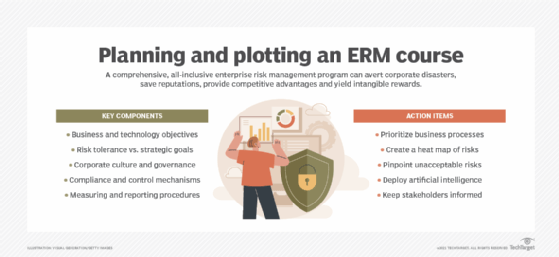
A risk management plan describes how an organization will manage risk. It lays out elements such as the organization's risk approach, the roles and responsibilities of risk management teams, resources that will be used in the risk management process and internal policies and procedures.
ISO 31000's overall seven-step process is a useful guide to follow for developing a plan and then implementing an ERM framework, according to Witte. Here is a more detailed rundown of its components:
- Communication and consultation. Since raising risk awareness is an essential part of risk management, risk leaders must also develop a communication plan to convey the organization's risk policies and procedures to employees and relevant parties. This step sets the tone for risk decisions at every level. The audience includes anyone who has an interest in how the organization takes advantage of positive risks and minimizes negative ones.
- Establishing the scope and context. This step requires defining both the organization's risk appetite and risk tolerance -- the latter is how much the risks associated with specific initiatives can vary from the overall risk appetite. Factors to consider here include business objectives, company culture, regulatory requirements and the political environment, among others.
- Risk identification. This step defines the risk scenarios that could have a positive or negative impact on the organization's ability to conduct business. As noted above, the resulting list should be recorded in a risk register and kept up to date.
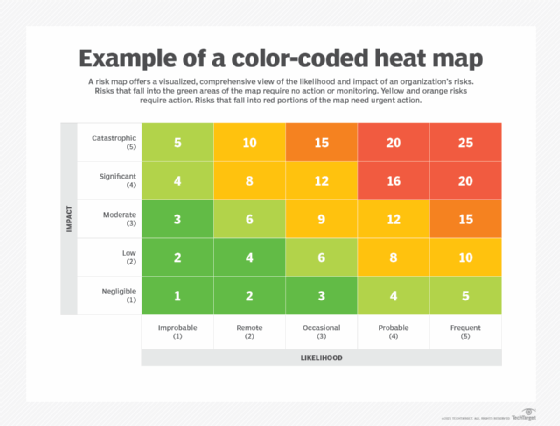
- Risk analysis. The likelihood and impact of each risk is analyzed to help sort risks. Making a risk heat map can be useful here; also known as a risk assessment matrix, it provides a visual representation of the nature and impact of a company's risks. An employee calling in sick, for example, is a high-probability event that has little or no impact on most companies. An earthquake, depending on location, is an example of a low-probability risk event with high impact. The qualitative approach many organizations use to rate the likelihood and impact of risks might benefit from a more quantitative analysis. The FAIR Institute, a professional association that promotes the Factor Analysis of Information Risk framework for cyber-risk quantification, has examples of the latter approach.
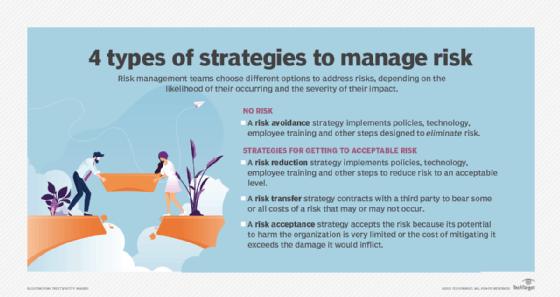
- Risk evaluation. Here is where organizations assess risks and decide how to respond to them through the following approaches:
- Risk avoidance, when the organization seeks to eliminate, withdraw from or not be involved in the potential risk.
- Risk mitigation, in which the organization takes actions to limit or optimize a risk.
- Risk sharing or transfer, which involves contracting with a third party (e.g., an insurer) to bear some or all costs of a risk that might or might not occur.
- Risk acceptance, when a risk falls within the organization's risk appetite and tolerance and is accepted without taking any risk reduction measures.
- Risk treatment. This step involves applying the agreed-upon controls and processes and confirming they work as planned.
- Monitoring and review. Are the controls working as intended? Can they be improved? Monitoring activities should measure performance and look for key risk indicators that might trigger a change in strategy.
Risk management best practices
A good starting point for any organization that aspires to follow risk management best practices is ISO 31000's nine principles of risk management. According to ISO, a risk management program should meet the following objectives:
- Create and protect value for the organization, as an overarching principle.
- Be integrated into overall organizational processes.
- Be systematic, structured and comprehensive.
- Be based on the best available information.
- Be tailored to individual projects.
- Account for human and cultural factors, including potential errors.
- Be transparent and all-inclusive.
- Be dynamic and adaptable to change.
- Be continuously monitored and improved upon.
Another best practice for the modern enterprise risk management program is to "digitally reform," said security consultant Dave Shackleford. This entails using AI and other advanced technologies to automate inefficient and ineffective manual processes. ERM and GRC platforms that include AI tools and other features are available from various risk management software vendors. Organizations can also take advantage of open source GRC tools and related resources.
Risk management for career professionals
The following articles provide resources for risk management professionals:
What is a risk management specialist?
Risk management limitations and examples of failures
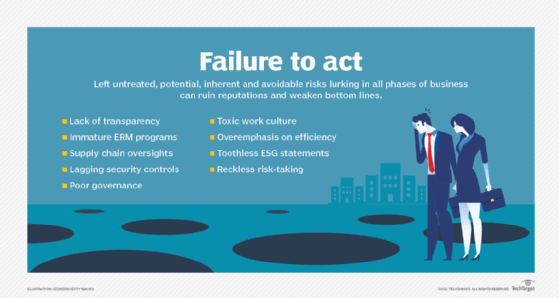
Risk management failures are often chalked up to willful misconduct, gross recklessness or a series of unfortunate events no one could have predicted. But an examination of common risk management failures shows that risk management gone wrong is more often due to avoidable missteps -- and run-of-the-mill profit-chasing. Here is a rundown of some mistakes to avoid.
Poor governance. The tangled tale of Citibank accidentally paying off a $900 million loan, using its own money, to Revlon's lenders in 2020 when only a small interest payment was due shows how even the largest bank in the world can mess up risk management -- despite having updated policies for pandemic work conditions and multiple controls in place. While human error and clunky software were involved, a federal judge ruled that poor governance was the root cause, although an appeals court overturned an order that the bank wasn't entitled to refunds from the lenders. Nonetheless, two months after the erroneous payment, Citibank was fined $400 million by U.S. regulators for "longstanding" governance failures and agreed to overhaul its internal risk management, data governance and compliance controls.
Overemphasis on efficiency vs. resiliency. Greater efficiency can lead to bigger profits when all goes well. Doing things quicker, faster and cheaper by doing them the same way every time, however, can result in a lack of resiliency, as companies found out during the pandemic when supply chains broke down. "When we look at the nature of the world … things change all the time," said Forrester's Valente. "So, we have to understand that efficiency is great, but we also have to plan for all of the what-ifs."
Lack of transparency. The scandal involving the New York governor's office underreporting coronavirus-related deaths at nursing homes in the state during 2020 and 2021 is representative of a common failing in risk management. Hiding data, a lack of data and siloed data -- whether due to acts of commission or omission -- can cause transparency issues. Avoiding that requires an enterprise-wide risk management strategy with common risk terminology, documented processes and centralized collection and management of key risk data.
Limitations of risk analysis techniques. Many risk analysis techniques, such as creating a risk prediction model or a risk simulation, require gathering large amounts of data. Extensive data collection can be expensive and is not guaranteed to be reliable. Furthermore, the use of data in decision-making processes can have poor outcomes if simple indicators are used to reflect complex risk situations. In addition, applying a decision intended for one small aspect of a project to the whole project can lead to inaccurate results.
Lack of risk analysis expertise. Software programs developed to simulate events that might negatively impact a company can be cost-effective, but they also require highly trained personnel to accurately understand the generated results.
Illusion of control. Risk models can give organizations the false belief that they can quantify and regulate every potential risk. This could cause an organization to neglect the possibility of novel or unexpected risks.
Risk management trends: What's on the horizon?
The spotlight that was shined on risk management during the COVID-19 pandemic has driven many companies to not only reexamine their risk practices but also to explore new techniques, technologies and processes for managing risk. As a look at the trends that are reshaping risk management shows, the field is brimming with ideas.
More organizations are adopting a risk maturity model to evaluate their risk processes and better manage the interconnectedness of threats across the enterprise. They are looking anew at GRC platforms to integrate their risk management activities, manage policies, conduct risk assessments, identify gaps in regulatory compliance and automate internal audits, among other tasks. Newer GRC features that risk management experts said should be considered include the following:
- Analytics for geopolitical risks, natural disasters and other events.
- Social media monitoring to track changes in brand reputation.
- Security systems to assess the potential impact of data breaches and cyber attacks.
- Third-party risk assessment tools to help strengthen supply chain risk management.
In addition to using risk management to avoid bad situations, more companies are looking to formalize how to manage positive risks to add business value.
They are also taking a fresh look at risk appetite statements. Traditionally used as a means to communicate with employees, investors and regulators, risk appetite statements are starting to be used more dynamically, replacing "check the box" compliance exercises with a more nuanced approach to risk scenarios. The caveat? A poorly worded risk appetite statement could hem in a company or be misinterpreted by regulators as condoning unacceptable risks.
More organizations are connecting their risk management initiatives and environmental, social and governance (ESG) programs, too. That's making sustainability risk management and efforts to address other kinds of ESG risks a higher priority for companies looking to make their operations more sustainable and ensure that they're acting in responsible and ethical ways.
Finally, while it's tough to make predictions -- especially about the future, as the adage goes -- tools for measuring and mitigating risks are getting better. Among the improvements? Internal and external sensing tools that detect trending and emerging risks.