keylogger (keystroke logger or system monitor)
What is a keylogger (keystroke logger or system monitor)?
A keylogger, sometimes called a keystroke logger, is a type of surveillance technology used to monitor and record each keystroke on a specific device, such as a computer or smartphone. It can be either hardware- or software-based. The latter type is also known as system monitoring software or keyboard capture software.
Why are keyloggers used?
Keyloggers are often used as a spyware tool by cybercriminals to steal personally identifiable information, login credentials and sensitive enterprise data.
That said, some uses of keyloggers could be considered ethical or appropriate in varying degrees. For instance, keyloggers can also be used for the following reasons:
- By employers to observe employees' computer activities.
- By parents to supervise their children's internet usage.
- By device owners to track possible unauthorized activity on their devices.
- By law enforcement agencies to analyze incidents involving computer use.
Types of keyloggers
Two main types of keyloggers are available.
Hardware-based keyloggers
A hardware-based keylogger is a small device that serves as a connector between the keyboard and the computer. The device is designed to resemble an ordinary keyboard PS/2 connector, part of the computer cabling or a USB adapter, making it relatively easy for someone who wants to monitor a user's behavior to hide the device.
Software-based keyloggers
A keylogging software program does not require physical access to the user's computer for installation. It can be purposefully downloaded by someone who wants to monitor activity on a particular computer, or it can be malware downloaded unwittingly by the user of the keyboard and its device, and then executed as part of a rootkit or remote administration Trojan. Either way, keylogging software allows an unauthorized threat actor to view the user's keystrokes, and then use this knowledge to access and compromise the device.
There are two main types of software keyloggers:
- User mode keyloggers use a Windows application programming interface (API) to intercept keyboard and mouse movements. GetAsyncKeyState or GetKeyState API functions might also be captured. These keyloggers require the attacker to actively monitor each key press.
- Kernel mode keyloggers are a more powerful and complex software keylogging method. They work with higher privileges and can be harder to locate in a system. In addition, they can modify the internal Windows system through the kernel.
Some keylogging software can use keyboard APIs to run another application, malicious script injection or memory injection.
How do keyloggers work?
A hardware keylogger might come in the form of a module installed inside the keyboard itself. When the user types on the keyboard, the keylogger collects each keystroke and saves it as text stored on its own hard drive, which can have a memory capacity up to several gigabytes. The person who installed the keylogger must physically remove the device to access the gathered information. There are also wireless keylogger sniffers that can intercept and decrypt data packets transferred between a wireless keyboard and its receiver.
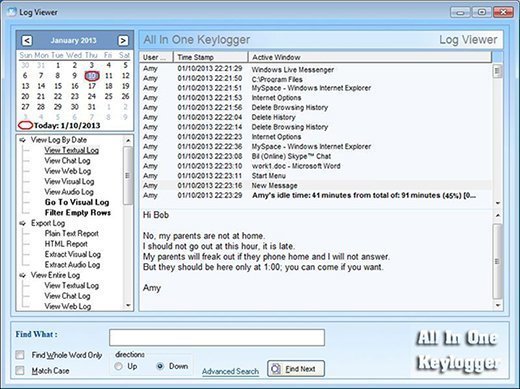
A common software keylogger consists of two files that get installed in the same directory: a dynamic link library file that does the recording, and an executable file that installs the DLL file and triggers it. The keylogger program records each keystroke the user types and periodically uploads the information over the internet, where the hacker can then access it.
Some keylogging programs can also include functionality to record user data besides keystrokes, such as capturing anything that has been copied to the clipboard and taking screenshots of the user's screen or a single application.
How to detect a keylogger
An anti-keylogger is a program designed specifically to scan for software-based keyloggers. These programs work by comparing the files on a computer against a keylogger signature base or a checklist of common keylogger attributes. Using security software such as an anti-keylogger can be more effective than an antivirus or antispyware program. The latter could incorrectly identify a keylogger as a legitimate program instead of spyware.
That said, an antispyware application might be able to locate and disable keylogger software with lower privileges than it has. Using a network monitor will ensure the user is notified each time an application tries to make a network connection, giving a security team the opportunity to stop any possible keylogger activity.
Checking the system's Task Manager can also help with the detection of a keylogger. However, since keyloggers can manipulate an operating system kernel, examining the Task Manager isn't necessarily enough to detect a keylogger, so it's better to use an anti-keylogger.
Protection against keyloggers
While visual inspection can identify hardware keyloggers, it is impractical and time-consuming to implement on a large scale. Instead, using a firewall can provide better protection by discovering and preventing the transfer of keystroke information from the victim's keyboard to the attacker.
Password managers that automatically fill in username and password fields can help protect against keyloggers. Monitoring software and antivirus software can also keep track of a system's health and help prevent keyloggers.
Extra precautions include using a security token as part of two-factor authentication to ensure an attacker cannot use a stolen password alone to log in to a user's account, or using an onscreen keyboard and voice-to-text software to circumvent using a physical keyboard. Application allowlisting can also be used to allow only documented, authorized programs to run on a system.
Learn more about keyloggers and other top spyware threats.