Transport Layer Security (TLS)
What is Transport Layer Security?
Transport Layer Security (TLS) is an Internet Engineering Task Force (IETF) standard protocol that provides authentication, privacy and data integrity between two communicating computer applications. It's the most widely deployed security protocol in use today and is best suited for web browsers and other applications that require data to be securely exchanged over a network. This includes web browsing sessions, file transfers, virtual private network (VPN) connections, remote desktop sessions and voice over IP (VoIP). More recently, TLS is being integrated into modern cellular transport technologies, including 5G, to protect core network functions throughout the radio access network (RAN).
How does Transport Layer Security work?
TLS uses a client-server handshake mechanism to establish an encrypted and secure connection and to ensure the authenticity of the communication. Here's a breakdown of the process:
- Communicating devices exchange encryption capabilities.
- An authentication process occurs using digital certificates to help prove the server is the entity it claims to be.
- A session key exchange occurs. During this process, clients and servers must agree on a key to establish the fact that the secure session is indeed between the client and server -- and not something in the middle attempting to hijack the conversation.
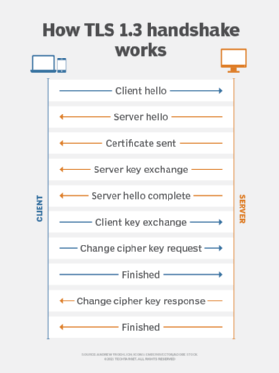
TLS uses a public key exchange process to establish a shared secret between the communicating devices. The two handshake methods are the Rivest-Shamir-Adleman (RSA) handshake and the Diffie-Hellman handshake. Both methods result in the same goal of establishing a shared secret between communicating devices so the communication can't be hijacked. Once the keys are exchanged, data transmissions between devices on the encrypted session can begin.
History and development of TLS
TLS evolved from Netscape Communications Corp.'s Secure Sockets Layer protocol and has largely superseded it, although the terms SSL or SSL/TLS are still sometimes used interchangeably. IEFT officially took over the SSL protocol to standardize it with an open process and released version 3.1 of SSL in 1999 as TLS 1.0. The protocol was renamed TLS to avoid legal issues with Netscape, which developed the SSL protocol as a key part of its original web browser. According to the protocol specification, TLS is composed of two layers: the TLS record protocol and the TLS handshake protocol. The record protocol provides connection security, while the handshake protocol enables the server and client to authenticate each other and to negotiate encryption algorithms and cryptographic keys before any data is exchanged.
The most recent version of TLS, 1.3, was officially finalized by IETF in 2018. The primary benefit over previous versions of the protocol is added encryption mechanisms when establishing a connection handshake between a client and server. While earlier TLS versions offer encryption as well, TLS manages to establish an encrypted session earlier in the handshake process. Additionally, the number of steps required to complete a handshake is reduced, substantially lowering the amount of time it takes to complete a handshake and begin transmitting or receiving data between the client and server.
Another enhancement of TLS 1.3 is that several cryptographic algorithms used to encrypt data were removed, as they were deemed obsolete and weren't recommended for secure transport. Additionally, some security features that were once optional are now required. For example, message-digest algorithm 5 (MD5) cryptographic hashes are no longer supported, perfect forward secrecy (PFS) is required and Rivest Cipher 4 (RC4) negotiation is prohibited. This eliminates the chance that a TLS-encrypted session uses a known insecure encryption algorithm or method in TLS version 1.3.
The benefits of Transport Layer Security
The benefits of TLS are straightforward when discussing using versus not using TLS. As noted above, a TLS-encrypted session provides a secure authentication mechanism, data encryption and data integrity checks. However, when comparing TLS to another secure authentication and encryption protocol suite, such as Internet Protocol Security, TLS offers added benefits and is a reason why IPsec is being replaced with TLS in many enterprise deployment situations. These include benefits such as the following:
- Security is built directly into each application, as opposed to external software or hardware to build IPsec tunnels.
- There is true end-to-end encryption (E2EE) between communicating devices.
- There is granular control over what can be transmitted or received on an encrypted session.
- Since TLS operates within the upper layers of the Open Systems Interconnection (OSI) model, it doesn't have the network address translation (NAT) complications that are inherent with IPsec.
- TLS offers logging and auditing functions that are built directly into the protocol.
The challenges of TLS
There are a few drawbacks when it comes to either not using secure authentication or any encryption -- or when deciding between TLS and other security protocols, such as IPsec. Here are a few examples:
- Because TLS operates at Layers 4 through 7 of the OSI model, as opposed to Layer 3, which is the case with IPsec, each application and each communication flow between client and server must establish its own TLS session to gain authentication and data encryption benefits.
- The ability to use TLS depends on whether each application supports it.
- Since TLS is implemented on an application-by-application basis to achieve improved granularity and control over encrypted sessions, it comes at the cost of increased management overhead.
- Now that TLS is gaining in popularity, threat actors are more focused on discovering and exploiting potential TLS exploits that can be used to compromise data security and integrity.
Differences between TLS and SSL
As mentioned previously, SSL is the precursor to TLS. Thus, most of the differences between the two are evolutionary in nature, as the protocol adjusts to address vulnerabilities and to improve implementation and integration capabilities.
Key differences between SSL and TLS that make TLS a more secure and efficient protocol are message authentication, key material generation and the supported cipher suites, with TLS supporting newer and more secure algorithms. TLS and SSL are not interoperable, though TLS currently provides some backward compatibility in order to work with legacy systems. Additionally, TLS -- especially later versions -- completes the handshake process much faster compared to SSL. Thus, lower communication latency from an end-user perspective is noticeable.
Attacks against TLS/SSL
Implementation flaws have always been a big problem with encryption technologies, and TLS is no exception. Even though TLS/SSL communications are considered highly secure, there have been instances where vulnerabilities were discovered and exploited. But keep in mind that the examples mentioned below were vulnerabilities in TLS version 1.2 and earlier. All known vulnerabilities against prior versions of TLS, such as Browser Exploit Against SSL/TLS (BEAST), Compression Ratio Info-leak Made Easy (CRIME) and protocol downgrade attacks, have been eliminated through TLS version updates. Examples of significant attacks or incidents include the following:
- The infamous Heartbleed bug was the result of a surprisingly small bug vulnerability discovered in a piece of cryptographic logic that relates to OpenSSL'simplementation of the TLS heartbeat mechanism, which is designed to keep connections alive even when no data is being transmitted.
- Although TLS isn't vulnerable to the POODLE attack because it specifies that all padding bytes must have the same value and be verified, a variant of the attack has exploited certain implementations of the TLS protocol that don't correctly validate encryption padding byte requirements.
- The BEAST attack was discovered in 2011 and affected version 1.0 of TLS. The attack focused on a vulnerability discovered in the protocol's cipher block chaining (CBC) mechanism. This enabled an attacker to capture and decrypt data being sent and received across the "secure" communications channel.
- An optional data compression feature found within TLS led to the vulnerability known as CRIME. This vulnerability can decrypt communication session cookies using brute-force methods. Once compromised, attackers can insert themselves into the encrypted conversation.
- The Browser Reconnaissance and Exfiltration via Adaptive Compression of Hypertext (BREACH) vulnerability also uses compression as its exploit target, like CRIME. However, the difference between BREACH and CRIME is the fact that BREACH compromises Hypertext Transfer Protocol (HTTP) compression, as opposed to TLS compression. But, even if TLS compression isn't enabled, BREACH can still compromise the session.