DMZ in networking

What is a DMZ in networking?
In computer networks, a DMZ, or demilitarized zone, is a physical or logical subnet that separates a local area network (LAN) from other untrusted networks -- usually, the public internet. DMZs are also known as perimeter networks or screened subnetworks.
Any service provided to users on the public internet should be placed in the DMZ network. External-facing servers, resources and services are usually located there. Some of the most common of these services include web, email, domain name system, File Transfer Protocol and proxy servers.
Servers and resources in the DMZ are accessible from the internet, but the rest of the internal LAN remains unreachable. This approach provides an additional layer of security to the LAN as it restricts a hacker's ability to directly access internal servers and data from the internet.
Hackers and cybercriminals can reach the systems running services on DMZ servers. Those servers must be hardened to withstand constant attack. The term DMZ comes from the geographic buffer zone that was set up between North Korea and South Korea at the end of the Korean War.
Why are DMZs important?
DMZs provide a level of network segmentation that helps protect internal corporate networks. These subnetworks restrict remote access to internal servers and resources, making it difficult for attackers to access the internal network. This strategy is useful for both individual use and large organizations.
Businesses place applications and servers that are exposed to the internet in a DMZ, separating them from the internal network. The DMZ isolates these resources so, if they are compromised, the attack is unlikely to cause exposure, damage or loss.
How does a DMZ work?
DMZs function as a buffer zone between the public internet and the private network. The DMZ subnet is deployed between two firewalls. All inbound network packets are then screened using a firewall or other security appliance before they arrive at the servers hosted in the DMZ.
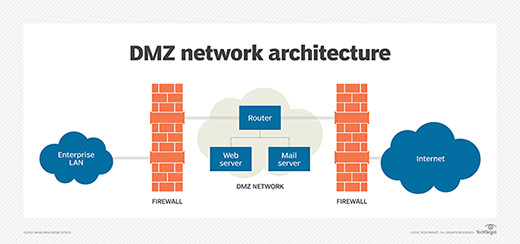
If better-prepared threat actors pass through the first firewall, they must then gain unauthorized access to the services in the DMZ before they can do any damage. Those systems are likely to be hardened against such attacks.
Finally, assuming well-resourced threat actors take over a system hosted in the DMZ, they must still break through the internal firewall before they can reach sensitive enterprise resources. Determined attackers can breach even the most secure DMZ architecture. However, a DMZ under attack will set off alarms, giving security professionals enough warning to avert a full breach of their organization.
What are the benefits of using a DMZ?
The primary benefit of a DMZ is that it offers users from the public internet access to certain secure services, while maintaining a buffer between those users and the private internal network. There are several security benefits from this buffer, including the following:
- Access control. A DMZ network provides access control to services outside an organization's network perimeters that are accessed from the internet. It simultaneously introduces a level of network segmentation that increases the number of obstacles a user must bypass before gaining access to an organization's private network. In some cases, a DMZ includes a proxy server, which centralizes the flow of internal -- usually, employee -- internet traffic and makes recording and monitoring that traffic simpler.
- Network reconnaissance prevention. A DMZ also prevents an attacker from being able to scope out potential targets within the network. Even if a system within the DMZ is compromised, the internal firewall still protects the private network, separating it from the DMZ. This setup makes external active reconnaissance more difficult. Although the servers in the DMZ are publicly exposed, they are backed by another layer of protection. The public face of the DMZ keeps attackers from seeing the contents of the internal private network. If attackers do manage to compromise the servers within the DMZ, they are still isolated from the private network by the DMZ's internal barrier.
- Protection against Internet Protocol (IP) spoofing. In some cases, attackers attempt to bypass access control restrictions by spoofing an authorized IP address to impersonate another device on the network. A DMZ can stall potential IP spoofers, while another service on the network verifies the IP address's legitimacy by testing whether it is reachable.
What DMZs are used for
DMZ networks have been an important part of enterprise network security for almost as long as firewalls have been in use. They are deployed for similar reasons: to protect sensitive organizational systems and resources. DMZ networks are often used for the following:
- isolate and keep potential target systems separate from internal networks;
- reduce and control access to those systems by external users; and
- host corporate resources to make some of them available to authorized external users.
More recently, enterprises have opted to use virtual machines or containers to isolate parts of the network or specific applications from the rest of the corporate environment. Cloud technologies have largely removed the need for many organizations to have in-house web servers. Many of the external facing infrastructure once located in the enterprise DMZ has migrated to the cloud, such as software-as-a service apps.
Architecture and design of DMZ networks
There are various ways to design a network with a DMZ. The two basic methods are to use either one or two firewalls, though most modern DMZs are designed with two firewalls. This approach can be expanded to create more complex architectures.
A single firewall with at least three network interfaces can be used to create a network architecture containing a DMZ. The external network is formed by connecting the public internet -- via an internet service provider connection -- to the firewall on the first network interface. The internal network is formed from the second network interface, and the DMZ network itself is connected to the third network interface.
Different sets of firewall rules for monitoring traffic between the internet and the DMZ, the LAN and the DMZ, and the LAN and the internet tightly control which ports and types of traffic are allowed into the DMZ from the internet, limit connectivity to specific hosts in the internal network and prevent unrequested connections either to the internet or the internal LAN from the DMZ.
The more secure approach to creating a DMZ network is a dual-firewall configuration, in which two firewalls are deployed with the DMZ network positioned between them. The first firewall -- also called the perimeter firewall -- is configured to allow only external traffic destined for the DMZ. The second, or internal, firewall only allows traffic from the DMZ to the internal network.
The dual-firewall approach is considered more secure because two devices must be compromised before an attacker can access the internal LAN. Security controls can be tuned specifically for each network segment. For example, a network intrusion detection and intrusion prevention system located in a DMZ could be configured to block all traffic except Hypertext Transfer Protocol Secure requests to Transmission Control Protocol port 443.
Examples of DMZs
Some of the various ways DMZs are used include the following:
- Cloud services. Some cloud services, such as Microsoft Azure, use a hybrid security approach in which a DMZ is implemented between an organization's on-premises network and the virtual network. This method is typically used in situations where the organization's applications run partly on premises and partly on the virtual network. It's also used where outgoing traffic must be audited or where granular traffic control is required in between the virtual network and the on-premises data center.
- Home networks. A DMZ can also be useful in a home network in which computers and other devices are connected to the internet using a broadband router and configured into a LAN. Some home routers include a DMZ host feature. This can be contrasted with the DMZ subnetwork used in organizations with many more devices than would be found in a home. The DMZ host feature designates one device on the home network to function outside of the firewall, where it acts as the DMZ while the rest of the home network lies inside the firewall. In some cases, a gaming console is chosen to be the DMZ host so that the firewall doesn't interfere with gaming. Also, the console is a good candidate for a DMZ host because it likely holds less sensitive information than a personal computer.
- Industrial control systems (ICS). DMZs provide a potential solution to the security risks of ICSes. Industrial equipment, such as turbine engines, or ICSes are being merged with information technology (IT), which makes production environments smarter and more efficient, but it also creates a larger threat surface. Much of the industrial or operational technology (OT) equipment connecting to the internet is not designed to handle attacks in the same way IT devices are. A DMZ can provide increased network segmentation that can make it harder for ransomware or other network threats to bridge the gap between IT systems and their more vulnerable OT counterparts.
The takeaway
A DMZ is a fundamental part of network security. These subnetworks create a layered security structure that lessens the chance of an attack and the severity if one happens. They are used to isolate a company's outward-facing applications from the corporate network. If a system or application faces the public internet, it should be put in a DMZ.
Learn how a honeypot can be placed in the DMZ to attract malicious traffic, keep it away from the internal network and let IT study its behavior.