Hoping for a passwordless future? Multifactor authentication using biometrics may be the answer. Consider the pros, cons and implications of biometric authentication before deploying.
As organizations and consumers around the world face an increasing number of cybersecurity risks, the search is on for more resilient security methods than traditional passwords. Recent studies have found stolen login credentials are the leading cause of data breaches. Around the globe, millions have suffered hacks and identity theft due to poor password hygiene, and most users have encountered a growing number of steps to log in to their digital services: Enter the code sent via text; answer a security question; take these steps before you can access this service.
These multiple factors are part of a broader trend to displace passwords with multifactor authentication (MFA). MFA requires users to present two or more pieces of evidence to an authentication mechanism. Evidence may include something they know, something they have, somewhere they are or something they are. Using multiple factors to authenticate can greatly reduce the risk of a hack.
Now, due to recent advancements in computing, increased quantities of data and decreased costs of hardware, a new authentication factor is going mainstream: biometrics.
The rise of biometric MFA
Facial, fingerprint, iris, voice and countless other forms of biometrics are seeing widespread adoption and growth rates. Mobile giants have sold billions of smartphones with at least one form of biometric authentication baked in since 2012. Now, investment is spreading across sectors. Financial services, automotive, healthcare and education sectors are configuring biometric-based MFA to redefine access controls and safeguard assets.
Before rushing to deployment, however, security professionals must consider the pros and cons of biometric MFA and its broader effects.
Pros and cons of biometric authentication
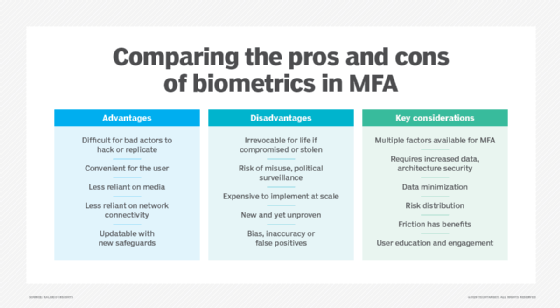
The good news is that biometrics are extremely difficult to hack. This is because the variations are so unique or subtle that they require sophisticated tools, computation and distinctive data to replicate. For example, the voice has well over 100 parameters unique to each individual. Likewise, fingerprints would require some sort of physical interaction to replicate.
Before rushing to deployment, security professionals across industries must consider the pros and cons of biometric MFA and the broader impacts.
But the ironclad strength of biometric uniqueness has a chink in its armor: If bad actors compromise this data, it is impossible to recover or replace. Individuals cannot swap out their fingerprints or DNA like they can a password or credit card number.
Biometrics have significantly less friction than passwords and other traditional factors, such as PINs, keys or security questions. Instead of fumbling across media and devices -- or scrambling to remember answers to obscure questions -- biometric-based authentication simply requires presenting the biometric for scan. But with convenience comes additional risks. How could data, particularly sensitive biometric data, be used for purposes beyond access controls? How might multiple databases be combined for dragnets, for lucrative sale on the dark web or for other unintended consequences? What is the role of mass biometric-based authentication in societal surveillance?
A third dynamic is the novelty of this technology at scale. Consider how biometric authentication has been around for decades in governmental and industrial security environments. These configurations ran on premises, often with physical tokens, and supported a small number of users. By contrast, AI-powered biometric authentication -- such as voice recognition in financial services or facial recognition in airports -- is designed to run at mass scale with diverse configurations, sometimes involving cloud service providers. Whether the objective is convenience or scale, the risk of inaccurate recognition remains. Denial of entry due to erroneous scanning, data inaccuracy and compromise of the biometric -- a cut finger, for instance -- are several untested variables to running biometric authentication at scale.
What to consider when implementing biometric-based MFA
Based on these dynamics, here are some of the subsequent considerations for security professionals to keep in mind when implementing biometric authentication in MFA programs:
Many factors are available for MFA. MFA includes a growing range of factors, including biometrics, PINs and encrypted tokens. When evaluating biometrics, understand criteria for the specific use case, existing security feasibility and potential financial implications.
Biometrics require increased data and architecture security. In an age of corporate data breaches, companies must treat biometric data with heightened caution, which requires additional resources.
Data minimization is strategic. Security must lead cross-functional discussions and designs around limiting the collection and retention of data to that which is only relevant and necessary for a specific purpose.
Distribute the risk. Avoid centralized honeypots of sensitive biometric data. Prioritize distributed processing with minimal functionality over centralized processing with multiple functions.
Friction has benefits. Increased safeguards often require more steps in UX, but avoiding friction at all costs can put users at greater risk.
Educate and engage users. Lean into the opportunity to educate, involve and listen to users during deployment. Use this collaboration to forge trust and improve UX.
Although the technology remains in relative infancy in terms of commercial application, biometric authentication modalities introduce employees and consumers to a fundamentally new interface. As sensor and software technologies continue to evolve into mainstream infrastructure, employees' physical selves may become key agents in digital services and transactions.