network security
What is network security?
Network security encompasses all the steps taken to protect the integrity of a computer network and the data within it. Network security is important because it keeps sensitive data safe from cyber attacks and ensures the network is usable and trustworthy. Successful network security strategies employ multiple security solutions to protect users and organizations from malware and cyber attacks, like distributed denial of service.
A network is composed of interconnected devices, such as computers, servers and wireless networks. Many of these devices are susceptible to potential attackers. Network security involves the use of a variety of software and hardware tools on a network or as software as a service. Security becomes more important as networks grow more complex and enterprises rely more on their networks and data to conduct business. Security methods must evolve as threat actors create new attack methods on these increasingly complex networks.
No matter the specific method or enterprise security strategy, security is usually framed as everyone's responsibility because every user on the network represents a possible vulnerability in that network.
Why is network security important?
Network security is critical because it prevents cybercriminals from gaining access to valuable data and sensitive information. When hackers get hold of such data, they can cause a variety of problems, including identity theft, stolen assets and reputational harm.
The following are four of the most important reasons why protecting networks and the data they hold is important:
- Operational risks. An organization without adequate network security risks disruption of its operations. Businesses and personal networks depend on devices and software that cannot operate effectively when compromised by viruses, malware and cyber attacks. Business also rely on networks for most internal and external communication.
- Financial risks for compromised personally identifiable information (PII). Data breaches can be expensive for both individuals and businesses. Organizations that handle PII, such as Social Security numbers and passwords, are required to keep it safe. Exposure can cost the victims money in fines, restitution and repairing compromised devices. Data breaches and exposure also can ruin a company's reputation and expose it to lawsuits. IBM's "Cost of a Data Breach 2022 Report," which was conducted by Ponemon Institute, reported the average cost of a data breach rose to $4.35 million in 2022 from $4.24 million in 2021.
- Financial risk for compromised intellectual property. Organizations can also have their own intellectual property stolen, which is costly. The loss of a company's ideas, inventions and products can lead to loss of business and competitive advantages.
- Regulatory issues. Many governments require businesses to comply with data security regulations that cover aspects of network security. For example, medical organizations in the United States are required to comply with the regulations of the Health Insurance Portability and Accountability Act (HIPAA), and organizations in the European Union that deal with citizens' data must follow the General Data Protection Regulation (GDPR). Violations of these regulations can lead to fines, bans and possible jail time.
Network security is so important that several organizations focus on instituting and sharing strategies on how to adapt to modern threats. Mitre ATT&CK, the National Institute of Standards and Technology and the Center for Internet Security provide free, nonproprietary security frameworks and knowledge bases to share cyber threat information and help businesses and other organizations evaluate their network security methods.
How does network security work?
Network security is enforced using a combination of hardware and software tools. The primary goal of network security is to prevent unauthorized access into or between parts of a network.
A security official or team determines strategies and policies that keep an organization's network safe and help it comply with security standards and regulations. Everyone on the network must abide by these security policies. Every point in the network where an authorized user could access data is also a point where data can be compromised, either by a malicious actor or through user carelessness or mistakes.
Types of network security software and tools
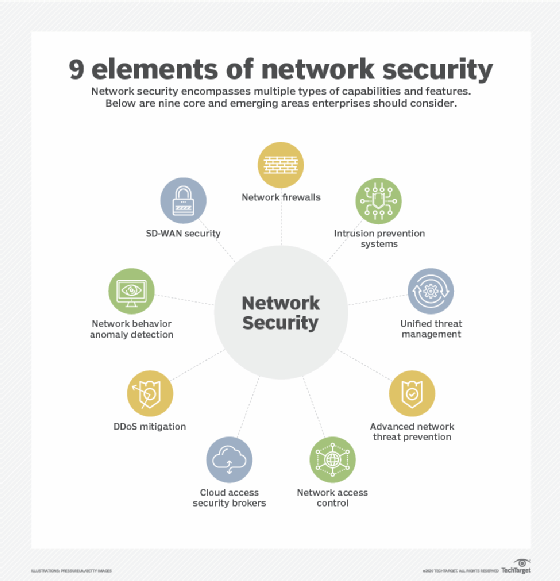
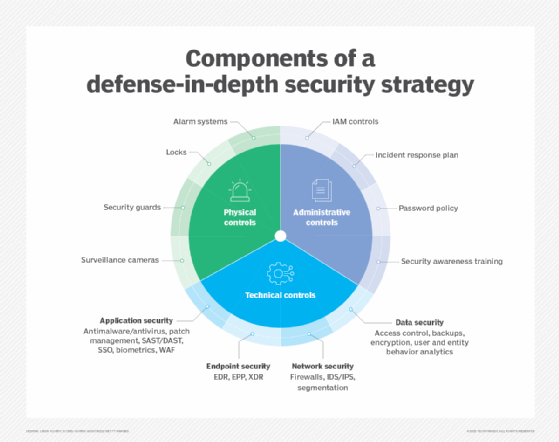
The choice of security policies and tools varies from network to network and changes over time. Strong security often involves using multiple approaches, known as layered security or defense in depth to give organizations as many security controls as possible. The following are some commonly used types of network security tools and software:
- Access control. This method limits access to network applications and systems to a specific group of users and devices. These systems deny access to users and devices not already sanctioned.
- Antivirus and antimalware. Antivirus and antimalware are software designed to detect, remove or prevent viruses and malware, such as Trojan horses, ransomware and spyware, from infecting a computer and, consequently, a network.
- Application security. It is crucial to monitor and protect applications that organizations use to run their businesses. This is true whether an organization creates that application or buys it, as modern malware threats often target Open Source code and containers that organizations use to build software and applications.
- Behavioral analytics. This method analyzes network behavior and automatically detects and alerts organizations to abnormal activities.
- Cloud security. Cloud providers often sell add-on cloud security tools that provide security capabilities in their cloud. The cloud provider manages the security of its overall infrastructure and offers tools for the user to protect their instances within the overall cloud infrastructure. For example, Amazon Web Services provides security groups that control the incoming and outgoing traffic associated with an application or resource.
- Data loss prevention (DLP). These tools monitor data in use, in motion and at rest to detect and prevent data breaches. DLP often classifies the most important and at-risk data and trains employees in best practices to protect that data. For instance, not sending important files as attachments in emails is one such best practice.
- Email security. Email is one of the most vulnerable points in a network. Employees become victims of phishing and malware attacks when they click on email links that secretly download malicious software. Email is also an insecure method of sending files and sensitive data that employees unwittingly engage in.
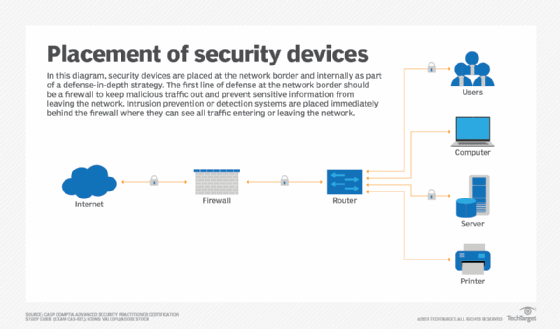
- Firewall. Software or firmware inspects incoming and outgoing traffic to prevent unauthorized network access. Firewalls are some of the most widely used security tools. They are positioned in multiple areas on the network. Next-generation firewalls offer increased protection against application-layer attacks and advanced malware defense with inline deep packet inspection.
- Intrusion detection system (IDS). An IDS detects unauthorized access attempts and flags them as potentially dangerous but does not remove them. An IDS and an intrusion prevention system (IPS) are often used in combination with a firewall.
- Intrusion prevention system. IPSes are designed to prevent intrusions by detecting and blocking unauthorized attempts to access a network.
- Mobile device security. Business applications for smartphones and other mobile devices have made these devices an important part of network security. Monitoring and controlling which mobile devices access a network and what they do once connected to a network is crucial for modern network security.
- Multifactor authentication (MFA). MFA is an easy-to-employ and increasingly popular network security solution that requires two or more factors to verify a user's identity. An example of this is Google Authenticator, an app which generates unique security codes that a user enters alongside their password to verify their identity.
- Network segmentation. Organizations with large networks and network traffic often use network segmentation to break a network into smaller, easier-to-manage segments. This approach gives organizations more control of and increased visibility into traffic flow. Industrial network security is a subset of network segmentation, providing increased visibility into industrial control systems (ICSes). ICSes are more at risk to cyber threats because of increased integration with the cloud.
- Sandboxing. This approach lets organizations scan for malware by opening a file in an isolated environment before granting it access to the network. Once opened in a sandbox, an organization can observe whether the file acts in a malicious way or shows any indications of malware.
- Security information and event management (SIEM). This security management technique logs data from applications and network hardware and monitors for suspicious behavior. When an anomaly is detected, the SIEM system alerts the organization and takes other appropriate action.
- Software-defined perimeter (SDP). An SDP is a security method that sits on top of the network it protects, concealing it from attackers and unauthorized users. It uses identity criteria to limit access to resources and forms a virtual boundary around networked resources.
- Virtual private network (VPN). A VPN secures the connection from an endpoint to an organization's network. It uses tunneling protocols to encrypt information that is sent over a less secure network. Remote access VPNs let employees access their company network remotely.
- Web security. This practice controls employee web use on an organization's network and devices, including blocking certain threats and websites, while also protecting the integrity of an organization's websites themselves.
- Wireless security. Wireless networks are one of the riskiest parts of a network and require stringent protections and monitoring. It's important to follow wireless security best practices, such as segmenting Wi-Fi users by service set identifiers, or SSIDs, and using 802.1X authentication. Good monitoring and auditing tools are also needed to ensure wireless network security.
- Workload security. When organizations balance workloads among multiple devices across cloud and hybrid environments, they increase the potential attack surfaces. Workload security measures and secure load balancers are crucial to protecting the data contained in these workloads.
- Zero-trust network access. Similar to network access control, zero-trust network access only grants a user the access they must have do their job. It blocks all other permissions.
Benefits of network security
The following are the main benefits of network security:
- Functionality. Network security ensures the ongoing high performance of the networks that businesses and individual users rely on.
- Privacy and security. Many organizations handle user data and must ensure the confidentiality, integrity and availability of data on a network, known as the CIA triad. Network security prevents the security breaches that can expose PII and other sensitive information, damage a business's reputation and result in financial losses.
- Intellectual property protection. Intellectual property is key to many companies' ability to compete. Securing access to intellectual property related to products, services and business strategies helps organizations maintain their competitive edge.
- Compliance. Complying with data security and privacy regulations, such as HIPAA and GDPR, is legally required in many countries. Secure networks are a key part of adhering to these mandates.
Challenges of network security
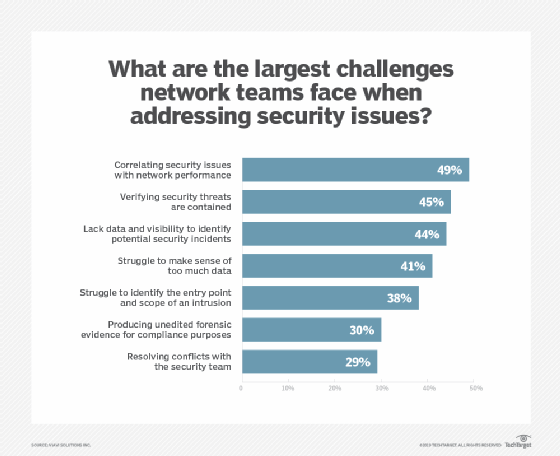
Network security involves a number of challenges, including the following:
- Evolving network attack methods. The biggest network security challenge is the rate at which cyber attacks evolve. Threat actors and their methods constantly change as technology changes. For example, new technology, such as blockchain, has led to new types of malware attacks, such as cryptojacking. As a result, network security defense strategies must adapt to these new threats.
- User adherence. As mentioned, security is every network user's responsibility. It can be difficult for organizations to ensure that everyone is adhering to network security best practices, while simultaneously evolving those strategies to address the newest threats.
- Remote and mobile access. More companies are adopting bring your own device policies, which means a more distributed and complex network of devices for organizations to protect. Remote work is also more prevalent. This makes wireless security more important, as users are more likely to be using a personal or public network when accessing company networks.
- Third-party partners. Cloud providers, managed security services and security product vendors often get access to an organization's network, opening new potential vulnerabilities.
Network layers and security
Networks contain layers, as represented by the Open Systems Interconnection (OSI) model. Data passes through these layers as it travels among devices, and different cyber threats target different layers. Therefore, each layer in the stack must be secured for the network to be considered secure.
This table matches the OSI levels to the corresponding type of network security.
| Layers (ISO 7498-1) | ISO 7498-2 Security Model |
| Application |
Authentication |
| Presentation |
Access control |
| Session |
|
| Transport |
|
| Network |
Confidentiality |
| Data Link |
Assurance and availability |
| Physical |
Notarization and signature |
Notice that the third layer from the bottom is called Network, but network security does not apply only to this layer. Every device in a computer network functions on multiple layers when processing information. Given that, each layer must be secure for the network to be considered secure. In other words, the word network in this definition of network security refers broadly to the corporate infrastructure as a whole, not just the network layer.
For example, some people may make the distinction between cloud security and network security. Cloud security includes application security and container security, which exist outside of the network layer of the OSI model. However, those cloud functions can still be considered part of the overall corporate network, and securing them is part of network security.
Network security jobs and certifications
Jobs related to network security include the following:
- Chief information security officers (CISOs) are one of the highest-paying positions in network security. CISOs are responsible for developing and implementing an overall information security program.
- Penetration testers, or pen testers, are hired to break into a corporate network to expose vulnerabilities. This can be automated or performed manually by employees or third-party pen testing-as-a-service providers.
- Security engineers focus on quality control within the IT infrastructure.
- Security architects plan, analyze, design and test an organization's IT infrastructure.
- Security analysts analyze and plan security strategy, as well as perform security audits.
Some certifications for careers in network security are the following:
- EC-Council's Certified Ethical Hacker (CEH);
- Global Information Assurance Certification Security Essentials (GSEC);
- ISACA's Certified Information Security Manager (CISM);
- ISACA's Certified Information Systems Auditor (CISA);
- (ISC)2 Certified Cloud Security Professional (CCSP); and
- (ISC)2 Certified Information Systems Security Professional (CISSP).
Network security is fundamental to a strong cybersecurity strategy. Read more about the best cloud security certifications and the steps to map a successful cybersecurity career.