Wi-Fi Protected Access (WPA)

What is WPA?
Wi-Fi Protected Access (WPA) is a security standard for computing devices equipped with wireless internet connections.
WPA was developed by the Wi-Fi Alliance to provide more sophisticated data encryption and better user authentication than Wired Equivalent Privacy (WEP), the original Wi-Fi security standard.
WPA was initially released in 2003. The Wi-Fi Alliance defined WPA as a response to serious weaknesses found in the WEP protocol. A more secure version, WPA2, was released in 2004. In 2018, the Wi-Fi Alliance announced the release of WPA's third and current version, WPA3.
WPA works using discrete modes for enterprise and personal use. The most recent enterprise mode, WPA-EAP, uses a stringent 802.1X authentication. The latest personal mode, WPA-PSK, uses Simultaneous Authentication of Equals (SAE) to create a secure handshake.
The enterprise mode requires an authentication server, with which clients communicate before sending login credentials.
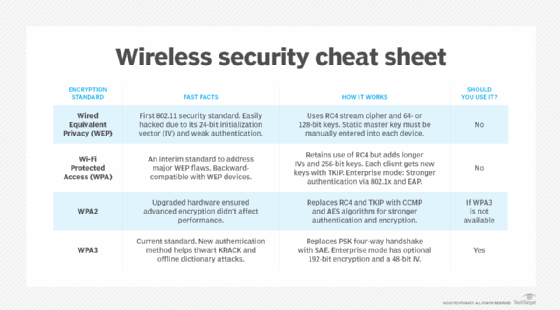
What are the new features of the WPA2 protocol?
WPA2 superseded WPA in 2004. WPA2 uses the Counter Mode Cipher Block Chaining Message Authentication Code Protocol (CCMP). The CCMP protocol is based on the Advanced Encryption Standard (AES) algorithm, which provides message authenticity and integrity verification. CCMP is stronger and more reliable than WPA's original Temporal Key Integrity Protocol (TKIP).
WPA2 still has vulnerabilities, however. Primary among those vulnerabilities is the potential for unauthorized access to the enterprise wireless network. This happens when there is an invasion of an attack vector on certain Wi-Fi Protected Setup (WPS) access points. It is recommended the WPS be disabled for each attack vector access point in WPA2 to discourage such threats. Other vulnerabilities exist in WPA2 as well, such as in Transport Layer Security, which threat actors can target using downgrade attacks.
Though these threats have traditionally been directed at enterprise wireless systems, home wireless systems with simple passwords and default passwords can be threatened as well. Privileged accounts, such as administrator accounts, should always be supported by stronger, longer passwords, and all passwords should be changed frequently.
What are the new features with the WPA3 protocol?
Wi-Fi Protected Access 3, or WPA3, superseded WPA2 in 2018. WPA3 is the latest, updated implementation of WPA. The Wi-Fi Alliance began to certify WPA3-approved products in 2018. WPA3 support is not automatically added to every device. Users who wish to use WPA3-approved devices, such as wireless routers, must either buy new routers that support WPA3 or have the device updated by the manufacturer.
New updates and features of WPA3 include the following:
- 256-bit Galois/Counter Mode Protocol encryption (GCMP-256);
- 384-bit Hashed Message Authentication Mode (HMAC);
- 256-bit Broadcast/Multicast Integrity Protocol (BIP-GMAC-256);
- an equivalent 192-bit cryptographic strength (in WPA3-EAP enterprise mode);
- SAE exchange; and
- Wi-Fi Device Provisioning Protocol (DPP).
The new SAE exchange method creates a secure handshake. It replaces WPA2's pre-shared key exchange, which shares a password used to derive a key that starts a four-way handshake. SAE provides more wireless security in personal mode when the initial key exchange occurs. Likewise, the new feature, Wi-Fi DPP, adds more network security by not relying on shared passwords. Instead, DPP uses QR codes or near field communication tags to allow devices access to a network. Even if a user's password is weak, WPA3 provides a more secure handshake using Wi-Fi DPP.
However, some vulnerabilities have infected WPA3. This includes five vulnerabilities, collectively called Dragonblood. Dragonblood includes a denial-of-service attack, two downgrade attacks and two side-channel attack information leaks. Four of the five -- not including the denial-of-service attack -- are used to steal user passwords.
The Wi-Fi Alliance has worked on patches for Dragonblood and other vulnerabilities as new ones are identified. For example, two vulnerabilities were found that enable attackers to use brute force attacks to bypass WPA3 protected networks.
WPA vs. WPA2 vs. WPA3: When to use them
The different WPA versions of WPA have over time increased the security standards for devices with wireless internet connections. One way to compare the three versions is to see how WPA and WPA3 stack up against WPA2.
WPA3 vs. WPA2
WPA3 is more secure and comprehensive than WPA2; however, the Wi-Fi Alliance still supports and updates the WPA2 protocol.
WPA3's notable features over WPA2 include the SAE protocol, individualized data encryption, bigger session keys and stronger brute force attack protection.
WPA3's GCMP-256 data encryption is stronger than WPA2's 128-bit encryption. WPA3 also supports larger session key sizes than WPA2, with 192-bit security in enterprise use cases. WPA3 also protects against offline password guesses by allowing a user only one guess. The user would have to interact with the Wi-Fi network device directly every time they want to guess the password. WPA2, by comparison, lacks this ability, making brute force attacks a bigger threat.
WPA2 vs. WPA
WPA2 is a stronger version of WPA with more security features. Some of the most notable differences between WPA and WPA2 include the following:
- WPA2's delineation between personal and enterprise modes;
- the use of AES, which makes WPA2 more secure; and
- its need for more processing power than WPA.
If an individual or businesses has the option, they should go with the newest WPA version to secure their wireless internet connection. The next best options are using WPA2 Enterprise and then WPA2 Personal.
Differences between WPA and WEP
WEP is a security protocol specified in the 802.11b standard. WEP provides a wireless local area network with security and privacy capabilities equivalent to a wired LAN.
The standard 64-bit WEP uses a 40-bit key, although a 128-bit WEP using a 104-bit key size can also be used. WEP also uses two forms of authentication -- Open System Authentication (OSA) and Shared Key Authentication (SKA). OSA allows any client to authenticate with the access point, as long as the client has the correct WEP keys. SKA sends the WEP key in a four-step handshake. The handshake uses a challenge-response authentication method, where the client and access point send requests and encrypt data.
In 2003, the Wi-Fi Alliance announced the supersession of WEP in favor of WPA. Software updates that allow both server and client computers to implement WPA became widely available that same year. Access points can operate in a mixed WEP/WPA mode to support both WEP and WPA clients. However, mixed-mode effectively provides only WEP-level security for all users.
WPA brought about a major change in the security of wireless communications. Learn more about the future of this rapidly changing industry as Wi-Fi 6 and 5G bring about new advances and potential shortcomings.