computer forensics (cyber forensics)
What is computer forensics (cyber forensics)?
Computer forensics is the application of investigation and analysis techniques to gather and preserve evidence from a particular computing device in a way that is suitable for presentation in a court of law. The goal of computer forensics is to perform a structured investigation and maintain a documented chain of evidence to find out exactly what happened on a computing device and who was responsible for it.
Computer forensics -- which is sometimes referred to as cyber forensics, computer forensic science, or digital forensics -- essentially is data recovery with legal compliance guidelines to make the information admissible in legal proceedings.
Digital forensics starts with the collection of information in a way that maintains its integrity. Investigators then analyze the data or system to determine if it was changed, how it was changed and who made the changes.
Real-world case studies of computer forensics
Computer forensics has been used by law enforcement agencies and in criminal and civil law since the 1980s to collect evidence. Some notable cases include:
- Apple trade secret theft. In 2018, a Chinese engineer was convicted of downloading Apple's trade secrets from confidential company databases after investigators reviewed his activity on Apple's network. The engineer, named Xiaolang Zhang, at Apple's autonomous car division announced his retirement and said he would be moving back to China to take care of his elderly mother. He told his manager he planned to work at an electronic car manufacturer in China, raising suspicion. According to a Federal Bureau of Investigation (FBI) affidavit, Apple's security team reviewed Zhang's activity on the company network and found, in the days prior to his resignation, he downloaded trade secrets from confidential company databases to which he had access. He was indicted by the FBI in 2018.
- Enron. In 2001, computer forensic analysts examined terabytes of data to understand and find evidence of Enron's complex fraud scheme. The scandal was a significant factor in the passing of the Sarbanes-Oxley Act of 2002, which set new accounting compliance requirements for public companies.
- Google trade secret theft. Anthony Scott Levandowski, a former executive of both Uber and Google, was charged with 33 counts of trade secret theft in 2019. From 2009 to 2016, Levandowski worked in Google's self-driving car program, where he downloaded thousands of files related to the program from a password-protected corporate server. He departed from Google and created Otto, a self-driving truck company, which Uber bought in 2016, according to The New York Times. Levandowski pleaded guilty to one count of trade secrets theft and was sentenced to 18 months in prison and $851,499 in fines and restitution. Levandowski received a presidential pardon in January 2021.
- Larry Thomas. Thomas shot and killed Rito Llamas-Juarez in 2016. Thomas was later convicted with the help of hundreds of Facebook posts he made under the fake name of Slaughtaboi Larro. One of the posts included a picture of him wearing a bracelet that was found at the crime scene.
- Michael Jackson's death. Investigators used metadata and medical documents from Conrad Murray's iPhone to conclude that Murray, Michael Jackson's doctor, prescribed lethal amounts of medication to Jackson (who died in 2009).
- Mikayla Munn. Munn drowned her newborn baby in the bathtub of her Manchester University dorm room in 2016. Investigators found Google searches on her computer containing the phrase "at home abortion," which were used to convict her.
Murder is just one of the many types of crime computer forensics can aid in combating. Learn how forensic financial analysis software is used to combat fraud.
Why is computer forensics important?
As computers and other data-collecting devices are used more frequently everywhere, digital evidence -- and the forensic process used to collect, preserve and investigate it -- has become more important in solving crimes and other legal issues. Computer forensics plays a role in identifying and preserving digital evidence and also helps ensure its integrity when presented in court cases.
The goal of computer forensics is to perform a structured investigation and maintain a documented chain of evidence to find out exactly what happened on a computing device and who was responsible for it.
The average person never sees much of the information modern devices collect. For instance, the computers in cars continually collect information on when a driver brakes, shifts and changes speed without the driver being aware. However, this information can prove critical in solving a legal matter or a crime, and computer forensics often plays a role in identifying and preserving that information.
Digital evidence isn't just useful in solving digital-world crimes, such as data theft, network breaches and illicit online transactions. It's also used to solve physical-world crimes, such as burglary, assault, hit-and-run accidents and murder.
Of course, its use isn't always tied to a crime. The forensic process is also used when the goal is data recovery: to gather data from a crashed server, failed drive, or reformatted operating system (OS), and in situations where a system has unexpectedly stopped working.
Businesses often use a multilayered data management, data governance and network security strategy to keep proprietary information secure. Having data that's well managed and safe can help streamline the forensic process should that data ever come under investigation.
As the world becomes more reliant on digital technology for the core functions of life, cybercrime is rising. As such, computer forensic specialists no longer have a monopoly on the field. See how the police in the U.K. are adopting computer forensic techniques to keep up with increasing rates of cybercrime.

Use cases for digital forensics
Digital evidence is useful in criminal investigations, particularly in solving cybercrime and digital-world crimes, such as data theft, network breaches and illicit online transactions. It's also used to solve physical-world crimes, such as burglary, assault, hit-and-run accidents, and even murder.
Businesses and governments also use computer forensics to find information related to a system or network compromise, and then use these discoveries to identify and prosecute cyberattackers. In addition, they can use digital forensic experts and processes to facilitate data recovery in the event of a system or network failure caused by a natural or other disaster.
Digital forensics are also used in civil litigation cases (fraud, divorce), and to investigate cases of intellectual property theft.
Types of computer forensics
There are various types of computer forensic examinations, including:
- Database forensics. The examination of information contained in databases, both data and related metadata.
- Email forensics. The recovery and analysis of emails and information contained in email platforms, such as schedules and contacts.
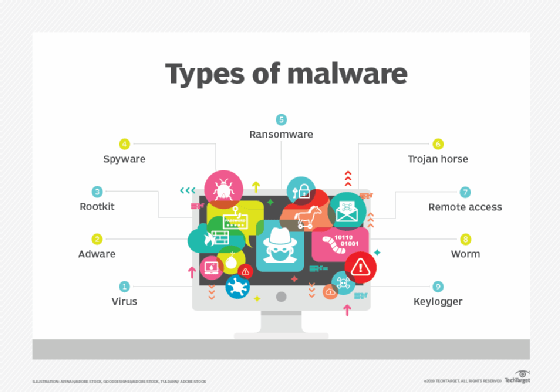
- Malware forensics. Sifting through code to identify possible malicious programs like Trojan horses or ransomware and analyzing their payload.
- Memory forensics. Collecting information stored in a computer's RAM and cache.
- Mobile forensics. Examining mobile devices to retrieve and analyze information such as contacts, incoming and outgoing text messages, pictures, and video files.
- Network forensics. Looking for evidence by monitoring network traffic, using tools such as a firewall or intrusion detection system.
How does computer forensics work?
Forensic investigators typically follow standard procedures, which vary depending on the context of the forensic investigation, the device being investigated or the information investigators are looking for. In general, these procedures include the following three steps:
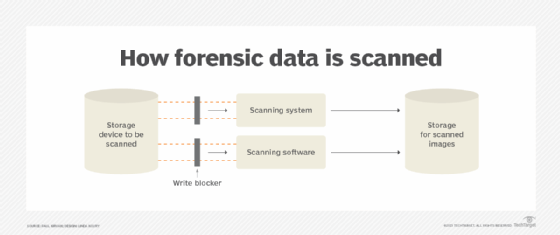
- Data collection. Forensic examiners search hidden folders and unallocated disk space on a digital device for copies of deleted, encrypted or damaged files, make a digital copy -- i.e., forensic image -- of the device's storage media, and then lock the original device in a secure facility. The investigation is conducted on the digital copy. They might also use publicly available information for forensic purposes, such as social media posts or charges logged in a payment application, such as public Venmo charges for purchasing illegal products or services displayed on the Venmo website.
- Analysis. Investigators analyze digital copies of storage media in a sterile environment to gather the information for a case using various tools including Basis Technology's Autopsy for hard drive investigations and the Wireshark network protocol analyzer. A mouse jiggler is useful when examining a computer to keep it from falling asleep and losing volatile memory data that is lost when the computer goes to sleep or loses power. Discovered evidence is carefully documented in a findings report and verified with the original device in preparation for legal proceedings.
- Presentation. The investigators present their findings in a legal proceeding, where it might be used to determine the result. In a data recovery situation, the investigators present what they could recover from a compromised system.
Often, multiple tools are used in computer forensic investigations to validate the results they produce. Learn how a researcher at Kaspersky Lab in Asia created an open source forensics tool for remotely collecting malware evidence without compromising system integrity.
Techniques used in computer forensics
Forensic investigators use a myriad of techniques and applications to examine digital copies of compromised devices. They search hidden folders and unallocated disk space for copies of deleted, encrypted or damaged files. Any evidence found on the digital copy is carefully documented in a finding report and verified with the original device in preparation for legal proceedings that involve discovery, depositions or actual litigation.
Computer forensic investigations use a combination of techniques and expert knowledge. Some common techniques include the following:
- Reverse steganography. Steganography is a common tactic used to hide data inside any type of digital file, message or data stream. Computer forensic experts reverse a steganography attempt to hide data inside any type of digital file, message or data stream by analyzing the file's data hashing. If a cybercriminal hides important information inside an image or other digital file, it might look the same before and after to the untrained eye, but the underlying hash or string of data that represents the image will change. So doing this might show if the image has changed, which will show if important information is hidden inside it.
- Stochastic forensics. With stochastic forensics, investigators analyze and reconstruct digital activity without the use of digital artifacts, which are unintended alterations of data that occur from digital processes, such as changes to file attributes during data theft. Artifacts include clues related to a digital crime, such as changes to file attributes during data theft. The technique is frequently used to investigate insider data breaches since insiders often don't leave behind digital artifacts.
- Cross-drive analysis. This technique correlates and cross-references information on multiple computer drives to clarify similarities and provide context. Events that raise suspicion are compared with information on other drives to look for similarities and provide context. This is also known as anomaly detection. This is also known as anomaly detection.
- Live analysis. A running device is analyzed from within the OS using system tools on the computer. The analysis looks at volatile data, which is often stored in cache or RAM.
- Deleted file recovery. Also known as file carving or data carving, this technique involves searching a computer system and memory for fragments of files that were partially deleted in one place but left traces elsewhere on the machine. The analysis looks at volatile data, which is often stored in cache or RAM. Many tools used to extract volatile data require the computer to be in a forensic lab to maintain the legitimacy of a chain of evidence.
Computer forensics careers and certifications
Computer forensics has become its own area of scientific expertise, with accompanying coursework and certification. The average annual salary for a computer forensic analyst is $101,612, according to Salary.com. Some examples of cyber forensic career paths include the following:
- Forensic engineer. These professionals deal with the collection stage of the computer forensic process, gathering data and preparing it for analysis. They help determine how a device failed.
- Forensic accountant. This position deals with crimes involving money laundering and other transactions made to cover up illegal activity.
- Cybersecurity analyst. This position deals with analyzing data once it has been collected and drawing insights that can later be used to improve an organization's cybersecurity strategy.
A bachelor's degree -- and, sometimes, a master's degree -- in computer science, cybersecurity or a related field are required of computer forensic professionals. There are several certifications available in this field, including the following:
- International Association of Computer Investigative Specialists' Certified Forensic Computer Examiner. This program focuses primarily on validating the skills necessary to ensure business follows established computer forensic guidelines.
- EC-Council's Computer Hacking Forensic Investigator. This certification assesses an applicant's ability to identify intruders and collect evidence that can be used in court. It covers search and seizure of information systems, working with digital proof and other cyber forensics skills.
- International Society of Forensic Computer Examiners' (ISFCE) Certified Computer Examiner. This forensic examiner program requires training at an authorized boot camp training center, and applicants must sign the ISFCE Code of Ethics and Professional Responsibility.
Learn more about the tools and techniques required in a cloud computing forensics investigation. Also, read about the patchwork of organizations that work together to combat international cybercrime. Explore how digital forensics and incident response combine to detect, investigate and respond to cybersecurity events.