deep packet inspection (DPI)
What is deep packet inspection (DPI)?
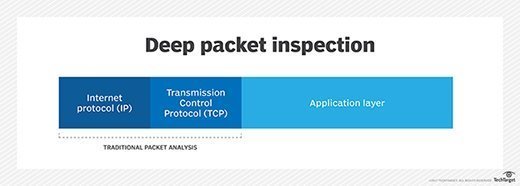
Deep packet inspection (DPI) is an advanced method of examining and managing network traffic. It is a form of packet filtering that locates, identifies, classifies and reroutes or blocks packets with specific data or code payloads that conventional packet filtering, which examines only packet headers, cannot detect.
Usually performed as part of a firewall defense, deep packet inspection functions at the application layer of the Open Systems Interconnection (OSI) reference model.
How does deep packet inspection work?
Deep packet inspection examines the contents of packets passing through a given checkpoint and makes real-time decisions depending on what a packet contains and based on rules assigned by an enterprise, an internet service provider or a network manager.
Previous forms of packet filtering only looked at packet header information, which is analogous to reading an address printed on an envelope without any knowledge of the contents of the envelope. This was due partly to the limitations of older technology.
Until recently, firewalls did not have the processing power necessary to perform deeper inspections on large volumes of traffic in real time. Technological advancements have enabled DPI to perform more advanced inspections so that it can check both packet headers and data.
DPI can examine the contents of a message and identify the specific application or service that sent it. In addition, filters can be programmed to look for and reroute network traffic from a specific Internet Protocol address range or a certain online service, such as Facebook or Twitter.
What are common uses and applications of deep packet inspection?
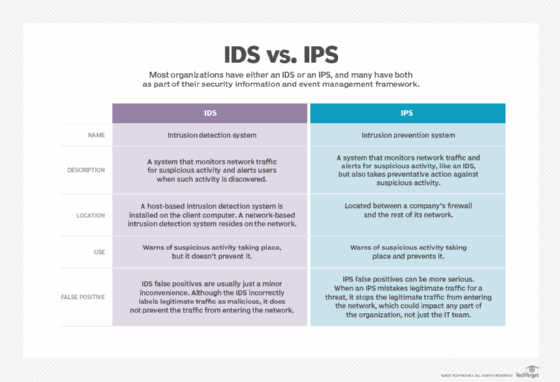
DPI is mainly used by firewalls that include an intrusion detection system feature and by standalone IDSes that are intended to both detect attacks and protect the network.
It can be used for benevolent purposes as a network security tool to detect and intercept viruses, worms, spyware and other forms of malicious traffic and intrusion attempts. But it can also be used for more nefarious activities, like eavesdropping and state-sponsored censorship.
Deep packet inspection is also useful for network management and content policy enforcement to stop data leaks and to streamline or modify the flow of network traffic as per specific use cases. For example, a message tagged as high-priority can be routed to its destination ahead of less important or lower-priority messages or packets. DPI can also be used to throttle data transfers to prevent peer-to-peer abuse and thus improve network performance.
Because DPI makes it possible to identify the originator or recipient of content containing specific packets, it has sparked concern among privacy advocates and opponents of net neutrality.
What are limitations of deep packet inspection?
Deep packet inspection has three significant limitations:
- It can create new vulnerabilities in the network, even as it provides protection against existing vulnerabilities. While effective against buffer overflow attacks, denial-of-service attacks and certain types of malware, DPI can also be exploited to facilitate attacks in those same categories.
- DPI adds to the complexity and unwieldy nature of existing firewalls and other security-related software. And, to remain optimally effective, DPI requires periodic updates and revisions, which can increase the administrative burden for security teams.
- DPI can reduce network speed and performance because it creates network bottlenecks and increases the burden on firewall processors for data decryption and inline inspection.
Despite these limitations, many network administrators have embraced deep packet inspection technology to cope with the increase in the volume, complexity and frequency of internet-related threats.
Deep packet inspection techniques
The following are the three main techniques used in deep packet inspection:
- Pattern or signature matching. A firewall with IDS capability analyzes each packet against a database of known network attacks. It looks for specific patterns that are known to be malicious and blocks the traffic if it finds such a pattern. The disadvantage of this approach is that its effectiveness depends on the signatures being updated regularly. This method only works against known threats or attacks. As new threats are discovered daily, ongoing signature updates are critical to ensure that the firewall can detect the threats and continue to protect the network.
- Protocol anomaly. The protocol anomaly method -- again, used by firewalls with an IDS -- doesn't have the inherent weakness of the pattern/signature matching method because it doesn't simply allow all content that doesn't match the signature database. Rather, it follows a default deny approach. The firewall determines which content/traffic should be allowed based on protocol definitions. Thus, unlike signature matching, this method also protects the network against unknown attacks.
- Intrusion prevention system (IPS). IPS solutions can block detected attacks in real time by preventing malicious packets from being delivered based on their contents. Thus, if a particular packet represents a known security threat, the IPS will proactively deny network traffic based on a defined rule set. One drawback of IPS is that the cyberthreat database must be regularly updated with information about new threats. The risk of false positives is also high but can be mitigated by establishing proper baseline behaviors for network components, creating conservative policies and custom thresholds, and regularly reviewing alerts and logged incidents to improve monitoring and alerting.
Deep packet inspection versus conventional packet filtering
In a network, each data packet comes with a header that provides basic information about its sender, intended recipient and the time it was sent. Conventional packet filtering can only read this information. This is the traditional approach used by older firewalls since they were incapable of processing other types of data quickly enough to avoid adversely affecting network performance.
With deep packet inspection, firewalls can overcome those shortcomings for more comprehensive, real-time packet inspection. This enables them to extract or filter information beyond packet headers for more proactive and advanced network monitoring and protection. Within the constantly expanding cyberthreat landscape, DPI is a powerful aspect of the network security ecosystem.