information security (infosec)
What is information security (infosec)?
Information security (infosec) is a set of policies, procedures and principles for safeguarding digital data and other kinds of information. Infosec responsibilities include establishing a set of business processes that protect information assets, regardless of how that information is formatted or whether it is in transit, being processed or at rest in storage.
Generally, an organization applies information security to guard digital information as part of an overall cybersecurity program. Infosec ensures that the employees have access to the data they require, while preventing unauthorized access. It can also be associated with risk management and legal regulations.
Principles of information security
The pillars or principles of infosec are collectively known as the confidentiality-integrity-availability (CIA) triad. These are intended to serve as a guide for information security policies and processes within an organization. The overall goal of infosec is to let the good guys in, while keeping the bad guys out. The three primary tenants to support this are confidentiality, integrity and availability.
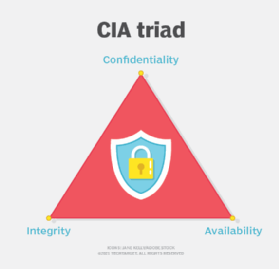
Confidentiality is the principle that information should only be available to those with the proper authorization to that data. Integrity is the principle that information is consistent, accurate and trustworthy. Availability is the principle that information is easily accessible by those with proper authorization and remains so in case of failure to minimize interruptions to users.
These three principles do not exist in isolation, but inform and affect one another. Therefore, any infosec system involves a balance of these factors. As an extreme example, information only available as a written sheet of paper stored in a vault is confidential but not easily available. Information carved into stone displayed in the lobby has a lot of integrity but is not confidential or available.
Other infosec principles
While the CIA triad forms the basis of infosec policy and decision-making, other factors, including the following, should be added to a complete infosec plan:
- Risk management. Because infosec involves a balance of competing factors, it is associated with risk management. The goal here is to maximize positive outcomes, while minimizing negative ones. Organizations use risk management principles to determine the level of risk they are willing to take on when executing a system. They can also put into place guards and mitigations to reduce risk.
- Data classification. Data classification should also be considered with infosec to give extra attention to information that needs to remain either highly confidential or data that needs to remain easily available.
- Media and confidentiality agreements. Information security is not limited to digital data and computer systems. A full infosec policy covers physical information, printed information and other kinds of media. It may also include confidentiality agreements.
- User training. Businesses should also employ user training to protect personal data, as well as both computer controls and organizational policy as risk mitigation factors. For example, to limit the risk of an accounting analyst changing financial data, an organization can put in place a technical control limiting change rights and logging changes. Alternatively, an organizational policy of having a second person to audit completed records can also mitigate this risk.
- Nonrepudiation. Another important infosec factor is nonrepudiation, which is the ability to prove that information hasn't been tampered with. No one should tamper with data at rest or in transit, its source should be trustworthy and it shouldn't be accidentally or maliciously modified.
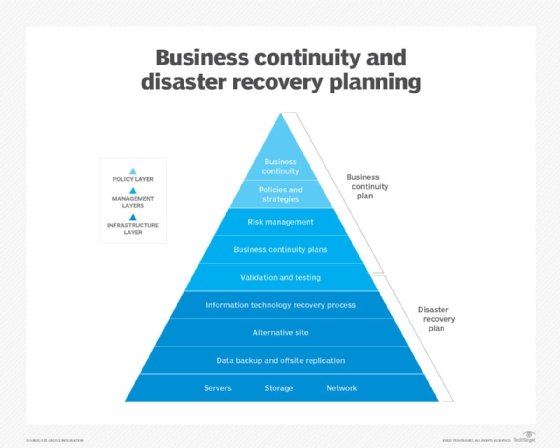
- Business continuity and disaster recovery (BCDR). BCDR is an additional consideration of infosec. Data should remain available and unchanged in the case of a software or hardware failure. Organizations can accomplish this through backups or redundant systems.
- Change management. Consider change management with an infosec policy as well. Poorly managed changes may cause outages that affect the availability of a system. System changes may also affect the overall security of stored data.
- Local laws and governmental regulations. Regulatory bodies often regulate personally identifiable information depending on the region. Regulations, such as the Health Insurance Portability and Accountability Act (HIPAA) for medical data, the Payment Card Industry Data Security Standard (PCI DSS) for payment information or the European Union's (EU) General Data Protection Regulation (GDPR) legislation, for example, may require that some information be treated differently or have special security controls in place.
Types of information security
Although information security can take many different forms, the following are the most common types:
- Application security. This infosec approach is designed for safeguarding applications and application programming interfaces. It stops and blocks vulnerabilities and data breaches from affecting applications. Application security can be achieved through various techniques, such as employing web application firewalls and scanners that continuously find, monitor and mitigate vulnerabilities.
- Infrastructure security. Infrastructure security focuses on safeguarding intranet and extranet networks, as well as labs, data centers, servers, desktop computers, cloud assets and mobile devices. It also protects against typical cybercrimes, as well as natural disasters and other mishaps. In short, infrastructure security plays a big part in reducing and mitigating damage from any type of malfunction.
- Cloud security. This approach is geared toward securing, building and hosting apps in the cloud. To ensure cloud security, businesses must ensure secure application usage and isolation between separate processes because cloud applications are run in a shared environment.
- Cryptography. Cryptography is the process of converting plaintext data into secure data by encrypting it. This infosec approach encrypts both the data at rest and in transit to ensure data integrity and defend against cyber attacks. To make messages and data harder to read, security teams frequently use digital signatures and sophisticated algorithms. For instance, symmetric key algorithms, such as Advanced Encryption Standard, are frequently employed to secure sensitive government data.
- Vulnerability management. Every year, thousands of new vulnerabilities are discovered that require organizations to patch their operating systems and applications and reconfigure the security settings of their network. The vulnerability management process identifies and manages all the weak points in an environment to proactively address vulnerabilities before they turn into real threats.
- Incident response plan. An incident response plan is a set of information security processes that are used to identify, contain and recover from security breaches. By having an incident response strategy in place, organizations can contain threats and recover easily from the aftermath of a security incident. Steps for preserving evidence for forensic examination and future prosecution should also be established as part of this plan. These details can be used to identify the perpetrator and prevent subsequent attacks.
Information security threats
Threats to information security can manifest themselves in a variety of ways. The most common threat vectors are as follows:
- Insecure systems. New technology is being released every day. However, if it's not designed with security in mind, it can have severe repercussions for the information security of an organization. Consequently, if a business is running obsolete or legacy systems, it runs a great risk of falling prey to security breaches. Organizations should identify weak systems and patch them up or decommission them as necessary.
- Social media attacks. Attacks on information security through social media are on the rise. On Oct. 7, 2022, Facebook's parent company, Meta, announced its researchers found 400 malicious Android and iOS apps during the previous year that were intended to steal Facebook users' usernames and passwords and compromise their accounts. Cybercriminals use direct or indirect means to attack social media sites. Through messaging, attackers can often transfer malware to social media users who are the targets of direct attacks, whereas indirect techniques may involve gathering data from social media sites to identify organizational or user vulnerabilities and plan an attack.
- Social engineering attacks. Social engineering is the practice of coercing individuals into disclosing or stealing their personal information. This tactic relies on exploiting human nature, which is typically the weakest link in a system. Attackers typically send phishing emails and messages that have a tone of urgency or fear, tricking users into divulging their sensitive information.
- Third-party breaches. Attackers occasionally use a flaw or vulnerability to gain access to and steal data held on the systems of third-party vendors. For instance, in 2021, hackers exploited the vulnerabilities in Microsoft Exchange Server to access the emails of 60,000 private companies and nine government entities.
- Lack of encryption. Encryption is a great way to protect information assets within an organization. However, this important method is often overlooked by certain organizations due to its complex nature and lack of legal implications. For example, the healthcare industry follows HIPAA compliance, which requires every computer to be encrypted due to the sensitive nature of the data involved.
What is the difference between information security vs. cybersecurity?
Since most information exchange happens in cyberspace these days, the terms information security and cybersecurity are often used interchangeably. While their paths intersect, both terms have individual meanings.
Physical security, endpoint security, data encryption and network security are all examples of information security. It is also closely related to information assurance, which safeguards data against threats, such as natural disasters and server outages. In short, information security is concerned with protecting any type of data, not just data in cyberspace.
Cybersecurity, on the other hand, is a subcategory of information security. It deals with technological threats and the practices and tools that can be used to mitigate cyber attacks, such as spyware or ransomware. Data security is another related category of cybersecurity that focuses on protecting an organization's data from accidental or malicious exposure to unauthorized parties.
Data protection laws for information security
There are currently no federal laws governing data security in the United States, but some regulations have been passed to protect specific types of data. The EU, on the other hand, adheres to GDPR, which governs the collection, use, storage, security and transmission of data pertaining to EU residents.
Data security regulations in the U.S. include the following:
- Federal Trade Commission Act forbids businesses from misleading consumers about privacy rules, failing to properly protect customer privacy and using deceptive advertising.
- Children's Online Privacy Protection Act controls how information and data regarding children are regulated.
- HIPAA controls the use, storage and confidentiality of health information.
- Fair and Accurate Credit Transactions Act specifies how credit report data should be used and discarded.
- Gramm-Leach-Bliley Act restricts how banks and financial institutions may gather and store personal information.
Infosec jobs
Most roles working with computers involve an element of information security. Therefore, infosec jobs may vary in their titles between organizations and be cross-disciplinary or interdepartmental.
The following are the most common job titles in information security:
- In IT, the chief security officer or chief information security officer, in collaboration with the chief information officer, is responsible for overall cybersecurity and infosec policy.
- A security director is a senior-level professional that oversees the application of all IT security measures within a company.
- An IT security architect is responsible for developing and overseeing the network and computer security infrastructure of a company.
- A security engineer or security systems administrator may be responsible for executing or evaluating infosec controls, managing firewall configurations, keeping an organization's IT security solutions up to date and looking into intrusion incidents.
- An information security analyst or IT security consultant may be responsible for making security risk assessments, evaluating effectiveness of controls, or analyzing a failure and its consequences.
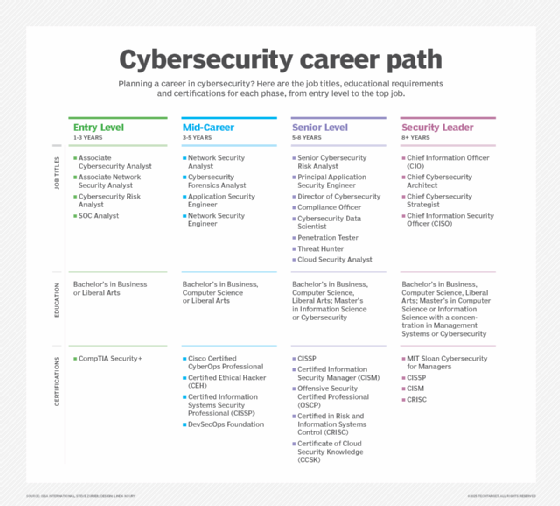
Learn more about the types of infosec jobs that are available.
Infosec certifications
A number of certifications are available to IT professionals who already -- or would wish to -- focus on infosec and cybersecurity more broadly, including the following:
- CompTIA Security+. This certification covers core cybersecurity knowledge and is used to qualify for entry-level IT and infosec roles.
- Certified Information Systems Auditor, or CISA. ISACA, a nonprofit and independent association that advocates for professionals involved in information security, assurance, risk management and governance, offers this certification. The exam certifies the knowledge and skills of security professionals. To qualify for this certification, candidates must have five years of professional work experience related to information systems auditing, control or security.
- Certified Information Security Manager, or CISM. CISM is an advanced certification offered by ISACA that validates individuals who have demonstrated the in-depth knowledge and experience required to develop and manage enterprise information security programs. ISACA aims this certification at information security managers, aspiring managers or IT consultants who support information security program management.
- GIAC Security Essentials, or GSEC. Created and administered by the Global Information Assurance Certification (GIAC) organization, this certification is geared toward security professionals who want to demonstrate they are qualified for hands-on roles with respect to security tasks related to IT systems. The exam requires candidates demonstrate an understanding of information security beyond simple terminology and concepts.
- Certified Information Systems Security Professional, or CISSP. CISSP is an advanced certification offered by (ISC)², an international nonprofit cybersecurity certification body. For experienced cybersecurity professionals, the exam covers the ability to design and develop an infosec program.
Information security-focused certifications for a range of cloud vendors are also readily available. Several popular examples include Google Professional Cloud Security Engineer, Microsoft Information Protection Administrator and AWS Certified Security - Specialty.
Cybersecurity, a subcategory of information security, necessitates thorough planning to be successful. Discover how to execute cybersecurity best practices by reading this guide. Also, learn the essentials of data security and the practice of preserving the confidentiality, integrity and availability of organizational data.