Software patch/fix

What is a software patch?
A software patch or fix is a quick-repair job for a piece of programming designed to resolve functionality issues, improve security or add new features.
Throughout its lifetime, software will run into problems called bugs. A patch is the immediate fix to those problems. IT or end users can often download a patch from the software maker's website. But the patch is not necessarily the best fix for the problem, and the product's developers will often incorporate a more complete fix when they package the software for its next release.
The creator of the patch usually develops and distributes the patch as a replacement for, or an insertion in, compiled code -- that is, in a binary file or object module. Larger operating systems often provide a special program to help IT manage and track patch installations.
Types of software patches
Software patches generally fall into three distinct categories. A single patch can fall into more than one category, however. These categories include bug fixes, security updates and feature updates.
Bug fix patches correct problems in the software. These patches help the software run more smoothly and reduce the likelihood of a crash.
Security patches address known security vulnerabilities, making the software more secure.
Feature patches add new functionality to the software. Microsoft, for example, at one time provided Windows feature updates twice per year, adding new capabilities to the Windows 10 operating system.
Why patches are important
Bug fix patches are important because they resolve problems in functionality, and feature updates give the software additional capabilities.
A security patch is particularly important because it addresses known vulnerabilities. When a vendor releases a security update, it alerts the hacker community that a vulnerability exists in that software. At that point, hackers begin actively looking for a way to exploit the known vulnerability and for unpatched copies of the software that they can exploit. The sooner an organization installs the security patch, the more quickly it can protect itself against the associated vulnerability.
Patch management policies and patch automation software
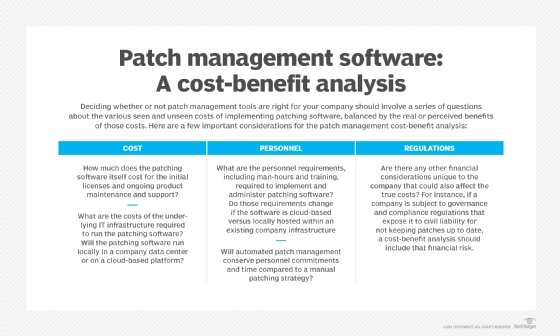
Many organizations have patch management policies that stipulate how to evaluate and apply patches. Such policies usually designate the time frame within which IT must apply the patch and how to test the patch to ensure it will not cause problems -- such as compatibility issues -- for the organization.
There are numerous options for automating patch management. Microsoft, for example, provides a free tool called the Windows Server Update Services (WSUS), which automates patch management for Microsoft software.
Windows Update, a free maintenance and support service, can automatically download and install patches for the Windows operating system and other Microsoft software, but there are some distinct advantages to using WSUS. For instance, WSUS gives administrators direct control over which patches Windows Update applies. WSUS also saves internet bandwidth, because it downloads each patch once and distributes the patches throughout the organization, as opposed to each PC downloading patches individually.
WSUS is only capable of managing patches for Microsoft products. Microsoft and various third-party vendors, including SolarWinds Patch Manager and GFI LanGuard, offer other patch management options that can automate the patching of non-Microsoft software.
The role of IT in distributing patches
IT should test patches before applying them. The IT department is responsible for the patch testing and distribution process. Additionally, IT is also usually tasked with performing periodic audits to determine if any devices are missing critical patches. Some organizations outsource these tasks to a managed service provider.
Patches in different devices
Software patches are platform-dependent. A patch that is related to a PC application, for example, would not be suitable for use on a device running Apple iOS. Given the variety of device types in most organizations, it is common to use an automated patch management tool that supports PCs and a variety of mobile OSes.