How to conduct security patch validation and verification
Learn about the validation and verification phases of the security patch deployment cycle, two key steps to ensuring an organization's patch management procedure is proactive.
Validation and verification are important steps in the security patch management lifecycle. They help to determine the impact of a patch on the security and efficiency of an organization's IT assets.
Patch validation is the process of examining newly available patches to see which ones apply to the organization's IT environment and then testing the chosen patches to determine if they could cause problems. The software patch testing process usually requires building a test environment that mimics a representative segment of the overall infrastructure.
Verify patch deployment
The patch verification process that follows, in contrast, involves checking related files, binary versions and registry settings to confirm that a patch has taken effect. If the patch management tool used by the organization is not capable of doing so, the process must be done manually. In addition, a vulnerability scanner can be used to verify that vulnerabilities the patch is intended to mitigate are no longer present or exploitable.
For verification to be trustworthy, the patch management tool used to deploy the security patch must have the ability to monitor patched systems after deployment. It should also verify that the security patch was properly installed and identify any post-deployment issues by running smoke tests. The tool should also keep track of the systems that have been patched. If the tool is unable to do all these things, the organization needs to create a manual method or subprocedure to complete the different verification tasks.
Review patch status
The organization's change control procedure -- be it a tool, ticket or form -- should be updated as each step is completed and a report generated to record the status of each patch. These reports can be generated by the patch management tool or the change management system used by the organization. The reports get distributed to the appropriate staff, including the patch management team and IT personnel involved in the review phase.
Each report should contain the following information:
- Number of systems successfully patched.
- Number of systems that failed patching or were unsuccessfully patched.
- Summary indicating why the failures occurred and the follow-up steps.
- Summary of reboot request reporting.
- Number of systems that were omitted from the process, which is typically provided in the accompanying exception report.
- Summary indicating why these systems were omitted from the process and any temporary workarounds implemented.
- Summary of reporting effectiveness.
KPIs should be developed for the patch management procedure. They enable the organization to measure the effectiveness and efficiency of its patch management initiatives. KPIs for patch management include the ones seen in the figure here.
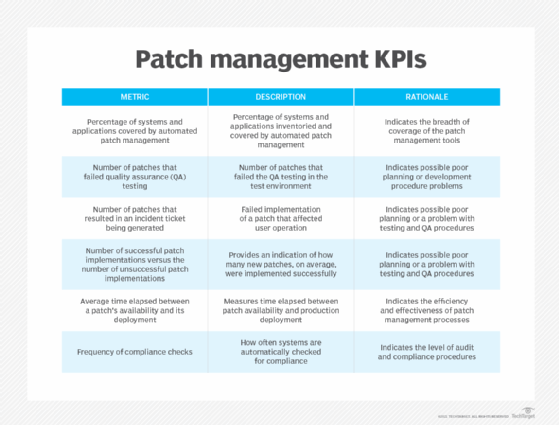
Those responsible for patch management should regularly analyze the reports and use the KPIs and other information to answer the following questions about their remediation and response processes:
- How effective is the process?
- If there is a high rate of failure, what are the contributing factors?
- Where can improvements to the patch management procedure be made?
This information establishes the baseline performance of the patch management procedure, which can then be used to expose the accuracy and effectiveness of the patch against attacks. Completing this last phase of the procedure ensures an organization's patch management initiative is proactive.
Michael Cobb, CISSP-ISSAP, is a renowned security author with more than 20 years of experience in the IT industry.
Felicia Nicastro is author of the book Security Patch Management.
Dig Deeper on Application and platform security
-
![]()
Creating a patch management policy: Step-by-step guide
By: Andrew Froehlich
-
![]()
10 enterprise patch management best practices
By: Andrew Froehlich
-
![]()
What is patch management? Lifecycle, benefits and best practices
By: David Essex
-
![]()
Cabinet Office looks to expand public data sharing for digital ID
By: Sebastian Klovig Skelton