cyber hijacking

What is cyber hijacking?
Cyber hijacking, or computer hijacking, is a type of network security attack in which the attacker takes control of computer systems, software programs and/or network communications. A wide range of cyber attacks rely on hijacking in one form or another, and -- similar to other hijackings, such as an airplane hijacker or criminals seizing control of an armored transport vehicle -- cyber hijacking is often, but not always, highly illegal with severe consequences for both the attacker and the victim.
There are several different kinds of cyber hijacking, among them:
- browser hijacking
- session hijacking
- domain hijacking
- clipboard hijacking
- domain name system (DNS) hijacking
- Internet Protocol (IP) hijacking
- page hijacking
What is browser hijacking?
Browser hijacking is a tactic used by hackers and unscrupulous online advertisers to take control of a web browser. In practice, browser hijacking is most often used to redirect web traffic, alter default browser settings or force a victim to click advertisements. However, there are also instances where hackers use hijacked browsers to intercept sensitive information and even make unwitting victims download additional malware.
In some cases, victims willingly download a browser add-on or toolbar plugin that's bundled with browser hijacking capabilities. Usually, though, these developers go to great lengths to hide this fact. In other instances, hackers might exploit security flaws within browsers to force victims to install their browser hijacker, also known as hijackware.
What is domain hijacking?
When a person or group tries to seize ownership of a web domain from its rightful owner, they are attempting a domain hijacking. For example, a cybercriminal could submit phony domain transfer requests in hopes of securing a trusted domain to orchestrate sophisticated phishing campaigns.
At the other end of the spectrum, a company that owns a trademarked brand name could use legal threats to pressure the owner of the web domain to transfer rights. These corporate takeover attempts are called reverse domain hijacking.
What is DNS hijacking?
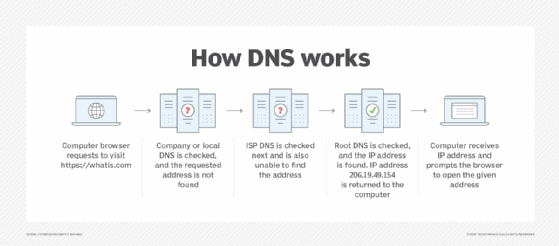
DNS hijacking and domain hijacking are similar in that both are attempts to hijack control of a web domain. DNS hijacking describes the takeover in a technical sense, however, whereas domain hijacking is a takeover by way of legal coercion or social engineering.
Hackers and cybercriminals find DNS hijacking attractive because, similar to browser hijacking, successful DNS attacks enable them to redirect a victim's traffic in order to generate revenue through ads, create cloned websites to steal private data and even censor or control the free flow of information.
There are several ways hackers might carry out a DNS hijack. For example, they could attack vulnerabilities in the hardware and software systems used by DNS providers or install malware on a victim's machine that is programmed to change DNS settings. Hackers could even turn to man-in-the-middle (MitM) attacks to take control of an established connection while it is in progress to intercept DNS messages -- to simply gain access to the messages or to enable the attacker to modify them before retransmission -- or use DNS spoofing to divert traffic away from valid servers and toward illegitimate servers.
What is session hijacking?
session hijacking is a type of computer hijacking where hackers gain unauthorized access to a victim's online account or profile by intercepting or cracking session tokens. Session tokens are cookies sent from a web server to users to verify their identity and website settings. If a hacker successfully cracks a user's session token, the results can range from eavesdropping to the insertion of malicious JavaScript programs.
Session hijacking was a common mode of attack for hackers in the early 2000s because the first version of Hypertext Transfer Protocol (HTTP) wasn't designed to adequately protect cookies. However, in recent years, modern encryption and newer standards, like HTTP Secure (HTTPS), do a better job of protecting cookie data. Better cookie protection makes session hijacking less likely, albeit not impossible.
What is clipboard hijacking?
When you use your device to copy and paste images, text and other information, the act of copying temporarily stores that data in random access memory (RAM). This section of RAM is known as the clipboard.
Clipboard hijacking happens when hackers replace the contents of a victim's clipboard with their own -- often malicious -- content. Depending on the technical ability of the attacker, clipboard hijacking can be hard to detect and may be spread inadvertently by victims when they paste information into web forms.
What is page hijacking?
Also known as 302 redirect hijacking or Uniform Resource Locator (URL) hijacking, a page hijacking attack tricks web crawlers used by search engines to redirect traffic the hacker's way. The web community introduced 302 HTTP responses to provide website owners a way to temporarily redirect users -- and search engine crawlers -- to a different URL in cases where a website is undergoing maintenance or testing.
Bad actors realized that, by implementing carefully planned 302 redirects, they could take over a victim's site in search engine results. This is because web crawlers would mistake a new page -- created and owned by the hijacker -- as an honest redirect from the old page. Essentially, all of the victim's page authority and ranking signals would be transferred over to the hijacker's page due to the false assumption by the web crawler that the victim configured the redirect.
While still technically possible, the number of page hijackings decreased as web crawlers became more sophisticated.
What is IP hijacking?
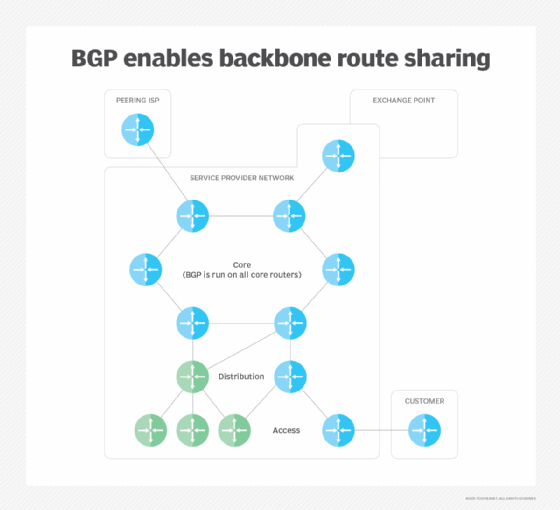
Routers used by internet service providers (ISPs) rely on a routing protocol known as the Border Gateway Protocol (BGP). BGP is designed so that routers operated by one provider can announce to routers operated by other providers the IP address blocks it owns.
IP hijacking happens when an attacker hacks or masquerades as an internet provider claiming to own an IP address it doesn't. When this happens, traffic destined for one network is redirected to the hacker's network. The hacker then becomes a man in the middle and can carry out a range of attacks from eavesdropping to packet injection -- covertly inserting forged packets into a communication stream -- and more.
Due to its high level of difficulty, IP hijacking is usually the work of hostile government actors or well-funded cyber gangs. Furthermore, although BGP-based IP hijacking is well known, the real-world extent of the threat is hard to study because of the walled-off nature of ISPs.
The cyber hijacking of SolarWinds
In 2020, hackers compromised software company SolarWinds' Orion IT monitoring and management software. Used by thousands of government agencies and businesses around the world, the hackers -- suspected to be nation-state actors -- deployed malicious code in Orion, thereby gaining access to the data, systems and networks of not just SolarWinds customers, but those organizations' customers and partners as well. The size and scope of the attack are unprecedented.
Essentially, the SolarWinds attack is an example of cyber hijacking in that the hackers hijacked the software compilation process of Orion to place a backdoor inside legitimate, digitally signed software updates. SolarWinds then pushed these updates out to customers -- among them tech behemoths Microsoft and FireEye and U.S. government agencies, like the departments of Homeland Security, State, Commerce and Treasury.