hacker
What is a hacker?
A hacker is an individual who uses computer, networking or other skills to overcome a technical problem. The term also may refer to anyone who uses their abilities to gain unauthorized access to systems or networks in order to commit crimes. A hacker may, for example, steal information to hurt people via identity theft or bring down a system and, often, hold it hostage in order to collect a ransom.
The term hacker has historically been a divisive one, sometimes being used as a term of admiration for individuals who exhibit a high degree of skill and creativity in their approach to technical problems. However, the term is also commonly applied to individuals who use this skill for illegal or unethical purposes.
Hacker was first used in the 1960s to describe a programmer or an individual who, in an era of highly constrained computer capabilities, could increase the efficiency of computer code in a way that removed, or hacked, excess machine code instructions from a program. It has evolved over the years to refer to someone with an advanced understanding of computers, networking, programming or hardware.
How does hacking work?
Hackers use technical skills to exploit cybersecurity defenses. Ethical hackers test for cybersecurity vulnerabilities and may take up hacking as a profession -- for example, a penetration tester (pen tester) -- or as a hobby. The end goal is often to gain unauthorized access to computers, networks, computing systems, mobile devices or internet of things systems. Many professional hackers use their skills to determine security holes in enterprise systems and then advise where companies should boost their security defenses to keep threat actors out.
Results can also be deleterious: Malicious hackers may steal login credentials, financial information and other types of sensitive information.
Many hackers aim to exploit either technical or social weaknesses to breach defenses. Technical weaknesses may include vulnerabilities in software or other exploitable weak spots. To exploit social weaknesses, hackers may attempt to manipulate social outcomes through false pretenses, such as impersonating a co-worker or other individual to gain financial or login information. Hackers may also use their technical skills to install dangerous malware, steal or destroy data, or disrupt an organization's services.
Hackers of all types participate in forums to exchange hacking information and tradecraft. There are numerous hacker forums where ethical hackers can discuss or ask questions about hacking. Many of these hacker forums offer technical guides with step-by-step instructions on hacking.
In contrast, forums and marketplaces serving threat actors or criminal hackers are often hosted on the dark web and provide an outlet for offering, trading and soliciting illegal hacking services.
Criminal hackers, who sometimes lack technical skills, often use scripts and other specifically designed software programs to break into corporate networks. This software may manipulate network data to gather intelligence about the workings of the target system. These scripts can be found posted on the internet for anyone, usually entry-level hackers, to use. Hackers with limited skills are sometimes called script kiddies, referring to their need to use malicious scripts and their inability to create their own code. Advanced malicious hackers might study these scripts and then modify them to develop new methods.
What are the different types of hackers?
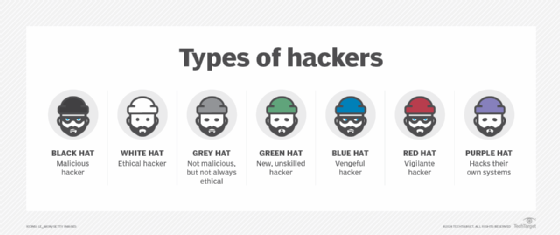
In the past, the security community informally used references to hat color as a way to identify different types of hackers, usually divided into five main types. A few of these terms have been replaced to reflect cultural changes.
- Ethical hackers or authorized hackers -- previously known as white hat hackers -- strive to operate in the public's best interest rather than to create turmoil. Many ethical hackers who work doing pen testing were hired to attempt to break into the company's networks to find and report on security vulnerabilities. The security firms then help their customers mitigate security issues before criminal hackers can exploit them.
- Threat actors or unauthorized hackers -- previously known as black hat hackers -- intentionally gain unauthorized access to networks and systems with malicious intent. This includes stealing data, spreading malware or profiting from ransomware, vandalizing or otherwise damaging systems, often in an attempt to gain notoriety. Threat actors are criminals by definition because they violate laws against accessing systems without authorization, but they may also engage in other illegal activity, including corporate espionage, identity theft and distributed denial-of-service (DDoS) attacks.
- Gray hat hackers fall somewhere between ethical hackers and threat actors. While their motives may be similar to those two groups, gray hats are more likely than ethical hackers to access systems without Authorization; at the same time, they are more likely than threat actors to avoid doing unnecessary damage to the systems they hack. Although they aren't typically -- or only -- motivated by money, gray hat hackers may offer to fix vulnerabilities they have discovered through their own unauthorized activities rather than using their knowledge to exploit vulnerabilities for illegal profit.
- Red hat hackers, also called eagle-eyed or vigilante hackers, are similar to ethical hackers. Red hat hackers intend to stop unethical attacks by threat actors. While red hat hackers may have a similar intent to ethical hackers, they differ in methodology, as red hat hackers may use illegal or extreme courses of action. Often, red hat hackers will deploy cyber attacks toward the systems of threat actors.
- Blue hat hackers, also known as vengeful hackers, use hacking as a social weapon. Frequently, it is used as a means for revenge against a person, employer or other organization. Hackers who post personal and confidential data online to ruin reputations or attempt to gain unauthorized access to email and social media accounts are classified as blue hats.
- Script kiddies are amateur, inexperienced hackers who attempt to use pre-written scripts in their hacking efforts. Often, these are fledgling hacking enthusiasts who cause little damage.
- Hacktivists are organizations of hackers that use cyber attacks to affect politically motivated change. The purpose is to bring public attention to something the hacktivist believes might be a violation of ethics or human rights. Hacktivism attacks may attempt to reveal evidence of wrongdoing by publicizing private communications, images or information.
What are common hacking techniques?
While the technological basis of these techniques is constantly evolving to keep up with developments in cybersecurity, the following common hacking techniques are persistent:
- Phishing. The criminal hacker creates a fraudulent email that appears to come from a legitimate organization and prompts the user to open it. Users are then tricked into entering their login credentials and disclosing other personal information, such as birth date, Social Security number or credit card details.
- Viruses and malicious code. A hacker inserts malicious code, including worms and Trojan horses, into website files, often with the intent to steal cookies that track a user's online activity.
- User interface (UI) redress. This technique, also known as clickjacking, creates a fake UI and link on top of an authentic webpage and tricks the user into clicking on the link. The threat actor can then take access of the user's computer without their knowledge.
- DoS and DDoS. These techniques make it impossible for users to access their computer systems, networks, services or other information technology (IT) resources. Typically, a criminal hacker uses this technique to crash web servers, systems or networks by disrupting the normal flow of traffic.
- Domain name system (DNS) cache poisoning. This technique, also known as DNS spoofing, exploits DNS clients and web servers by diverting internet traffic to fake servers.
- Structured Query Language (SQL) injection. This technique adds SQL code to a web form input box in order to gain access to unauthorized resources and data.
- Keylogger injection. A keylogging program is injected into the user's system as malware to monitor and record each of the user's keystrokes. This enables the threat actor to steal personally identifiable information, login credentials and sensitive enterprise data.
- Brute-force attack. These attacks commonly use automated tools to guess various combinations of username and password until they find the correct combination.
Famous hackers
While many famous technologists have been considered hackers -- including Donald Knuth, Ken Thompson, Vinton Cerf, Steve Jobs and Bill Gates -- threat actors are more likely to gain notoriety as hackers in mainstream accounts. Gates was also caught breaking into corporate systems as a teenager before founding Microsoft.
Some notorious threat actors include the following:
- Anonymous is a group of hackers from around the world who meet on online message boards and social networking forums. They mainly focus their efforts on encouraging civil disobedience and unrest via DoS attacks, publishing victims' personal information online, and defacing and defaming websites.
- Jonathan James gained notoriety for hacking into multiple websites, including those of the U.S. Department of Defense and National Aeronautics and Space Administration, as well as for stealing software code when he was a teenager. In 2000, James became the first juvenile -- he was just 16 years old -- to be incarcerated for computer hacking. He committed suicide in 2008 when he was 25 years old.
- Adrian Lamo hacked into the systems of several organizations, including The New York Times, Microsoft and Yahoo, to exploit their security flaws. Lamo was arrested in 2003, convicted in 2004, sentenced to six months of home detention at his parents' home and two years' probation, and ordered to pay about $65,000 in restitution.
- Kevin Mitnick was convicted of a number of criminal computer crimes after evading authorities for 2 ½ years. Once one of the Federal Bureau of Investigation's Most Wanted for hacking into networks of 40 high-profile corporations, Mitnick was arrested in 1993 and served five years in a federal prison. After his release, he founded a cybersecurity firm to help organizations keep their networks safe.
While not all types of hacking are considered malicious, the presence of threat actors necessitates strong cybersecurity defenses for enterprises, especially those dealing with sensitive information. Breaches in security can cause financial loss, as well as irreversible damage to an organization's reputation.
This guide on data security touches on the different types of data security, best practices and tips for building a security strategy. As remote work can increase cybersecurity risks, it is important to manage cybersecurity accordingly in the new digital age.
TechTarget is responding to readers' concerns as well as profound cultural changes when it comes to certain commonly used but potentially linguistically biased terms. In some cases, we are defaulting to industry-standard terminology that may be seen as linguistically biased in instances where we have not found a replacement term. However, we are actively seeking out and giving preference to terms that properly convey meaning and intent without the potential to perpetuate negative stereotypes.