FTP (File Transfer Protocol)
What is FTP (File Transfer Protocol)?
FTP (File Transfer Protocol) is a network protocol for transmitting files between computers over Transmission Control Protocol/Internet Protocol (TCP/IP) connections. Within the TCP/IP suite, FTP is considered an application layer protocol.
In an FTP transaction, the end user's computer is typically called the local host. The second computer involved in FTP is a remote host, which is usually a server. Both computers need to be connected via a network and configured properly to transfer files via FTP. Servers must be set up to run FTP services, and the client must have FTP software installed to access these services.
Although many file transfers can be conducted using Hypertext Transfer Protocol (HTTP) -- another protocol in the TCP/IP suite -- FTP is still commonly used to transfer files behind the scenes for other applications, such as banking services. It is also sometimes used to download new applications via web browsers.
How does FTP work?
FTP is a client-server protocol that relies on two communications channels between the client and server: a command channel for controlling the conversation and a data channel for transmitting file content.
Here is how a typical FTP transfer works:
- A user typically needs to log on to the FTP server, although some servers make some or all of their content available without a login, a model known as anonymous FTP.
- The client initiates a conversation with the server when the user requests to download a file.
- Using FTP, a client can upload, download, delete, rename, move and copy files on a server.
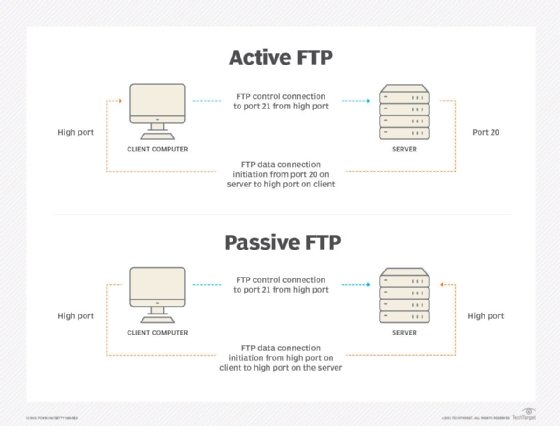
FTP sessions work in active or passive modes:
- Active mode. After a client initiates a session via a command channel request, the server creates a data connection back to the client and begins transferring data.
- Passive mode. The server uses the command channel to send the client the information it needs to open a data channel. Because passive mode has the client initiating all connections, it works well across firewalls and network address translation gateways.
Users can work with FTP via a simple command-line interface -- from a console or terminal window in Microsoft Windows, Apple macOS or Linux -- or with a dedicated graphical user interface. Web browsers can also serve as FTP clients.
Why is FTP important and what is it used for?
FTP is a standard network protocol that can enable expansive file transfer capabilities across IP networks. Without FTP, file and data transfer can be managed with other mechanisms -- such as email or an HTTP web service -- but those other options lack the clarity of focus, precision and control that FTP enables.
FTP is used for file transfers between one system and another, and it has several common use cases, including the following:
- Backup. FTP can be used by backup services or individual users to backup data from one location to a secured backup server running FTP services.
- Replication. Similar to backup, replication involves duplication of data from one system to another but takes a more comprehensive approach to provide higher availability and resilience. FTP can also be used to facilitate this.
- Access and data loading. FTP is also commonly used to access shared web hosting and cloud services as a mechanism to load data onto a remote system.
FTP types
There are several different ways an FTP server and client software can conduct a file transfer using FTP:
- Anonymous FTP. This is the most basic form of FTP. It provides support for data transfers without encrypting data or using a username and password. It's most commonly used for download of material that is allowed for unrestricted distribution. It works on port
- Password-protected FTP. This is also a basic FTP service, but it requires the use of a username and password, though the service might not be encrypted or secure. It also works on port 21.
- FTP Secure (FTPS). Sometimes referred to as FTP Secure Sockets Layer (FTP-SSL), this approach enables implicit Transport Layer Security (TLS) as soon as an FTP connection is established. FTPS was initially used to help enable a more secure form of FTP data transfer. It typically defaults to using port 990.
- FTP over explicit SSL/TLS (FTPES). This approach enables explicit TLS support by upgrading an FTP connection over port 21 to an encrypted connection. This is a commonly used approach by web and file sharing services to enable secure file transfers.
- Secure FTP (SFTP). This is technically not an FTP protocol, but it functions similarly. Rather, SFTP is a subset of the Secure Shell (SSH) protocol that runs over port 22. SSH is commonly used by systems administrators to remotely and securely access systems and applications, and SFTP provides a mechanism within SSH for secure file transfer.
FTP security
FTP was initially defined in 1971, predating TCP and IP, and it has been redefined several times since then to accommodate new technologies, including the use of TCP/IP, or Request for Comments 765 and RFC 959, and IPv6, or RFC 2428.
FTP has also undergone several updates to enhance FTP security. These include versions that encrypt via an implicit TLS connection (FTPS) or explicit TLS connection (FTPES) or that work with SFTP.
By default, FTP does not encrypt traffic, and individuals can capture packets to read usernames, passwords and other data. By encrypting FTP with FTPS or FTPES, data is protected, limiting the ability of an attacker to eavesdrop on a connection and steal data.
FTP may still be vulnerable to brute-force attacks against user/password authentication spoofing, an FTP bounce attack or a distributed denial-of-service attack.
History of FTP
The first specification for FTP was published as RFC 114 on April 16, 1971, and was written by Abhay Bhushan, then a student at the Massachusetts Institute of Technology. The original idea behind FTP was to enable the transfer of files over ARPANET, the precursor to the internet.
As the modern internet began to take shape, the FTP specification underwent several revisions to align with networking standards, including TCP/IP. In 1980, a new version of FTP was defined in RFC 765 by Jon Postel, a research scientist at the Information Sciences Institute at the University of Southern California at the time. Five years later, FTP was redefined yet again with RFC 959, which introduced new management capabilities for the protocol, including the ability to make and remove a file directory. Prior iterations of FTP were largely limited to transferring files to and from existing file directory structures.
In 1997, RFC 959 was updated with new capabilities defined in RFC 2228 to provide security capabilities. Two years later, FTP was updated with RFC 2428 to support the IPv6 protocol.
FTP clients
FTP clients are used to upload, download and manage files on a server. FTP clients include the following:
- FileZilla. This is a free FTP client for Windows, macOS and Linux that supports FTP, FTPS and SFTP.
- Transmit. This is an FTP client for macOS that supports FTP and SSH.
- WinSCP. This is a Windows FTP client that supports FTP, SSH and SFTP.
- WS_FTP. This is another Windows FTP client that supports SSH.