Encrypting File System (EFS)

What is Encrypting File System (EFS)?
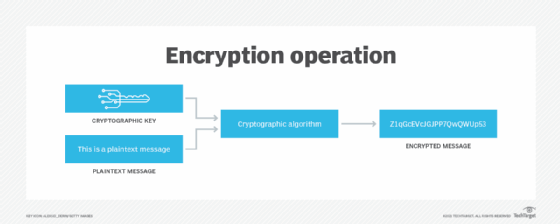
Encrypting File System provides an added layer of protection by encrypting files or folders on various versions of the Microsoft Windows OS. EFS is a functionality of New Technology File System (NTFS) and is built into a device via the OS. It facilitates file or directory encryption and decryption with the help of complex cryptographic algorithms.
Through encryption, EFS helps keep sensitive files safe from hackers or data thieves who gain unauthorized access to a computing network or devices.
EFS and NTFS
On Windows systems, NFTS supports EFS. NTFS itself is a built-in system used to store and retrieve files. The ultimate aim of EFS is to encrypt files on hard drives from unauthorized intruders who get access to authorized users' physical software. EFS also ensures that only authorized users or intended recipients can decrypt the file, which they can with just a click of the button.
Additional users such as administrators can also access these encrypted files, but to do this, they need the right permissions. Unauthorized users cannot open the files. Instead, they see a warning message depending on the application trying to access the file and its data.
EFS explained
EFS is a user-based encryption control technique that enables users to control who can read the files on their system. The typical method of using EFS is to perform encryption at the folder level. This ensures that all files added to the encrypted folder are automatically encrypted. At the same time, users can also select and encrypt individual files. The files are encrypted when they are closed and are automatically ready to use once they are opened.
When a folder is marked encrypted, future files transported to that folder are also encrypted and automatically protected. However, users can opt out of automatic encryption by selecting a custom setting called This file only.
Once a file is marked for encryption, EFS runs in the background without disrupting the user. The file remains encrypted if it is moved to another folder or even a different hard drive.
The system automatically decrypts the file or folder when the authorized user accesses it. When they save the file, encryption is reapplied to the file to maintain its cryptographic protection. Users who are not authorized cannot open, copy, rename or move the encrypted file or folder. Instead, they see a warning message like access denied, depending on the application trying to access the file or its data.
How EFS works
To encrypt and decrypt files (or directories), EFS uses public key encryption technology. When a user requests to encrypt a file or folder, EFS generates an X.509 certificate. This certificate has a private/public key pair that the RSA algorithm generates, with EFS as a key usage. If the user loses the certificate and thus cannot decrypt the file, the recovery agent user or the holder of the associated private key can decrypt the file instead. The RSA algorithm generates both the public and private keys that are stored in the certificate.
EFS stores its private key in the user's individual profile. It also stores the public key with the user-created files. Only that user can decrypt the files. The public key is public, so that other users can encrypt data for a user. However, the private key is private because only the person holding it can decrypt it. Further, even the person encrypting the data with the public key cannot decrypt it once it is encrypted.
Before encryption, EFS generates a cryptographically strong random key based on the default Advanced Encryption Standard (AES) cipher. The RSA algorithm encrypts this key, and not the data. Then, the public RSA key encrypts the AES key, which is then used to encrypt the actual data.
Characteristics of EFS
The key characteristics of EFS are the following:
- Users can turn encryption on or off by simply selecting or deselecting a checkbox in a file's properties.
- It contains a data recovery mechanism.
- EFS supports the encryption of sparse files.
- Users can share access to encrypted files.
EFS benefits
EFS provides many benefits over several other third-party encrypting applications, including:
- The entire encryption and decryption process is transparent to the authorized user who encrypts and decrypts the file.
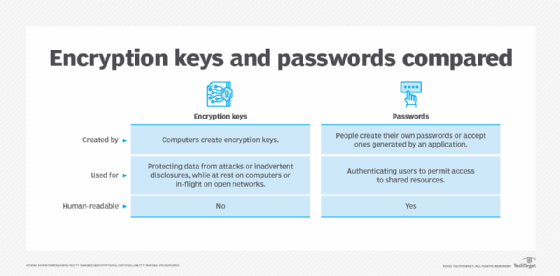
- The user does not need to remember passwords once the file is encrypted.
- EFS minimizes the probability of dictionary attacks with its strong key security, making it superior to many other applications where keys are based on user-entered passphrases.
- The encrypting and decrypting processes are run in kernel mode to eliminate the risk of leaving the key in the paging file from which an intruder could possibly extract it.
- The EFS data recovery mechanism allows system administrators to restore data from encrypted files if the original authorized user is no longer available (e.g., because they were transferred to another department or left the company entirely).
- Administrators can use tools to identify EFS-encrypted data and the user account that can decrypt these files or folders.
EFS best practices
Newer versions of EFS provide reliable encryption. However, there could be some security issues, especially when system administrators don't enforce strong group encryption policies, or if they don't maintain recovery agents for lost passwords. To avoid these problems, it's important to follow some EFS best practices.
Control access to private keys
Any unauthorized user, such as a cyber attacker or data thief, can decrypt EFS data if they get access to the private key. That's why it's critical to maintain these private keys and control access to them.
Private keys should always be stored in a safe location to prevent unauthorized third parties from decrypting protected data. Private keys should also be complemented with recovery keys. Admins should create multiple recovery accounts and store recovery keys on a redundant device.
Maintain backups
It's important to keep backups of all private keys and recovery certificates if EFS changes recovery agents. This is a good way to maintain redundant older files that were encrypted under an older recovery agent. Users should also check each file individually, and not automatically assume that all EFS files are up to date with a new recovery agent.
Using recovery agent accounts
These accounts should only be used for recovery and for no other purpose. It can be useful to keep at least two recovery agent accounts on separate machines to prevent a single point of failure from causing irrecoverable data loss.
Encrypt full partitions or virtual drives
The best way to maintain system performance on servers is to ensure that EFS is only used on folders that require additional security controls. Full partitions or virtual drives should not be encrypted unless absolutely required to meet specific business needs.
See how to back up encrypted files and how to use the Encrypting File System and look at techniques for performing EFS recovery. Also, see how to protect PowerShell credentials in task automation and review a Windows file systems showdown.