security
What is security?
Security for information technology (IT) refers to the methods, tools and personnel used to defend an organization's digital assets. The goal of IT security is to protect these assets, devices and services from being disrupted, stolen or exploited by unauthorized users, otherwise known as threat actors. These threats can be external or internal and malicious or accidental in both origin and nature.
An effective security strategy uses a range of approaches to minimize vulnerabilities and target many types of cyberthreats. Detection, prevention and response to security threats involve the use of security policies, software tools and IT services.
Unfortunately, technological innovation benefits both IT defenders and cybercriminals. To protect business assets, companies must routinely review, update and improve security to stay ahead of cyberthreats and increasingly sophisticated cybercriminals.
IT security consists of two areas: physical and information.
Physical security
Physical security is the protection of people, hardware, software, network information and data from physical actions, intrusions and other events that could damage an organization and its assets. Safeguarding the physical security of a business means protecting it from threat actors, as well as accidents and natural disasters, such as fires, floods, earthquakes and severe weather. A lack of physical protection could risk the destruction of servers, devices and utilities that support business operations and processes. That said, people are a large part of the physical security threat.
Theft and vandalism are examples of human-initiated threats that require physical security solutions. A physical security breach doesn't necessarily require technical knowledge, but it can be just as dangerous as a data breach.
There are three parts to physical security:
- access control
- surveillance
- testing
The success of an organization's physical security program depends on effectively implementing, maintaining and updating each of these components.
Access control
Controlling access to office buildings, research centers, laboratories, data centers and other locations is vital to physical security. An example of a physical security breach is an attacker gaining entry to an organization and using a Universal Serial Bus (USB) flash drive to copy and steal data or put malware on the systems.
The goal of access control is to record, monitor and limit the number of unauthorized users interacting with sensitive and confidential physical assets. Access control can be as simple as barriers like walls, fences and locked doors. Identification badge and keycodes are also part of an effective physical access system. Physical identification is a great way to authenticate the identity of users attempting to access devices and areas reserved for authorized personnel.
More sophisticated access control methods include various forms of biometric authentication. These security systems use biometrics, or unique biological characteristics, to authenticate the identity of authorized users. Fingerprint and facial recognition are two examples of common applications of this technology.
Surveillance
Surveillance involves the technologies and tactics used to monitor activity in and around facilities and equipment. Many companies install closed-circuit television cameras to secure the perimeter of their buildings. These cameras act as both a deterrent to intruders and a tool for incident response and analysis. Cameras, thermal sensors, motion detectors and security alarms are only some examples of surveillance technology.
Testing
Testing is a reliable way to increase physical security. Companies that have strong security protocols test their policies to see if they need to be updated or changed. Such tests can include red teaming, where a group of ethical hackers try to infiltrate a company's cybersecurity protocols.
Information security
Information security is also referred to as infosec. It includes strategies used to manage the processes, tools and policies that protect both digital and nondigital assets. When implemented effectively, infosec can maximize an organization's ability to prevent, detect and respond to threats.
Infosec encompasses several specialized categories of security technology, including:
Application security to protect applications from threats that seek to manipulate, access, steal, modify or delete software and its related data. Application security uses a combination of software, hardware and policies that are called countermeasures. Common countermeasures include application firewalls, encryption, patch management and biometric authentication systems.
Cloud security is a set of policies and technologies designed to protect data and infrastructure in a cloud computing environment. Two key concerns of cloud security are identity and access management and data privacy. Penetration testing, network protocol maintenance, man-in-the-middle (MitM) detection and application scanning are some tools infosec professionals use to secure the confidentiality of information.
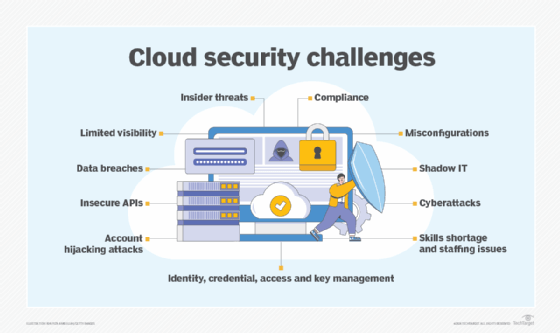
Cloud security is a responsibility that is shared by the cloud service provider (CSP) and the tenant, or the business that rents infrastructure such as servers and storage. A legal gray zone in cloud security can occur if CSP agreements are not well constructed. For example, if a tenant's server is compromised by cybercriminals who gain access to another tenant's server, it can be clear who is to blame?
Endpoint security requires network nodes meet certain security standards, like the Federal Information Security Modernization Act, prior to establishing a secure connection. Node devices include personal computers, laptops, tablets, smartphones and equipment such as point-of-sale terminals, barcode readers, sensors and internet of things (IoT) devices.
Internet security is the protection of software applications, web browsers and virtual private networks that use the internet. Techniques such as encryption, for example, protect data from attacks such as malware, phishing, MitM and denial-of-service attacks.
Mobile security is referred to as wireless security. It protects mobile devices, such as smartphones, tablets and laptops, and the networks they connect to from theft, data leakage and other attacks.
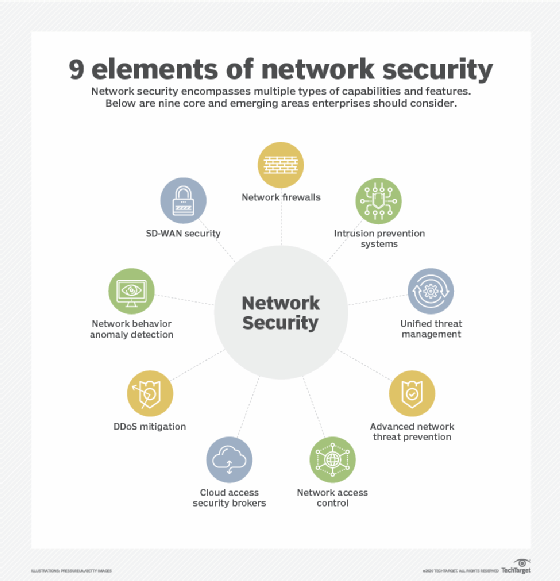
Network security defends the network infrastructure and the devices connected to it from threats such as unauthorized access, malicious use and modifications.
Supply chain security protects the network between a company and its suppliers who often have access to sensitive information such as employee information and intellectual property. The SolarWinds data breach in 2020 demonstrated how vulnerable organizations can be when supply chain channels are poorly monitored. SolarWinds is an IT company that manages client networks and systems and has access to the customers' IT. Once hackers infiltrated SolarWinds' update server, they were able to install a virus that acted as a digital backdoor to client systems and data.
Information technology security concepts and principles
A number of concepts and principles form the foundation of IT security. Some of the most important ones are:
- Application lifecycle management. This protects all stages of the application development process by reducing exposure to bugs, design flaws and configuration errors.
- Defense in depth. This is a strategy that uses multiple countermeasures simultaneously to protect information. These methods can include endpoint detection and response, antivirus software and kill switches. Defense in depth is based on the military principle that it's more difficult for an enemy to beat a multilayered defense system than a single-layer one.
- Patch management. Patches and updates are acquired, tested and installed for flawed code in applications, operating systems and firmware.
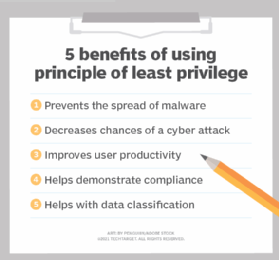
- Principle of least privilege. This principle strengthens IT security by limiting user and program access to the lowest level of access rights needed for them to do their jobs or functions.
- Risk management. This is the process of identifying, assessing and controlling security risks that threaten an organization's IT environment.
- Vulnerability management. With this approach, security admins routinely check for vulnerabilities by identifying, verifying, mitigating and patching IT security weaknesses as they arise.
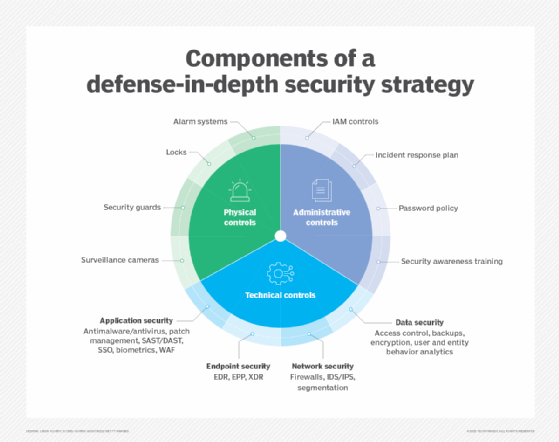
These are some of the most important concepts and principles of IT security and technology. However, combining all these principles doesn't guarantee 100% security for an organization. This is a fundamental problem facing every IT security leader and business. However, by deploying a comprehensive security strategy, organizations can defend against physical security and infosec threats.
Cybersecurity vs. infosec
Considering information security's intersection with endpoint, IoT and network security, it can be difficult to separate information security from cybersecurity; however, there are distinct differences. One difference is geopolitical issues. Cybersecurity can refer to the defense mechanisms that protect a country or a government's data from cyberwarfare. This is because cybersecurity includes the protection of data and its related technologies from threats.
Information security, on the other hand, focuses on ensuring information is available, remains confidential and maintains its integrity.
Learn more about the threats to information security that enterprise IT is facing today.