intrusion detection system (IDS)

What is an intrusion detection system (IDS)?
An intrusion detection system (IDS) is a system that monitors network traffic for suspicious activity and alerts when such activity is discovered.
While anomaly detection and reporting are the primary functions of an IDS, some intrusion detection systems are capable of taking actions when malicious activity or anomalous traffic is detected, including blocking traffic sent from suspicious Internet Protocol (IP) addresses.
An IDS can be contrasted with an intrusion prevention system (IPS), which monitors network packets for potentially damaging network traffic, like an IDS, but has the primary goal of preventing threats once detected, as opposed to primarily detecting and recording threats.
How do intrusion detection systems work?
Intrusion detection systems are used to detect anomalies with the aim of catching hackers before they do real damage to a network. IDSes can be either network- or host-based. A host-based intrusion detection system is installed on the client computer, while a network-based intrusion detection system resides on the network.
Intrusion detection systems work by either looking for signatures of known attacks or deviations from normal activity. These deviations or anomalies are pushed up the stack and examined at the protocol and application layer. They can effectively detect events such as Christmas tree scans and Domain Name System (DNS) poisonings.
An IDS may be implemented as a software application running on customer hardware or as a network security appliance. Cloud-based intrusion detection systems are also available to protect data and systems in cloud deployments.
Different types of intrusion detection systems
IDSes come in different flavors and detect suspicious activities using different methods, including the following:
- A network intrusion detection system (NIDS) is deployed at a strategic point or points within the network, where it can monitor inbound and outbound traffic to and from all the devices on the network.
- A host intrusion detection system (HIDS) runs on all computers or devices in the network with direct access to both the internet and the enterprise's internal network. A HIDS has an advantage over an NIDS in that it may be able to detect anomalous network packets that originate from inside the organization or malicious traffic that an NIDS has failed to detect. A HIDS may also be able to identify malicious traffic that originates from the host itself, such as when the host has been infected with malware and is attempting to spread to other systems.
- A signature-based intrusion detection system (SIDS) monitors all the packets traversing the network and compares them against a database of attack signatures or attributes of known malicious threats, much like antivirus software.
- An anomaly-based intrusion detection system (AIDS) monitors network traffic and compares it against an established baseline to determine what is considered normal for the network with respect to bandwidth, protocols, ports and other devices. This type often uses machine learning to establish a baseline and accompanying security policy. It then alerts IT teams to suspicious activity and policy violations. By detecting threats using a broad model instead of specific signatures and attributes, the anomaly-based detection method improves upon the limitations of signature-based methods, especially in the detection of novel threats.
Historically, intrusion detection systems were categorized as passive or active. A passive IDS that detected malicious activity would generate alert or log entries but would not take action. An active IDS, sometimes called an intrusion detection and prevention system (IDPS), would generate alerts and log entries but could also be configured to take actions, like blocking IP addresses or shutting down access to restricted resources.
Snort -- one of the most widely used intrusion detection systems -- is an open source, freely available and lightweight NIDS that is used to detect emerging threats. Snort can be compiled on most Unix or Linux operating systems (OSes), with a version available for Windows as well.
Capabilities of intrusion detection systems
Intrusion detection systems monitor network traffic in order to detect when an attack is being carried out by unauthorized entities. IDSes do this by providing some -- or all -- of the following functions to security professionals:
- monitoring the operation of routers, firewalls, key management servers and files that are needed by other security controls aimed at detecting, preventing or recovering from cyberattacks;
- providing administrators a way to tune, organize and understand relevant OS audit trails and other logs that are otherwise difficult to track or parse;
- providing a user-friendly interface so nonexpert staff members can assist with managing system security;
- including an extensive attack signature database against which information from the system can be matched;
- recognizing and reporting when the IDS detects that data files have been altered;
- generating an alarm and notifying that security has been breached; and
- reacting to intruders by blocking them or blocking the server.
Benefits of intrusion detection systems
Intrusion detection systems offer organizations several benefits, starting with the ability to identify security incidents. An IDS can be used to help analyze the quantity and types of attacks. Organizations can use this information to change their security systems or implement more effective controls. An intrusion detection system can also help companies identify bugs or problems with their network device configurations. These metrics can then be used to assess future risks.
Intrusion detection systems can also help enterprises attain regulatory compliance. An IDS gives companies greater visibility across their networks, making it easier to meet security regulations. Additionally, businesses can use their IDS logs as part of the documentation to show they are meeting certain compliance requirements.
Intrusion detection systems can also improve security responses. Since IDS sensors can detect network hosts and devices, they can also be used to inspect data within the network packets, as well as identify the OSes of services being used. Using an IDS to collect this information can be much more efficient than manual censuses of connected systems.
Challenges of intrusion detection systems
IDSes are prone to false alarms -- or false positives. Consequently, organizations need to fine-tune their IDS products when they first install them. This includes properly configuring their intrusion detection systems to recognize what normal traffic on their network looks like compared to potentially malicious activity.
However, despite the inefficiencies they cause, false positives don't usually cause serious damage to the actual network and simply lead to configuration improvements.
A much more serious IDS mistake is a false negative, which is when the IDS misses a threat and mistakes it for legitimate traffic. In a false negative scenario, IT teams have no indication that an attack is taking place and often don't discover until after the network has been affected in some way. It is better for an IDS to be oversensitive to abnormal behaviors and generate false positives than it is to be undersensitive, generating false negatives.
False negatives are becoming a bigger issue for IDSes -- especially SIDSes -- since malware is evolving and becoming more sophisticated. It's hard to detect a suspected intrusion because new malware may not display the previously detected patterns of suspicious behavior that IDSes are typically designed to detect. As a result, there is an increasing need for IDSes to detect new behavior and proactively identify novel threats and their evasion techniques as soon as possible.
IDS versus IPS
An IPS is similar to an intrusion detection system but differs in that an IPS can be configured to block potential threats. Like intrusion detection systems, IPSes can be used to monitor, log and report activities, but they can also be configured to stop threats without the involvement of a system administrator. An IDS simply warns of suspicious activity taking place, but it doesn't prevent it.
An IPS is typically located between a company's firewall and the rest of its network and may have the ability to stop any suspected traffic from getting to the rest of the network. Intrusion prevention systems execute responses to active attacks in real time and can actively catch intruders that firewalls or antivirus software may miss.
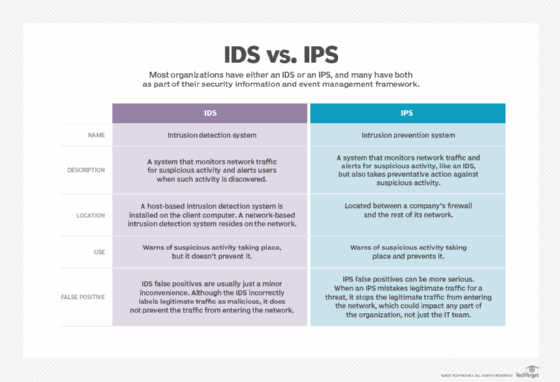
However, organizations should be careful with IPSes because they can also be prone to false positives. An IPS false positive is likely to be more serious than an IDS false positive because the IPS prevents the legitimate traffic from getting through, whereas the IDS simply flags it as potentially malicious.
It has become a necessity for most organizations to have either an IDS or an IPS -- and usually both -- as part of their security information and event management (SIEM) framework.
Several vendors integrate an IDS and an IPS together in one product -- known as unified threat management (UTM) -- enabling organizations to implement both simultaneously alongside firewalls and systems in their security infrastructure.